


Microsoft Advertising is worth testing for most law firms, especially those in personal injury, estate planning, and family law where older, higher-income searchers still dominate. The single most important first move isn’t writing ad copy. It’s installing UET and assigning dollar values to consultations and calls before you spend a cent on clicks. Do that, check your state bar rules and Microsoft’s editorial policy, and you’re ready to launch.
TL;DR:
- Bing’s older, higher-income audience makes it a valuable secondary channel for estate planning, elder law, and select personal injury practices.
- Cost-per-click on Microsoft Advertising is generally lower than Google Ads due to less competition, but traffic volume is also reduced.
- Accurate setup of conversion tracking, including UET and dollar value mapping, is critical to maximizing campaign performance and avoiding costly mistakes.
- Compliance with state bar rules and landing page quality is essential to prevent ad disapprovals and ensure smooth approval processes.
- A dedicated Bing budget should only be considered after consistent cost-per-lead advantages over Google for two months.
Why Microsoft Advertising (Bing) Can Work for Law Firms
Bing’s user base skews older, more affluent, and more likely to browse from a desktop at work, which happens to overlap heavily with the demographic that hires estate planning attorneys, searches for divorce lawyers mid-workday, or looks into personal injury representation after an incident during business hours. That overlap is not an accident of platform design. It’s a byproduct of who still uses Windows-default search and who doesn’t bother switching it.
Cost-per-click on Microsoft Advertising tends to run lower than Google Ads in the same practice areas, largely because fewer firms bid there. Lower competition means lower prices, but it also means less traffic volume. That trade-off matters when you’re deciding where to put your first PPC dollar or your fifth.
Microsoft’s syndication network, which distributes ads across Bing, Yahoo, and various partner sites, extends reach beyond what the raw Bing search share suggests. For firms already running Google Ads well, Bing usually works best as the efficiency channel that stretches a fixed monthly budget further, not as the primary engine.
Consider Bing your complementary channel until the data proves otherwise. It rarely makes sense as your only paid search platform, but a few situations favor it more heavily:
- Practice areas with an older, higher-income client base (estate planning, elder law, some personal injury segments)
- Markets where Google CPCs have become prohibitively expensive for smaller firms
- Firms with existing Google Ads success looking to extend reach at a lower blended cost
Pro Tip: Pull your Google Ads audience demographics report before you decide how much budget to shift. If a meaningful share of your converting traffic already comes from desktop users aged 45 and up, Bing is likely underweighted in your current mix.
Compliance Rules Every Legal Advertiser Must Follow
Microsoft organizes its advertising rules into three tiers: prohibited, restricted, and editorial, and each one demands a different response. Microsoft Advertising’s policy framework treats prohibited content as an automatic rejection with no appeal path, restricted content as something that may run with certification or documentation, and editorial issues as fixable problems in your copy or landing page.
State bar rules layer on top of that framework, and they’re often stricter than anything Microsoft enforces on its own. Watch for these red flags specifically:
- Unsupported claims about past results (“We win 95% of our cases”)
- Fee language that implies free service when contingency terms apply
- Client testimonials without required disclaimers, which several states restrict outright
- Missing jurisdictional disclosure on multi-state firm websites
Landing pages need a few non-negotiable elements to clear editorial review cleanly: a visible privacy policy, a clear statement of attorney identity and licensing jurisdiction, and disclaimers that are actually readable, not buried in six-point gray text. Editorial failure reason codes frequently point to landing-page quality issues rather than the ad text itself, which is the detail most firms miss.
Before you submit your first ad, run through this checklist:
- Confirm your state bar’s advertising rules for the specific practice area you’re promoting.
- Verify the landing page has a visible privacy policy and attorney licensing information.
- Remove or properly disclaim any results-based claims.
- Check that phone numbers and business names match your Microsoft Advertising account verification exactly.
Firms working across multiple jurisdictions should review attorney advertising rules by state and, for California-based practices specifically, the California compliance guide before launch.
Setting Up Your Account and Tracking Conversions Correctly
Account setup starts with accurate business verification. Microsoft Advertising cross-checks your business name, address, and phone number against public records, and mismatches here are a common source of early account friction.
- Create your account at Ads and complete business verification with your firm’s exact legal name and address.
- Import existing campaigns directly from Google Ads using the built-in import tool.
- Review every imported campaign for landing page URLs, ad extensions, and negative keywords that may not translate cleanly between platforms.
- Install the Universal Event Tracking (UET) tag on every page of your website, including the confirmation page after a contact form submission.
- Map conversion goals to actual dollar values: a scheduled consultation might be worth $150, a completed phone call worth $300, based on your average case value and close rate.
Skipping that value-mapping step is the single most expensive mistake firms make. Microsoft’s own tooling documentation makes clear that UET setup and conversion value assignment needs to happen before you lean on automated bidding, because the algorithm optimizes toward whatever value you tell it matters.
Pro Tip: After importing from Google, expect your Bing bids to need a downward adjustment initially. Practitioner experience consistently shows that imported bids run high relative to Bing’s actual auction dynamics, so start lower and let two to three weeks of conversion data guide you back up.
If you’re mid-migration and want a sense of what typically goes wrong, common Google Ads mistakes are worth reviewing before you replicate the same errors on a new platform.
Targeting and Ad Copy That Actually Converts
Microsoft’s LinkedIn profile targeting is the platform’s real differentiator for legal advertisers, and most firms ignore it entirely. You can layer targeting by job function, industry, or company size on top of your keyword bids, which matters enormously for practice areas like employment law, business litigation, or executive-level estate planning where the client’s professional profile predicts intent better than the search term alone. In-market audiences work similarly, letting you target users Microsoft has already identified as actively researching legal services.
A few targeting and creative habits separate firms that get consistent leads from firms that burn budget:
- Review your search terms report weekly for the first month, then biweekly after that, and add negatives aggressively.
- Test fee-first ad copy (“Free Consultation, No Fee Unless We Win”) against credibility-first copy (“30 Years of Trial Experience”) in the same ad group.
- Include required compliance language (jurisdiction, licensing disclaimers) directly in ad extensions, not just the landing page.
- Match your landing page headline to your ad headline word-for-word where possible; mismatches hurt both conversion and editorial review.
Pro Tip: Some practitioners report that fee-first messaging outperforms credibility-first messaging for personal injury queries specifically on Bing. Treat that as a hypothesis to A/B test in your own account, not a rule to copy blindly.
Bidding, Budget Splits, and Ongoing Optimization
Start every imported campaign with bids roughly 15 to 20% below what worked on Google, then let two to three weeks of conversion data pull them back up. Bing’s auction behaves differently enough that a straight import without adjustment tends to overspend on clicks that don’t convert at the same rate.
Automated, value-based bidding works well once your UET conversion values are populated with real numbers. Manual bidding still has a place in the first few weeks, while you’re gathering enough data for the algorithm to optimize against.
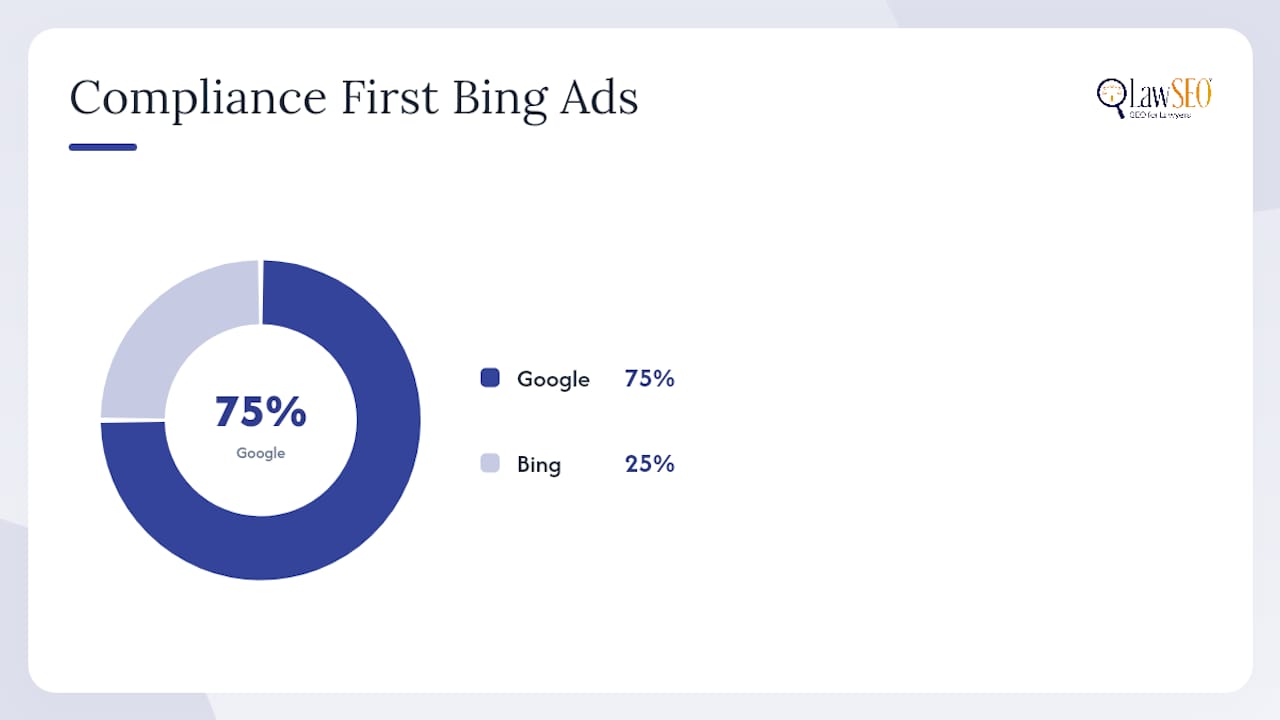
A reasonable starting budget split for firms running both platforms is 70 to 80% Google, 20 to 30% Bing, shifting toward Bing only after you see cost-per-lead figures that justify it. Watch these signals weekly:
- Cost per conversion by campaign, not just cost per click
- Search terms triggering irrelevant matches
- Quality score trends on your highest-spend keywords
- Conversion value per dollar spent, compared side-by-side with your Google campaigns
The editorial review process can also flag budget-draining issues indirectly. A disapproved ad simply stops spending, which sometimes masks a compliance problem as a performance problem.
Handling Disapprovals: Fix or Appeal?
Most disapprovals aren’t punishments. They’re editorial flags pointing at a specific, fixable problem. Editorial failure reason codes tell you exactly what triggered the rejection, whether it’s a missing disclaimer, a landing page mismatch, or language that reads as an unsupported claim.
- Read the specific failure code before touching anything else. Guessing wastes a resubmission cycle.
- Correct the flagged asset, whether that’s ad copy, a landing page element, or an extension.
- Resubmit and monitor the review outcome.
- Reserve appeals for cases where the code indicates a system error or your business qualifies for a documented policy exception, as troubleshooting guides for the vertical explain.
Appeals take longer than fixes and have limited submission volume, so use them sparingly. Firms that build a documented review process, checking every new ad against the same compliance checklist before submission, see far fewer repeat disapprovals than firms that resubmit reactively each time something gets flagged.
Templates and Checklists from LawSEO’s Legal PPC Work
Todd R. Stager has spent close to three decades in search marketing, and the compliance-sensitive nature of legal PPC is exactly where that experience shows: platform rules change, but the discipline of checking every asset against both Microsoft’s tiers and bar advertising rules stays constant.
LawSEO’s onboarding process for paid search clients typically includes:
- A pre-launch compliance checklist matched against the client’s specific state bar rules
- A UET mapping template assigning dollar values to every conversion action before launch
- A 30/60/90 day bid-tuning schedule tied to actual conversion data, not guesswork
- A first-30-day review covering editorial status, search term quality, and early cost-per-lead trends
When to Invest in a Dedicated Bing Ads Budget
Bing earns dedicated budget once you see cost-per-lead beating Google in the same practice area for two consecutive months, not one. Watch consultation volume and cost-per-conversion closely in months one through three. If you’re working with an agency, ask about exclusivity terms early. You don’t want your competitor down the street benefiting from the same playbook.
— TODD
How LawSEO Builds and Manages Compliant Microsoft Advertising Campaigns
Running Bing Ads well means juggling UET setup, conversion value mapping, state bar compliance, and editorial review, all while your caseload doesn’t slow down to accommodate a learning curve. A specialized firm can handle the entire operation for law firms: account setup, conversion tracking, ad creative that clears editorial review the first time, and ongoing bid tuning to optimize lead generation. Some firms offer exclusivity agreements to prevent using the same strategies for competing practices in the same region.
If you want a straightforward look at where your current paid search setup stands, request a legal SEO and PPC consultation and get a practical read on what’s working, what’s costing you money, and where Bing fits into your specific budget.
Sources
FAQ
What is the new name for Bing Ads?
Bing Ads was rebranded as Microsoft Advertising, and that’s the name you’ll see across the platform’s account dashboard, policy pages, and support documentation today.
Is Bing Ads worth it for lawyers?
For many practices, especially personal injury, estate planning, and family law, yes. Bing’s older, higher-income, desktop-skewed audience often produces lower cost-per-click than Google in the same practice area, making it a strong complementary channel.
What is the 80/20 rule for lawyers?
In marketing contexts, it typically means roughly 80% of a firm’s leads or revenue comes from about 20% of marketing channels or referral sources, which is why tracking cost-per-lead by channel matters before expanding a Bing Ads budget.
How do I fix a disapproved Bing ad for a law firm?
Read the specific editorial failure reason code first, correct the flagged issue in your ad copy or landing page, and resubmit. Reserve formal appeals for cases involving a system error or a documented policy exception.
Can I import my Google Ads campaigns directly into Microsoft Advertising?
Yes, Microsoft Advertising has a built-in import tool that pulls campaigns, keywords, and ad groups from Google Ads, but bids typically need downward adjustment afterward based on Bing-specific conversion data.
