


The single highest-impact photo update for your firm is a professional attorney headshot uploaded to your Google Business Profile using Google’s JPG/PNG specs. Prioritize real headshots and original office photos over stock imagery, follow Google’s technical requirements (JPG or PNG, 10 KB to 5 MB, 720x720px recommended), and add new images regularly every month. That cadence, paired with the right image types, is what actually moves engagement.
TL;DR:
- Consistently upload high-quality, full-resolution attorney headshots and office photos that meet Google’s specifications to improve profile engagement and avoid rejection.
- Prioritize real, unfiltered images of your office and team over stock photos, and name or tag them with descriptive, location-based filenames for better search visibility.
- Maintain a regular monthly upload schedule of two to four new images, tracking and backing up all original files to sustain profile freshness and compliance.
- Avoid posting client photos without explicit, documented consent, especially for sensitive practice areas like family or criminal law, to protect confidentiality and liability.
- Ensure all photos adhere to ethical and advertising rules, avoiding misleading edits or misrepresented credentials, and seek legal counsel before sharing images with claims or awards.
Google Business Profile Photo Requirements You Can’t Ignore
Google rejects or buries images that miss its technical specs, and most firms never find out why their photo count stalls. The rules are specific, and they’re non-negotiable if you want images to display at all.
Every image must meet Google’s baseline: JPG or PNG format, between 10 KB and 5 MB, with a recommended resolution of 720x720px and a hard minimum of 250x250px. Anything smaller gets flagged as low quality; anything larger just slows upload without adding benefit.
- Format: JPG or PNG only
- Size: 10 KB to 5 MB
- Recommended resolution: 720x720px
- Minimum resolution: 250x250px
- Video: up to 30 seconds, up to 75 MB, 720p or higher
Pro Tip: A short, 20 second attorney intro video shot in 720p on a modern smartphone will clear Google’s specs easily and often outperforms static photos for engagement.
Beyond specs, policy matters just as much. Google confirms that photos and videos display only after your profile is verified, and every upload goes through a compliance review before it goes live. Heavily filtered images, misleading edits, or anything that misrepresents the physical space can get pulled. Google’s own policy is explicit that businesses are responsible for ensuring uploaded content meets platform standards. Skip the Instagram filters. Upload real, unedited representations of your office and team.
Which Photos Should Your Firm Actually Upload?
Not every photo carries equal weight. Some images convert prospective clients into phone calls; others just take up space in your media library. Prioritize in this order.
- Attorney headshots. This is the asset that does the heavy lifting. Searchers make hire-or-pass judgments off a face before they read a single review, and industry analysis identifies the professional headshot as the highest-converting visual asset a law firm can post. Frame from the chest up, use even lighting with no harsh shadows, and dress to match your practice area: a family law attorney can afford warmer, more approachable styling than a securities litigator. Get written consent from every attorney whose image goes public, and store a signed release even for partners.
- Exterior photos. A clear shot of your building, signage, suite number, and visible parking cuts down on missed appointments. Clients who can’t find your office reschedule, or worse, hire someone else.
- Interior photos. Reception area, conference room, and a private consultation space set expectations before a client ever walks in. This matters more in family law and criminal defense, where anxiety about a first visit runs high.
- Team, event, and credential photos. These humanize the firm and prove local involvement. Photograph bar association events, community sponsorships, and awards in their actual displays rather than screenshotting a certificate, which reads as generic and often illegible on mobile.
Avoid generic stock photography across every category. Stock images actively damage credibility because prospective clients can usually tell, and a fake photo undercuts the trust your real credentials are supposed to build.
How Should You Name and Tag Your Firm’s Photos?
Google Business Profile doesn’t expose alt text fields on uploaded media, so the SEO value comes from what you do before and after the upload, not during it.
Name every file with a consistent, descriptive convention: city-practicearea-attorney-description.jpg, for example “denver-familylaw-attorney-headshot-jsmith.jpg”. This gives search engines and AI crawlers context clues even when the platform strips metadata, and it helps your images surface in Google Images searches tied to your practice area and city.
- Use natural, accurate descriptions. Never stack keywords into a filename just to hit a target.
- Add descriptive alt text and captions to the same images on your website, where Google can actually read that metadata.
- Keep original, full-resolution files stored on your own server or cloud drive; upload compressed, web-sized copies to GBP.
- Maintain a simple spreadsheet logging filename, upload date, and image source for every photo in rotation.
Pro Tip: If your firm has multiple offices, build the filename convention around each location’s city name from day one. Retrofitting hundreds of images later is a painful, avoidable project.
Keyword stuffing a filename or caption doesn’t fool anyone, human or algorithm. Describe what’s actually in the photo, and let the specificity do the work.
How Often Should You Upload New Photos?
Photo optimization isn’t a project you finish. It’s a maintenance schedule, and firms that treat it that way outperform firms that upload ten photos once and walk away.
- Run an initial sprint. Build a baseline library of numerous images in your first month: headshots for every attorney, full exterior and interior coverage, and at least a handful of team and event shots.
- Maintain a monthly cadence. Add two to four new photos every month, rotating updated headshots, seasonal office shots, and recent event or community photos.
- Assign clear ownership. A marketing lead or office manager should own the upload calendar; a photographer or agency handles the actual shoots on a quarterly or biannual basis.
- Track everything in one place. A shared spreadsheet with upload dates, captions, and image sources prevents duplicate uploads and gives you a paper trail for compliance reviews.
- Back up before you upload. Keep originals off GBP entirely; the platform is a display surface, not a storage system.
This kind of operational discipline is exactly where Google My Business tactics compound with photo strategy rather than competing with it.
What Metrics Actually Prove Your Photos Are Working?
Photo updates take time to register. New uploads can take 24 to 48 hours to appear after Google’s compliance review, so don’t judge a fresh headshot by Monday morning traffic.
Once photos are live, track these signals monthly:
- Photo views inside your GBP Insights dashboard
- Profile views and how they trend against upload dates
- Direction requests, which tend to climb when exterior photos are clear and current
- Website clicks and phone calls originating from the profile
- Local map pack ranking for your core practice area terms
Firms that maintain strong, active photo libraries tend to see meaningfully higher engagement metrics than profiles with stale or sparse image sets, though the gains show up over weeks, not days. Run a simple test: swap your cover photo or lead headshot, then compare click-through and call volume over the following 30 days against the prior 30. Build a one-page monthly report tracking new uploads, top-performing images, and any correlated shift in calls or direction requests. That report is what turns “we updated some photos” into a number a managing partner actually cares about.
Why Trust This Playbook
This approach comes from Todd R. Stager, founder of Lawseo and an SEO practitioner with more than 29 years in search marketing, all of it now focused exclusively on law firms. That specialization matters here: legal marketing carries ethical and consent obligations that generic small-business SEO advice simply ignores.
LawSEO’s guidance ties directly to Google’s official Business Profile photo documentation and to industry-specific research on what actually converts for attorneys, rather than generic small-business photo advice repurposed for law firms. The firm’s own published analysis points to the same conclusion argued throughout this guide: Google reviews, a sharpened primary category, and a large, active photo library compound to move map-pack rank more than any single exotic tactic.
Client-specific case studies and before-and-after profile audits are available on request through LawSEO’s consultation process, and firms considering a full GBP overhaul can review the complete GBP guide for law firms for a broader checklist beyond photos alone.
Legal and Ethical Considerations for Client Photos on Google
Uploading a photo of a client, even a happy one at case resolution, is not the same decision as uploading a headshot of your own attorney. Client images carry attorney-client privilege concerns, confidentiality obligations, and reputational risk that a firm’s own team photos never trigger.
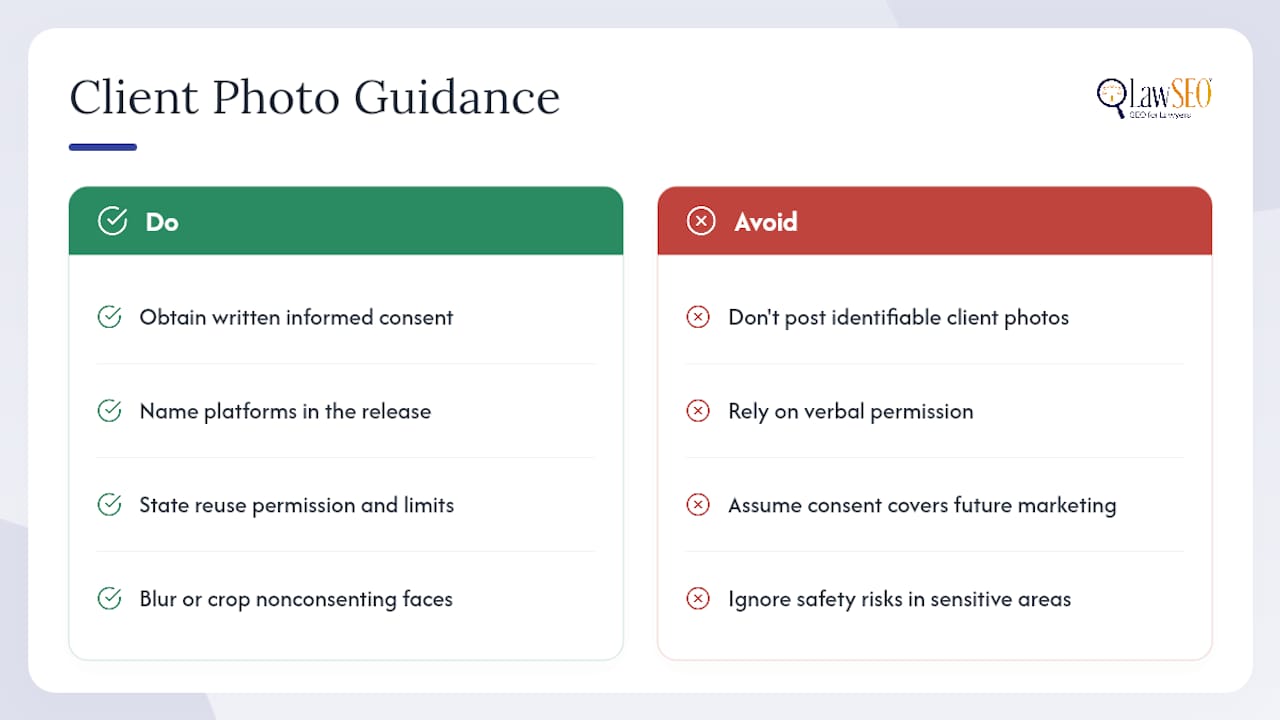
Never post an identifiable photo of a current or former client without documented, informed written consent that specifically covers use on Google Business Profile and your website. Verbal permission given in a hallway doesn’t hold up if a dispute arises later. The consent form should name the specific platforms, state whether the image can be reused in future marketing, and give the client a clear path to revoke permission.
Certain practice areas carry elevated risk regardless of consent. Family law, criminal defense, and immigration matters often involve clients who face real safety or privacy exposure if their face and case type become publicly associated. Even with signed consent, weigh whether the marketing value is worth the exposure for that specific client.
Event photos present a gray zone. A community sponsorship photo that happens to catch a former client in the background isn’t the same as a testimonial photo, but it can still create an unintended association between that person and your firm’s practice area. When in doubt, blur faces of anyone who isn’t a firm employee and hasn’t signed a release, or crop them out entirely before the image ever reaches your upload folder.
Privacy and Consent When Photographing People in Legal Settings
Law offices are unusually sensitive spaces to photograph. Clients walk through your lobby during some of the hardest weeks of their lives, and a photographer capturing “candid” office culture shots can accidentally document someone who never agreed to appear in your marketing.
Set a firm-wide rule before any shoot: no client faces in any photo intended for Google Business Profile or the website unless a signed release exists specifically for that shoot, on that date. This protects the firm even when a well-meaning staff member wants to post a quick photo of a “great client meeting” to social media.
Staff and attorney consent works differently but still needs documentation. An employee photographed for a team page should sign a release covering how long the image stays in use and whether it transfers if they leave the firm. This avoids the awkward, all-too-common situation where a former associate’s headshot sits on the website for a year after departure because nobody tracked who authorized what.
Physical staging matters too. Schedule headshot and interior shoots outside business hours or in a blocked-off conference room specifically to avoid capturing clients in the background during active business hours. A consultation room photographed for GBP should be staged and empty, never shot mid-session even with blurred faces, because the visual implication of an active meeting undercuts the privacy your firm is supposed to represent.
Securing Sensitive Images in Your Firm’s Photo Library
A photo library for a law firm isn’t just a marketing asset. It’s a collection of files that can include identifiable people, office layouts useful to anyone with bad intentions, and sometimes accidental captures of case documents or client files left visible on a desk.
Store original, full-resolution images on a secured internal server or a business-grade cloud account with access controls, never on a personal phone or a shared public drive. Limit editing access to the marketing lead or office manager who owns the upload calendar, and set view-only permissions for everyone else who might need to reference the library.
Before any image leaves that secure storage for GBP or the website, run a quick visual audit: check backgrounds for visible client files, whiteboards with case notes, or screens displaying case management software. This sounds obvious until a firm posts a “meet the team” photo and a paralegal’s monitor in the background is showing an open client file.
Retention policy matters as much as access control. Old headshots of departed attorneys, photos of closed office locations, and outdated team photos should be archived, not left live on public platforms where they create confusion or, worse, misrepresent your current staffing to a prospective client. Build the same versioning discipline into your photo library that you’d apply to case files: dated folders, a clear naming convention, and a periodic review to purge anything no longer accurate.
Staying Compliant With Advertising Rules on Attorney Images
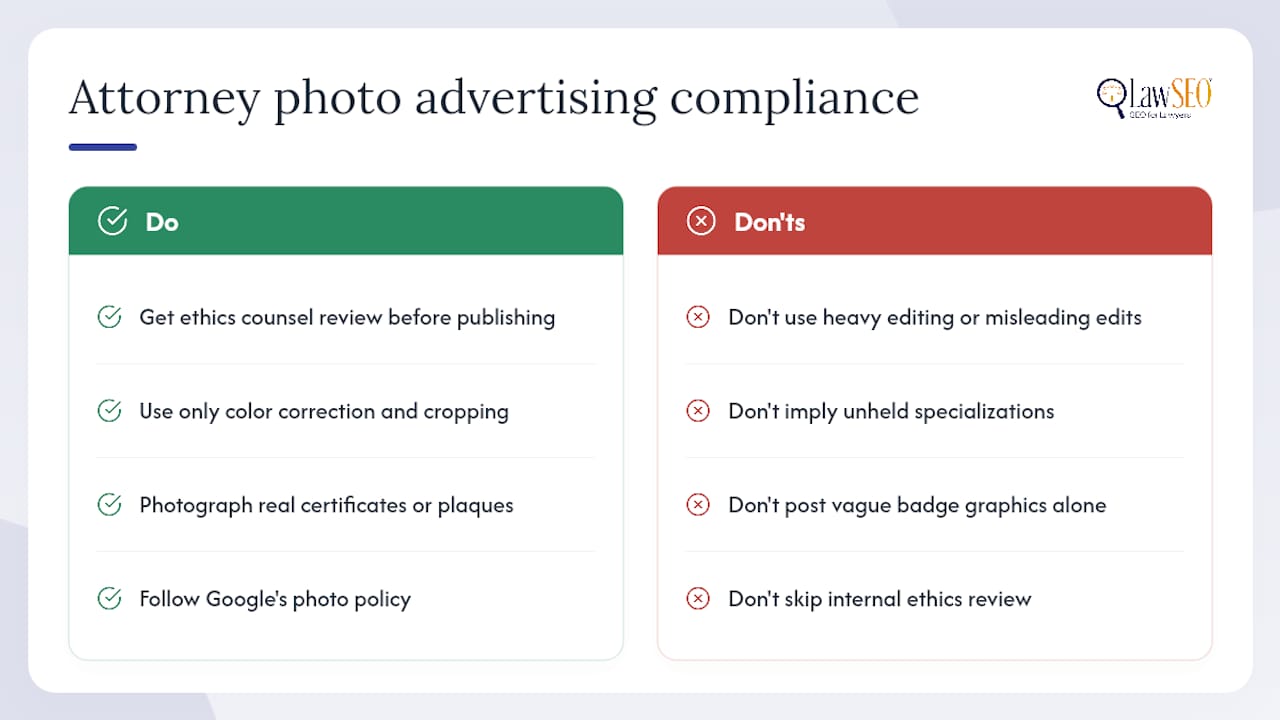
Every state bar maintains rules of professional conduct governing attorney advertising, and photos count as advertising the moment they appear on a public-facing Google Business Profile or website. The core standard across most jurisdictions is straightforward: images can’t create a false or misleading impression about the lawyer’s services, credentials, or results.
A headshot that misrepresents an attorney’s actual appearance through heavy editing, or a photo implying a specialization or certification the attorney doesn’t actually hold, can trigger a bar complaint. This is one more reason to skip filters and edits on GBP images beyond basic color correction and cropping. Google’s own photo policy already prohibits misleading edits, and most state bar advertising rules independently reinforce the same standard from a different angle.
Credential and award photos need particular care. Photographing an actual certificate or award plaque is fine; implying a certification through vague imagery, like a generic “Super Lawyer” badge graphic without the underlying credential, can cross into misleading territory depending on your jurisdiction’s specific advertising rules.
Because these rules vary meaningfully by state and by bar association, run any photo campaign that includes credential claims, awards, or comparative language past your firm’s ethics counsel before it goes live on GBP. A quick internal review is cheaper than a bar complaint, and it takes far less time than most partners assume.
What Actually Moves the Needle Here
Most law firm marketing advice treats photos as decoration, something to check off after the “real” SEO work is done. That’s backwards. A profile with strong reviews and a sharpened primary category still underperforms if every photo is a stock image of a gavel and a bookshelf, because the searcher’s actual decision often comes down to a face they trust enough to call.
The conventional advice oversells volume and undersells consent and quality. Uploading 200 mediocre photos in a single afternoon does less for engagement than 15 well-shot, properly consented images added on a disciplined monthly cadence. Firms get this backwards because volume feels like progress and process feels like busywork.
If you do one thing after reading this, replace every stock image on your profile with a real, consented, properly specced photo, starting with attorney headshots. Everything else, exterior shots, team photos, the monthly cadence, matters. But it matters less than getting that first decision right.
— TODD
How Lawseo Handles Your Firm’s Photo Strategy
Professional SEO services can integrate photography, compliance review, and marketing coordination into a connected process. A GBP photo audit can identify which images are underperforming, missing consent documentation, or violating Google’s technical specs, then coordinate professional photography and a monthly upload cadence to keep profiles fresh.
The outcome is straightforward: fresher, properly specced photos, headshots that actually convert, and a documented monthly program instead of a one-time upload that quietly ages for two years. An exclusive focus on law firms ensures that consent and advertising-rule awareness are incorporated into shoot and upload planning.
If your profile hasn’t seen a new photo in months, start with a legal SEO consultation and get a specific plan for your firm’s photo library, not a generic checklist.
Sources
- Manage your Business Profile photos & videos – Google Business Profile Help
- Advanced Google Business Profile optimization strategies for law firms – AttorneyAtLaw Magazine
