


Google has retired public Q&A and replaced it with an AI-generated Ask Maps experience powered by Gemini, and the change is already live. Law firms no longer control the question-and-answer content clients see on their listings; Gemini now synthesizes answers from your Google Business Profile, your reviews, and your website. The fix is immediate: audit your profile data, tighten your service pages, and make sure your intake team can handle what Ask Maps sends your way.
TL;DR:
- Public Q&A data has been discontinued, making manual monitoring essential since programmatic tools no longer function.
- Gemini relies heavily on your profile data, reviews, and website content, with review reviews and service descriptions offering significant weighting.
- Fixing profile details and updating practice-area pages can drastically improve AI citation accuracy within a short timeframe.
- Regular audits of your Google Business Profile, including categories, attributes, and reviews, are crucial to prevent outdated or inaccurate AI-generated answers.
- Operational capacity must match increased inquiry volume to avoid losing potential clients from unanswered Ask Maps calls.
What Happened to Google Q&A for Lawyers?
Google didn’t quietly sunset Q&A. It deprecated the My Business Q&A API and formally retired it on November 3, 2025, cutting off the programmatic access that many reputation management platforms relied on to monitor and answer questions automatically, according to Google’s own developer documentation. Firms that used third-party tools to auto-flag new questions lost that visibility overnight.
The public-facing change followed close behind. Industry reporting on a December 2025 Google product forum post confirmed that the user-facing Q&A feature is being phased out in favor of an AI-driven Ask button, rolling out in stages across Maps and Search. Rather than letting anyone post a question that sits publicly until someone answers it, Google now generates an answer instantly, pulled from whatever data it can find about your firm.
This shift matters more than it sounds. Here’s what it means in practice for a law firm’s public information:
- Public Q&A threads are no longer the user-facing control point for correcting misinformation about your firm.
- Backend Q&A data you’ve already entered in your Business Profile still feeds the AI, so it hasn’t become useless. It’s simply invisible on the front end.
- Programmatic monitoring tools built on the old API no longer function, which means manual spot checks are now the primary way to catch a bad AI answer.
- Any inaccurate answer synthesized by Ask Maps is harder to trace back to its source, since it may blend GBP data, review snippets, and third-party listings.
The practical upshot: you can’t out-argue a public post anymore. You have to make sure the underlying data Gemini reads is accurate, because that’s the only lever left.
How Ask Maps and Gemini Ground Answers in Your Data
Ask Maps doesn’t guess. It runs a three-step grounding process, intent detection, retrieval from Maps data, and synthesis, before it generates a response about your firm, according to analysis from Subscribe PR on how Gemini picks which businesses to cite. That means the quality of your Business Profile directly determines whether Gemini names your firm accurately, vaguely, or not at all.
The retrievable signals Gemini pulls from include:
- Primary and secondary business categories
- Listed services and business attributes
- Hours of operation and NAP (name, address, phone) consistency
- Photos and their recency
- Google Posts
- Backend Q&A content you’ve already entered
- Review text, not just star ratings
Review text carries more weight than most firms assume. Gemini’s retrieval layer treats specific language in reviews, mentions of “car accident,” “custody hearing,” or “DUI defense,” as evidence that your firm actually handles that practice area, according to BrightLocal’s guide to Google Business Profile Q&A. A firm with fifty five-star reviews that never mention a practice area gives Gemini less to work with than a firm with twenty reviews that specifically describe outcomes.
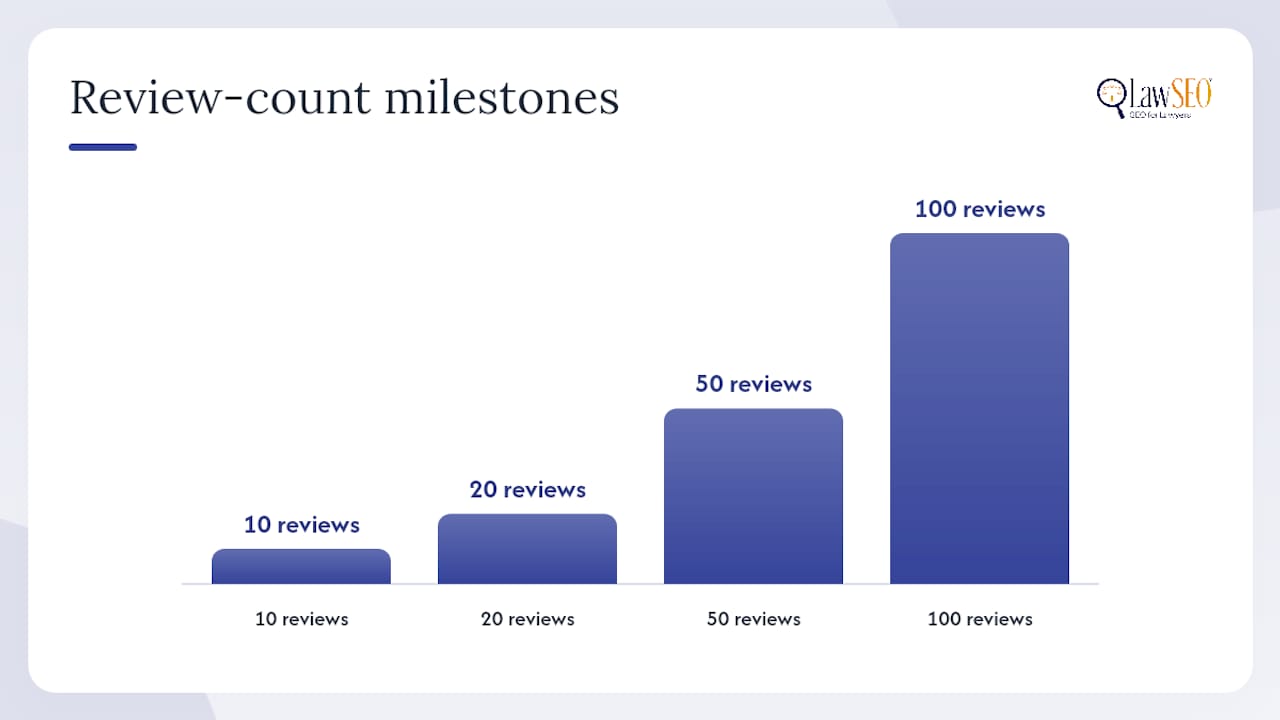
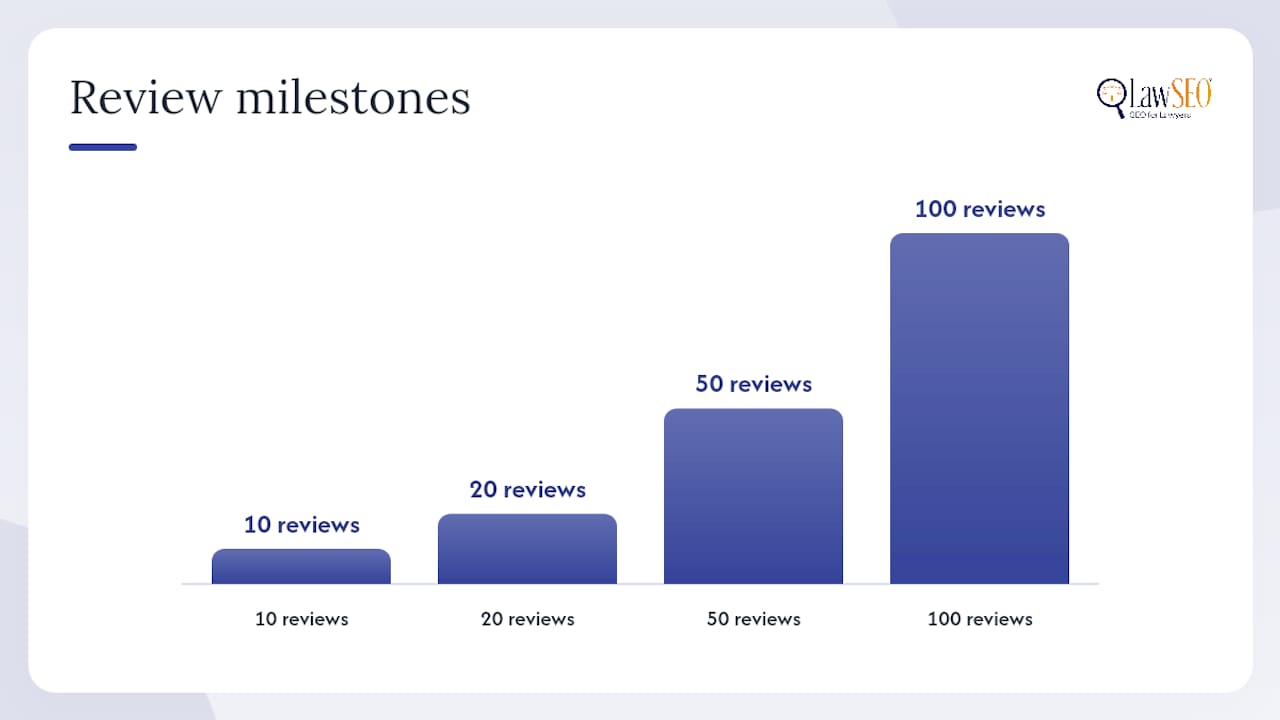
Industry playbooks tracking local visibility have found ranking and engagement lifts tied to specific review-count milestones, roughly at 10, 20, 50, and 100 reviews, according to Subscribe PR’s 2026 Google Business Profile playbook for law firms. Crossing each threshold appears to correlate with more retrieval activity and citation from Google’s local systems.
Your website matters too. Ask Maps treats service pages and FAQ content as citation material when GBP data alone doesn’t answer the question fully. If your GBP lists “Personal Injury Law” but your website never explains what that covers, Gemini has to fill the gap with weaker signals, or skip your firm and cite a competitor instead. Learn more about the fields that shape Google Business Profile visibility for law firms before you start making changes.
Practical GBP Audit Checklist for Law Firms
Fixing this isn’t a redesign project. It’s a data-accuracy exercise, and most of it can be done in an afternoon if you work through it in order.
- Pick the single most specific primary category available. “Personal Injury Attorney” beats “Law Firm” every time, and secondary categories should map to every practice area you actually handle, not aspirational ones.
- Fill out every service listed under your profile, matching the exact language clients search for, “divorce mediation,” “wrongful death claims,” “estate planning,” not internal legal jargon.
- Enable every relevant attribute (wheelchair accessible, free consultation, online appointments) since attributes feed directly into Gemini’s retrieval layer.
- Verify NAP consistency across your GBP, website footer, and any legal directories where your firm is listed. A mismatched phone number or suite number is a contradictory signal that can confuse the AI’s synthesis step.
- Confirm hours are accurate, including holiday hours, since Ask Maps often answers “is this firm open now” queries directly.
- Upload fresh photos monthly. Office exteriors, team headshots, and courtroom-adjacent images (not stock photography) perform better and signal an active, maintained profile.
- Set a review target and track it against the 10/20/50/100 milestones, prioritizing recency over raw volume; a profile with 40 reviews from the last six months outperforms one with 100 reviews that stopped three years ago.
- Enter or update backend Q&A entries in your Business Profile dashboard. The front-end thread is gone, but the data still functions as retrievable content for Gemini.
- Publish a Google Post at least twice a month covering case results, practice updates, or community involvement.
- Cross-check your website’s practice-area pages against your GBP services list so nothing contradicts itself between the two.
Claiming or re-verifying an unmanaged profile is step zero if you haven’t touched your listing in a while, and the claiming process for law firms takes less time than most managing partners expect.
Pro Tip: Set a recurring 15-minute calendar block every Monday to check your GBP dashboard for new backend Q&A entries and flagged reviews. Ask Maps updates its synthesis continuously, so a profile you audit once and abandon drifts out of sync within weeks.
Feeding Ask Maps: Website Content, Schema, and Review Tactics
Your website is now a direct input into how AI describes your firm, not just a place clients land after they’ve already decided to call. Structure every service page in answer-first format: state what the practice area covers in the first sentence, then expand with specifics, rather than opening with a paragraph of firm history.
Add LegalService or Attorney schema markup where it applies. Schema doesn’t guarantee citation, but it gives Gemini a structured, unambiguous field to pull from instead of forcing it to infer meaning from prose, which reduces the odds of a misattributed practice area.
A few structural moves make the biggest difference:
- Write FAQ sections that mirror how clients actually phrase questions (“How much does a DUI lawyer cost in [your area]?”) rather than generic industry phrasing.
- Keep one canonical version of each practice-area description and reuse it verbatim across your site, directories, and any guest content, since contradictory descriptions elsewhere online create noise Gemini has to resolve.
- Sync your Google Maps ranking factors work with your website copy so both sources reinforce the same categories and services.
Review requests need a careful touch here. Never script clients to use specific keywords, that violates Google’s review policies and reads as manipulation if flagged. Instead, ask clients open-ended questions that naturally surface practice-area language: “What part of your case were you most concerned about, and how did we help?” tends to produce reviews that mention case type and outcome without anyone feeding them a script.
Pro Tip: Ask for reviews within 48 hours of case resolution, when the outcome is fresh. Reviews written from memory months later tend to be vaguer and give Gemini less to retrieve.
Monitoring and Correcting Bad Ask Maps Answers
Because Ask Maps is generative, it can produce an answer to a question no client has ever literally asked, which means you can’t wait for a public thread to alert you to a problem. You have to test it yourself, on a routine basis.
- Test your listing directly by searching your firm name in Maps on a mobile device, tapping “Ask,” and posing questions a prospective client might ask about hours, services, or specialties.
- Run the same queries in an incognito browser to rule out personalization skewing what you see.
- Check your Knowledge Panel in standard Search results for the same firm-specific questions.
- If an answer is wrong, correct the underlying source first: update the GBP field, then your website copy, then request a review response or edit if a review is the source of the error.
- If a third-party directory supplied the bad data, contact that directory directly since Gemini may be citing it as a supporting source.
- Log every correction with a date, then retest the same query seven to ten days later to confirm the fix propagated.
Track call volume from your GBP profile, the ratio of Ask-driven inquiries to total leads, and how long it takes each correction to show up in a retest. A two-week response SLA for verifying fixes is a reasonable internal target for most firms.
Operational Readiness: Turning Visibility Into Clients
Fixing your profile data is only half the job. Firms that improve GBP visibility without matching intake capacity end up paying for calls nobody answers, a pattern documented in Smith. More Ask Maps citations mean more inbound calls, and unanswered calls from AI-driven traffic are lost clients, not just missed data points.
Build these operational pieces alongside your profile work:
- Confirm your intake team can log “lead source: Google Ask/Maps” as its own field, not lumped into generic “Google” traffic.
- Track initial contact method (call, chat, form) and first mention (review, post, or Ask answer) so you know which fix drove which lead.
- Set a call-answered-rate KPI and review it monthly against your GBP change log.
- Consider 24/7 answering coverage if Ask-driven calls arrive outside business hours, which they often do.
Todd R. Stager, who has overseen legal SEO strategy for more than 29 years, has watched this same pattern repeat across client campaigns: firms fix the profile, traffic rises, and then the front desk becomes the bottleneck. The technical fix is the easy half.
Case Studies: Law Firms Adapting to Ask Maps
The rollout is recent enough that most firms are still reacting rather than optimizing proactively, and that gap is exactly where early movers gain ground. Firms that treated their Business Profile as a static “set it and forget it” listing before late 2025 are now discovering that Gemini’s synthesized answers occasionally misstate practice areas or cite outdated hours pulled from stale data.
A personal injury firm that hadn’t updated its GBP services list in over a year found that Ask Maps was answering “does this firm handle motorcycle accidents” with an ambiguous non-answer, because the service was never explicitly listed, even though the firm had handled dozens of such cases. Adding the specific service line and reinforcing it with matching website copy resolved the gap within two weeks of retesting.
Firms with active review pipelines that specifically mention practice areas, rather than generic five-star praise, report more consistent citation when Gemini answers practice-area-specific questions. The pattern lines up with what BrightLocal’s Q&A analysis describes: Ask Maps rewards firms that give it more specific, retrievable text to work with, and it penalizes firms that leave fields blank or reviews generic. The firms adapting fastest aren’t necessarily the biggest; they’re the ones auditing their profile data on a real schedule instead of an annual glance.
Publisher Perspective: The Quick Wins We’d Push First
If you only do three things this quarter, do these. Change your primary GBP category to the most specific option available, it’s a five-minute edit with outsized influence on how Gemini classifies your firm. Push for ten recent, practice-area-specific reviews before you touch anything else, because review text is the fastest-moving signal Ask Maps reads. Then rewrite one service page in answer-first format and watch how it performs before touching the rest of your site.
Speed matters here in a way it didn’t with old-school SEO. Ask Maps synthesizes from whatever data exists right now, not from a crawl history that rewards patience. A stale profile gets a stale, sometimes wrong, answer today. Fix the fastest-moving signals first, then build out the rest.
— TODD
How Lawseo Implements Google Business Profile and Ask Maps Optimization
Most firms don’t have a spare week to run a full GBP audit, rewrite service pages, and set up review workflows on top of actually practicing law. Lawseo handles that work as a structured engagement: a full profile audit, prioritized fixes across categories, services, attributes, and backend Q&A data, and ongoing monitoring to catch when Ask Maps starts pulling from a bad source.
The path is straightforward. We start with an audit of your current profile and website against the signals Gemini actually retrieves, prioritize the fixes with the fastest impact, then move into monthly monitoring so a stale listing never drifts back into inaccuracy. Because Lawseo works under exclusivity agreements by region, the same optimization work isn’t being handed to the firm competing for your same intake calls. If you want a firm to look at your specific profile and tell you exactly where Ask Maps is likely to misfire, start with Lawseo’s law firm SEO services and get a prioritized fix list before your competitors get there first.
Sources
- Q&A API | Google Business Profile APIs | Google for Developers
- A guide to Google Business Profile Q&A – BrightLocal
- Does Gemini recommend law firms? How Google’s 750M-user AI picks who to cite | Subscribe PR
- Smith
- Google quietly kills Q&A for an AI button most won’t use
