


TL;DR:
- Law firm schema markup is essential for signaling authority, practice areas, and locations to Google and AI engines. Properly linking key schema types with @id properties creates a unified entity graph that improves search and AI recommendations. Regular schema maintenance ensures accuracy, helps avoid penalties, and enhances the firm’s organic visibility in 2026.
Law firm schema markup is the structured data layer that tells Google and AI search engines exactly who your firm is, what it does, where it operates, and why it should be trusted. Knowing how to optimize law firm schema is no longer a technical bonus. It is a core requirement for any firm competing for organic visibility in 2026. Legal content falls under Google’s YMYL (Your Money or Your Life) classification, which means search engines demand demonstrated E-E-A-T (Experience, Expertise, Authoritativeness, Trustworthiness) before ranking it. Schema markup signals E-E-A-T directly to both Google and AI engines, making it the most direct path from your website to a top search result.
What are the essential schema types for law firms?
Four schema types form the foundation of any well-built legal structured data strategy: LegalService, Person, FAQPage, and LocalBusiness.
LegalService schema belongs on your firm’s homepage and core service pages. It extends LocalBusiness with legal-specific attributes, including areaServed, legalName, and practice area details. LegalService schema triggers knowledge panels and local pack results that generic Organization schema cannot. Firms using generic Organization schema miss the jurisdictional and practice-area signals that drive ranking and AI recommendations.
Person schema replaces the deprecated Attorney schema, which Google retired in 2024. Every attorney bio page needs Person schema with properties including alumniOf, hasCredential (for bar admissions with jurisdiction), knowsAbout (for practice areas), and worksFor linked to the firm’s LegalService entity. Person schema with hasCredential gives AI engines the credential data they need to verify and recommend specific attorneys with confidence.
FAQPage schema belongs on every practice area page. It structures the questions real clients ask during intake and makes that content available for AI extraction and featured snippets. LocalBusiness schema supports multi-location firms by giving each office its own entity block with unique contact details, hours, and geographic data.
The connector that makes all four work together is the @id property. Proper @id referencing links firm, attorney, service, and location blocks into a single entity graph that Google and AI systems recognize as one coherent business. Without it, each schema block is an isolated island.
- LegalService: firm homepage and service pages
- Person: individual attorney bio pages
- FAQPage: practice area pages
- LocalBusiness: each physical office location
- @id: the linking property that unifies all blocks
Pro Tip: Use a JSON-LD schema generator to build your initial schema blocks quickly, then customize the output with attorney-specific credential data before deploying.
What tools and prerequisites do you need before implementing schema?
Successful schema implementation starts with complete, accurate data. Missing or outdated information produces schema that either fails validation or earns a manual penalty.
Data you must gather before writing a single line of JSON-LD:
- Full legal name, address, and phone number for every office location
- Each attorney’s law school, graduation year, bar admissions with jurisdiction and year, and primary practice areas
- A list of all services offered, organized by practice area
- Verified client review sources (Google Business Profile, Avvo) for AggregateRating schema
- The canonical URL for every page that will receive schema markup
Tools required for implementation and validation:
| Tool | Purpose |
|---|---|
| Google Rich Results Test | Confirms schema is eligible for rich result features |
| Schema Markup Validator | Checks JSON-LD syntax and property accuracy |
| Google Search Console | Monitors rich result performance and flags errors |
| JSON-LD editor or generator | Builds and formats schema blocks before deployment |
Access to your site’s source code or CMS is non-negotiable. Schema markup must be injected as a <script type="application/ld+json"> block in the <head> of each page. Plugin-generated schema can conflict with custom blocks, so audit existing plugins before adding new markup. Plan for ongoing maintenance from the start. Attorney credentials change, offices open and close, and practice areas expand. Stale schema data erodes trust signals over time.
How to implement law firm schema step by step
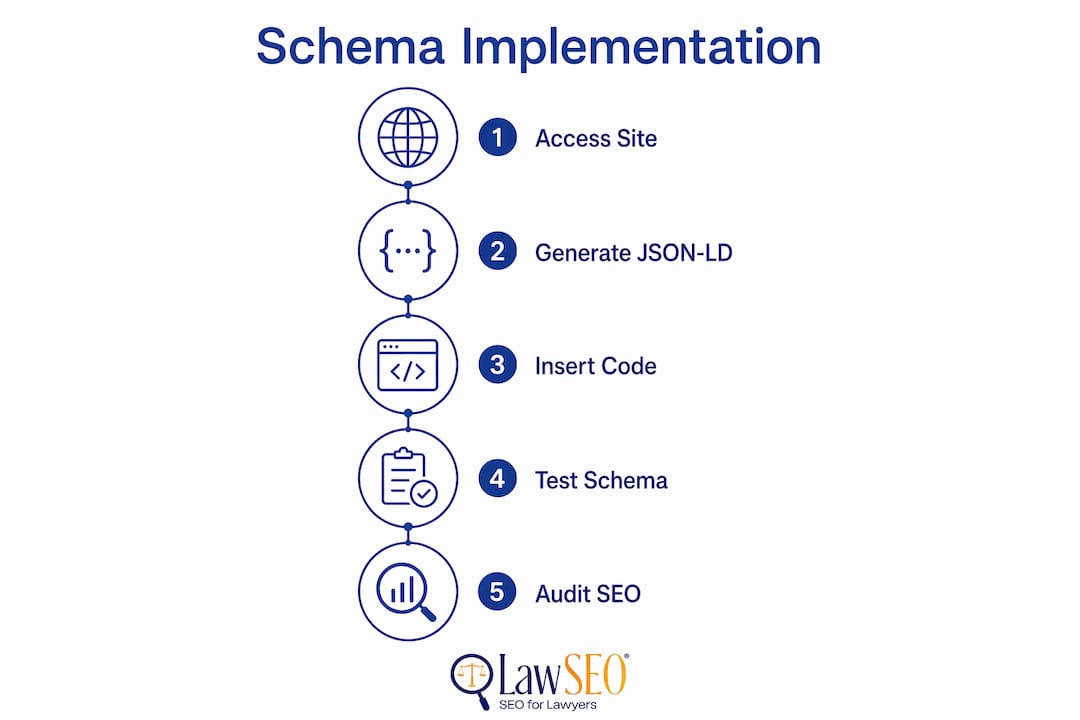
A complete law firm schema implementation follows six sequential steps. Each step builds on the previous one, and skipping any step weakens the entity graph.
-
Implement LegalService schema on the firm homepage. Include
legalName,url,telephone,address,areaServed, andpriceRange. Link this block to a unique@idURL (typically the homepage URL with a#LegalServicefragment). This block is the anchor for your entire schema graph. -
Add Person schema to every attorney bio page. Include
name,jobTitle,alumniOf(law school),hasCredential(bar admissions with issuing jurisdiction),knowsAbout(practice areas), andworksForpointing to the LegalService@id. Attorney bio schema with full credential data is the primary signal AI engines use to verify and recommend individual lawyers. -
Create FAQPage schema on every practice area page. Pull questions directly from real client intake calls or your firm’s contact form submissions. Each
Questionentity needs a conciseacceptedAnswerthat matches the visible text on the page. FAQPage markup increases AI citation rates and featured snippet potential when the visible content and the schema match exactly. -
Add LocalBusiness schema blocks for each office. Give each location its own unique
@idand link it to the parent LegalService entity using theparentOrganizationproperty. Includename,address,telephone,openingHours, andgeocoordinates for each location. -
Use OfferCatalog on your main services page. List each practice area as a
Serviceschema entity nested within anOfferCatalog, and connect eachServiceback to the LegalService@id. This gives search engines a machine-readable catalog of everything your firm offers. -
Validate every schema block before publishing. Run each page through the Google Rich Results Test and the Schema Markup Validator. Fix any errors before the page goes live. After publishing, monitor Google Search Console’s “Enhancements” report weekly for the first month.
Pro Tip: Run an AI search audit on your site after implementing schema to confirm that AI engines are reading and citing your firm’s structured data correctly.
| Schema type | Page placement | Key properties |
|---|---|---|
| LegalService | Homepage | areaServed, legalName, @id |
| Person | Attorney bio pages | hasCredential, alumniOf, worksFor |
| FAQPage | Practice area pages | Question, acceptedAnswer |
| LocalBusiness | Each office page | address, geo, parentOrganization |
| OfferCatalog | Main services page | Service, provider linked to LegalService |
For a broader look at how structured data fits into your full site architecture, the Lawseo guide on structured data for law firms covers the complete picture.
What are common schema mistakes and how do you fix them?
Schema errors fall into two categories: technical errors that break validation and content errors that trigger manual penalties. Both categories cost you ranking and AI visibility.
Fabricated reviews, hidden FAQ content, and stale attorney data are the three fastest ways to earn a Google manual action on your law firm’s schema. Every property you mark up must reflect what a visitor actually sees on the page.
- Using deprecated Attorney schema. The Attorney schema was deprecated in 2024. Replace it with Person schema and connect it to LegalService via
worksFor. Any site still using Attorney schema is sending an outdated signal. - Using Organization instead of LegalService. Generic Organization schema omits the legal-specific properties that drive local pack and AI recommendations. Switch every core page to LegalService.
- Schema that does not match visible content. Hidden FAQ blocks or answers that differ from on-page text violate Google’s guidelines and can trigger manual penalties. The schema and the page content must be identical.
- Fabricated or aggregated review data. AggregateRating schema must reflect real, third-party reviews from sources like Google Business Profile or Avvo. Invented ratings cause penalties.
- Disconnected schema blocks. Without
@idlinking, Google treats each schema block as a separate, unrelated entity. Connect every block to the parent LegalService@id. - Plugin conflicts. Two plugins generating schema for the same page produce duplicate or contradictory markup. Audit your CMS plugins and disable any that generate schema you are managing manually.
- Stale data. An attorney who left the firm two years ago still appearing in Person schema undermines trust. Build a quarterly review process into your schema maintenance calendar.
Use Google Search Console’s “Enhancements” tab to identify which pages have schema errors or warnings. Fix critical errors first, then address warnings. The law firm visibility checklist from Lawseo includes a schema audit component that helps you catch these issues systematically.
Key Takeaways
Optimizing law firm schema requires implementing LegalService, Person, FAQPage, and LocalBusiness types, connecting them with @id references, and keeping all data current and matched to visible page content.
| Point | Details |
|---|---|
| Use LegalService, not Organization | LegalService carries legal-specific properties that trigger local pack and AI results. |
| Replace deprecated Attorney schema | Use Person schema with worksFor linked to LegalService for full AI compatibility. |
| Connect all blocks with @id | Linked @id references create a unified entity graph that AI engines can read and cite. |
| Match schema to visible content | Every FAQ answer and credential must appear on the page to avoid manual penalties. |
| Validate before and after publishing | Use Google Rich Results Test and Search Console to catch errors before they cost rankings. |
Why schema is the most underused asset in law firm SEO
After nearly three decades working in SEO, I have watched law firms spend tens of thousands of dollars on content and paid ads while leaving their schema markup in a state that would embarrass a first-year developer. The shift from Attorney to Person schema in 2024 is a perfect example of how quickly this space moves. Firms that did not update their markup are now invisible to AI engines that cannot verify their attorneys’ credentials.
The firms that win in 2026 are not necessarily the ones with the most content. They are the ones whose structured data gives Google and AI systems a complete, verifiable picture of who they are. A personal injury firm in Dallas with clean, interconnected LegalService and Person schema will outrank a larger firm with sloppy or outdated markup, even with less content volume.
My honest advice: stop relying on plugins to handle schema for a YMYL site. Bespoke JSON-LD gives you control over every property and eliminates the plugin conflict risk that I see derail schema projects repeatedly. Treat schema maintenance like you treat bar admission renewals. It is not a one-time task. It is an ongoing professional obligation. Firms that build that discipline now will spend far less on paid acquisition in the years ahead.
For a deeper look at how schema fits into a full legal SEO strategy, the Lawseo resource on law firm website structure is worth your time.
— TODD
How Lawseo helps law firms get schema right
Lawseo works exclusively with attorneys and law firms, which means every schema implementation the firm delivers is built for the specific demands of YMYL content and legal E-E-A-T requirements. Todd R. Stager and his team personally review every client’s structured data strategy, from initial LegalService setup through attorney Person schema and ongoing maintenance. The firm’s law firm SEO services cover the full technical stack, including JSON-LD implementation, AI search optimization, and Google Search Console monitoring. If your firm’s schema is outdated, disconnected, or simply missing, Lawseo provides the expertise to fix it and keep it current as your practice grows.
FAQ
What schema type should a law firm use on its homepage?
Law firms should use LegalService schema on the homepage, not generic Organization schema. LegalService includes legal-specific properties like areaServed and practice area data that trigger local pack results and AI recommendations.
Is the Attorney schema still valid in 2026?
No. Google deprecated the Attorney schema in 2024. Law firms must use Person schema with worksFor linking to the firm’s LegalService entity to maintain search and AI compatibility.
How does FAQPage schema help a law firm’s SEO?
FAQPage schema on practice area pages structures real client questions and answers for AI extraction and featured snippet eligibility. The visible page content and the schema markup must match exactly to avoid penalties.
What is @id referencing and why does it matter?
The @id property assigns a unique URL identifier to each schema block and links them together into a single entity graph. Without @id referencing, Google treats each schema block as an isolated, unrelated entity, which reduces both SEO and AI visibility.
How often should a law firm update its schema markup?
Law firms should audit schema at least quarterly. Attorney departures, new office locations, updated bar admissions, and new practice areas all require schema updates to keep structured data accurate and penalty-free.
