

TL;DR:
- Alt text SEO improves website accessibility and search rankings by providing descriptive text for images. Properly written, keyword-relevant alt text enhances image visibility and complies with legal standards. Regular audits ensure images contribute to SEO and legal compliance, especially for AI-powered search relevance.
Alt text SEO is the practice of writing and optimizing the alternative text attribute on images to improve both website accessibility and search engine rankings. Every image on your website has an alt attribute in its HTML code. Search engines read that attribute to understand what the image shows. Screen readers use it to describe images to visually impaired users. Google Images accounts for over 20% of all web searches. That single statistic tells you how much traffic you leave on the table when your images carry no descriptive text. Generative AI models now use alt text as a direct contextual signal, making image alternative text a front-line ranking factor in both traditional and AI-powered search.
How does alt text affect SEO and web accessibility?
Alt text serves two masters at once: accessibility law and search engine ranking. Getting both right is not optional for any serious webmaster or digital marketer.
Accessibility and legal compliance
WCAG compliance requires descriptive alt text on all meaningful images. The Web Content Accessibility Guidelines, known as WCAG, set the international standard for accessible web content. The Americans with Disabilities Act, or ADA, extends those requirements into legal territory for U.S. websites. Sites that skip alt text face real litigation risk. Courts have ruled against businesses whose websites failed to meet ADA accessibility standards, and the number of such lawsuits has grown steadily. For law firms in particular, operating a non-compliant website while advising clients on legal matters creates a credibility problem that goes beyond SEO.
Screen readers announce images by reading the alt attribute aloud. Without it, a screen reader says something like “image” or reads the file name, which gives the user nothing useful. Proper alt text turns that gap into a complete experience.
Search engine ranking signals
Search engines cannot see images the way humans do. Google’s crawlers read alt text to categorize images and connect them to relevant search queries. A well-written alt attribute tells Google whether your image shows a “personal injury attorney consultation” or a generic stock photo of two people shaking hands. That distinction directly affects whether your image appears in Google Images results and whether your page ranks for related queries.
Keyword stuffing in alt text triggers spam classification and can result in ranking penalties. Google Search Central is explicit on this point. The goal is natural, descriptive language that accurately reflects the image content while including one relevant keyword where it fits organically.
- Alt text improves image search visibility and drives additional organic traffic.
- Screen readers depend on alt text to make images accessible to visually impaired users.
- Missing alt text on linked images breaks navigation for keyboard and screen reader users.
- ADA and WCAG non-compliance exposes your site to legal action.
- Keyword-stuffed alt text signals spam to Google and harms your overall page ranking.
Pro Tip: Run a quick search of your own site on Google Images. If your images do not appear for relevant queries, missing or weak alt text is the most likely cause.
What are the best practices for writing effective alt text?
Writing good alt text is a skill, not a formula. The goal is accuracy first, keyword relevance second.
-
Keep it under 125 characters. Screen readers cut off alt text at approximately 125 characters. Descriptions longer than that get truncated, which defeats the purpose. Write tight, specific descriptions that fit within that limit.
-
Describe the image accurately. Tell the reader what is actually in the image. For a law firm website, “attorney reviewing contract documents at a desk” is far more useful than “lawyer photo.” Specificity helps both users and search engines.
-
Skip redundant phrases. Phrases like “image of” or “photo of” waste your character budget. Screen readers already identify the element as an image. Start directly with the description.
-
Integrate keywords naturally. One relevant keyword per alt attribute is the standard. If your page targets “Chicago personal injury lawyer,” an image of your office could carry alt text like “Chicago personal injury law firm reception area.” That reads naturally and signals topical relevance.
-
Use empty alt attributes for decorative images. Decorative images should carry
alt=""so screen readers skip them entirely. Dividers, background textures, and purely aesthetic graphics add no informational value. Forcing a screen reader to announce them clutters the user experience. -
Describe the destination for linked images. When an image functions as a link, alt text on linked images must describe where the link goes, not just what the image shows. A logo linking to your homepage should read “Law firm homepage” rather than “firm logo.”
Pro Tip: Write alt text as if you are describing the image to someone over the phone. If your description makes sense out loud, it will work for both screen readers and search engines.
Handling complex images
Charts, infographics, and diagrams need more context than a simple photo. For complex visuals, write a short alt attribute that names the type of content, then provide a full description in the surrounding body text or a caption. This approach satisfies both accessibility requirements and search engine context signals without cramming a paragraph into the alt attribute.
How do AI search engines use alt text?
AI search platforms read alt text as part of their page understanding process. This is not a future development. It is happening now, and it changes how you should think about image optimization.
Generative AI models use alt text as a contextual signal to determine page relevance and decide when to cite a website in response to visual queries. When a user asks an AI assistant about personal injury law in their city, the AI scans page content, including alt text, to assess topical authority. Pages with descriptive, keyword-relevant alt text score higher on that relevance assessment.
The role of AI search engines in modern SEO has shifted alt text from a secondary accessibility feature to a primary content signal. AI models do not separate “accessibility text” from “SEO text.” They read alt attributes as part of the full page context, the same way they read headings and body copy.
“Alt text is no longer just a fallback for broken images or a courtesy for screen reader users. For AI-powered search, it is a direct input into how a model understands what your page is about and whether your site deserves to be cited.”
AI-generated alt text drafts require human review before publication. Automated tools can generate plausible-sounding descriptions that miss critical context, misidentify branded imagery, or produce generic text that adds no SEO value. A tool might describe a photo of your founding partner as “businessman in a suit” rather than “founding partner of Smith Law Group in Chicago.” That error costs you both accuracy and topical relevance.
- AI models treat alt text as a page-level topical relevance signal.
- Accurate alt text increases the probability of AI citation for visual and informational queries.
- Branded and complex images require human review after any automated alt text generation.
- Consistent, descriptive alt text across a site sends a cumulative authority signal to search engines.
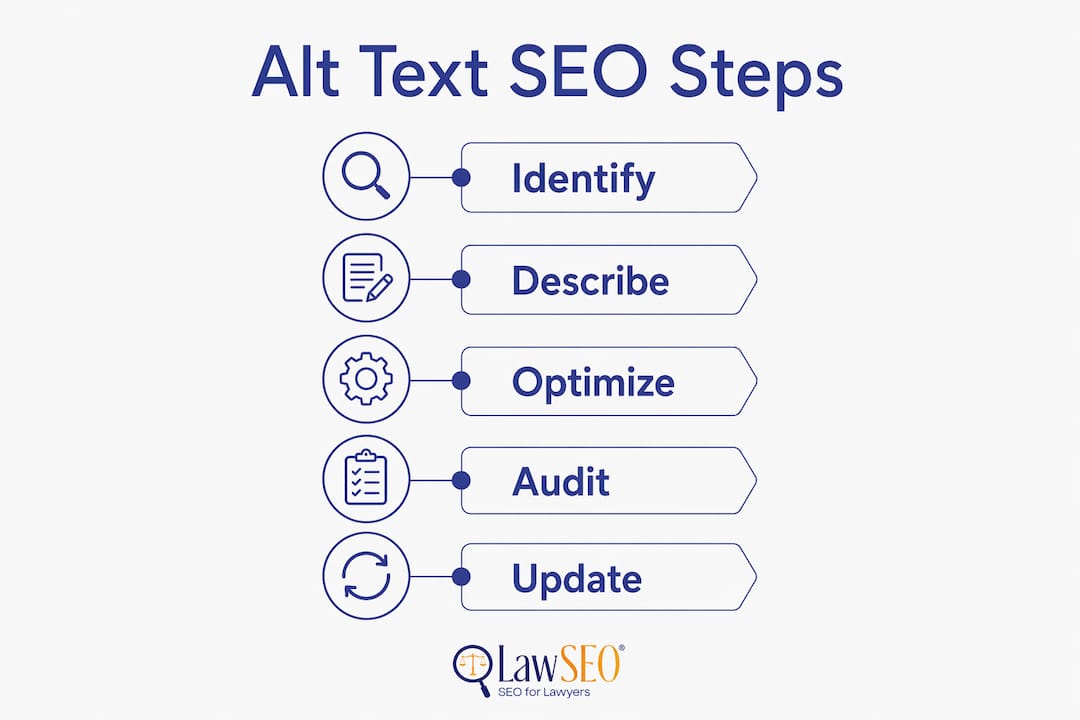
How to audit and optimize existing alt text on your website?
Most websites have alt text problems they do not know about. An audit is the fastest way to find and fix them.
Running an alt text audit
SEO audit tools scan for images lacking alt attributes and flag them in a prioritized list. Tools like Semrush’s Site Audit, Screaming Frog SEO Spider, and Google Search Console surface these issues quickly. The output is a list of URLs with missing or empty alt attributes, which gives you a clear starting point.
Prioritize your highest-traffic pages first. A homepage image with no alt text costs you more than a blog post image from three years ago. Product pages, attorney profile pages, and practice area pages deserve immediate attention because they carry the most commercial intent.
| Audit Priority | Page Type | Action |
|---|---|---|
| High | Homepage and practice area pages | Write descriptive, keyword-relevant alt text immediately |
| High | Attorney profile and team photos | Include name, role, and location for topical relevance |
| Medium | Blog post images | Add alt text aligned with the post’s target keyword |
| Low | Decorative graphics and dividers | Set alt="" to remove screen reader noise |
Balancing automation and manual review
Automation finds the gaps. Human judgment fills them correctly. Use audit tools to generate a list of missing alt attributes, then write the descriptions manually or review any AI-generated drafts before publishing. For large sites with thousands of images, batch the work by page priority rather than trying to fix everything at once.
Track your progress by monitoring Google Search Console’s coverage reports and your Google Images traffic over time. Improvements in image search impressions and clicks confirm that your alt text updates are working.
Pro Tip: Set a recurring quarterly audit in your calendar. New images get added constantly, and alt text gaps reopen faster than most webmasters expect. Quarterly reviews keep your site compliant and competitive.
Key Takeaways
Alt text is a direct ranking signal for both traditional search engines and AI-powered platforms, making it one of the highest-return technical SEO tasks available to webmasters and digital marketers.
| Point | Details |
|---|---|
| Alt text drives image search traffic | Google Images handles over 20% of web searches, and descriptive alt text is the primary factor in image ranking. |
| WCAG and ADA compliance is mandatory | Missing alt text creates legal exposure under the ADA and fails WCAG accessibility standards. |
| Keep descriptions under 125 characters | Screen readers truncate longer alt text, so concise and accurate descriptions serve users best. |
| AI models read alt text as a ranking signal | Generative AI uses alt text to assess page relevance and decide which sites to cite in responses. |
| Audit quarterly and prioritize high-traffic pages | Regular audits with SEO tools catch new gaps before they compound into ranking and compliance problems. |
Why most sites still get alt text wrong
After nearly three decades in SEO, I have reviewed hundreds of law firm websites. The pattern is consistent: alt text is either completely missing, stuffed with keywords, or filled with file names like “IMG_4892.jpg.” None of those approaches serve the site or its users.
The mistake I see most often is treating alt text as an afterthought. Webmasters launch a site, upload images, and move on. Alt text never gets written. Then, months later, they wonder why their Google Images traffic is flat and their accessibility audit is failing.
The second most common mistake is the opposite: over-optimization. Someone learns that alt text is an SEO signal and proceeds to write “personal injury lawyer Chicago personal injury attorney law firm” into every image attribute. Google reads that as spam. It is.
The right approach is the one that serves a real user. Write alt text that a visually impaired person would find genuinely useful, then check whether a relevant keyword fits naturally. If it does, include it. If it does not, leave it out. That discipline produces alt text that satisfies accessibility standards, avoids spam signals, and earns ranking credit.
Looking ahead, the stakes are only rising. As AI search assistants handle more queries, alt text’s role in AI-driven SEO will grow from a supporting signal to a primary one. Sites that treat alt text seriously now will have a structural advantage as that shift accelerates.
— TODD
How Lawseo helps law firms win with image SEO
Lawseo works exclusively with attorneys and law firms, which means every audit and optimization strategy is built around the specific content types legal websites carry: attorney headshots, courtroom imagery, office photos, and practice area graphics. The firm’s technical SEO audits identify every image lacking proper alt text and deliver a prioritized fix list aligned with legal SEO strategies that drive measurable ranking improvements. Lawseo also addresses WCAG and ADA compliance as part of its accessibility consulting, reducing legal exposure while improving search performance. For law firms that want their content cited by AI search platforms, Lawseo’s AI-focused optimization work treats alt text as the foundational content signal it has become.
FAQ
What is alt text in SEO?
Alt text in SEO is the descriptive text written in an image’s alt HTML attribute. Search engines read it to understand image content and use it as a ranking signal for both page relevance and image search results.
How long should alt text be for SEO?
Alt text should stay under 125 characters. Screen readers truncate longer descriptions, and concise text forces the specificity that both users and search engines prefer.
Does missing alt text hurt your Google rankings?
Missing alt text removes a ranking signal from your images and prevents them from appearing in Google Images results, which account for over 20% of all web searches.
Should decorative images have alt text?
Decorative images should carry an empty alt attribute, written as alt="". This tells screen readers to skip the image, which improves the experience for visually impaired users without adding noise.
How does AI search use alt text?
Generative AI models read alt text as part of their page understanding process. Accurate, descriptive alt text increases the likelihood that an AI assistant will cite your site when answering relevant queries.