


Yes: law firm websites must run on SSL/TLS (HTTPS), full stop. Three reasons decide the question fast. First, encryption protects confidential client communications the moment they leave a browser. Second, HTTPS aligns with regulatory expectations under frameworks like GDPR’s Article 32, which calls for “appropriate technical measures.” Third, Chrome and other browsers flag unencrypted pages as “Not Secure,” which quietly bleeds trust and conversions.
Check this today:
- Does typing your firm’s domain redirect automatically to
https://? - Does the padlock icon appear with no warnings in Chrome, Firefox, and Safari?
- Do your contact and intake forms load from a secure origin, not an embedded HTTP frame?
Key Takeaways
Law firm websites need SSL/TLS because it protects confidential client data in transit, supports regulatory compliance, and prevents browser trust warnings that drive prospective clients away.
| Point | Details |
|---|---|
| HTTPS is non-negotiable | Every page, especially intake forms, must load over encrypted, authenticated connections. |
| Certificates need a lifecycle | Automate renewal with Certbot or a managed CA instead of tracking expiration manually. |
| Padlock isn’t proof of legitimacy | Pair encryption with DMARC and staff training since phishing sites can hold valid certificates too. |
| Free options are viable | Let’s Encrypt and Cloudflare cover most firms; GlobalSign fits those wanting OV/EV validation and support. |
| Lawseo audits close the gap | Lawseo’s technical audits pair HTTPS implementation with ongoing monitoring tied to search visibility. |
What HTTPS Actually Does: Encryption, Integrity, Authentication
HTTPS is the padlock-and-address-bar signal that a site runs Transport Layer Security, or TLS. It does three specific jobs at once, and each one matters for a different reason.
Encryption scrambles data in transit so anyone intercepting the connection, a hacker on public Wi-Fi, an ISP, a compromised router, sees nothing usable. Integrity guarantees the page a visitor loads is the exact page you published, with no injected code or altered form fields along the way. Authentication confirms the browser is actually talking to your server, not an impostor sitting between the two. Together, these functions are the core defense against man-in-the-middle attacks, where an attacker quietly reroutes traffic to eavesdrop or tamper with it.
Without TLS, a technique called SSL stripping can silently downgrade a visitor’s connection to plain HTTP, exposing whatever they type next.
Pro Tip: Test your own site from a coffee shop Wi-Fi network. If any page loads without the padlock, that page is a live target for interception.
Why HTTPS Matters Specifically For Law Firms
General web security advice applies to every business. Law firms carry a heavier obligation, because the data flowing through intake forms and client portals is often privileged.
Encrypting that traffic in transit is a practical way to support the confidentiality duty every attorney already owes clients. It’s not the whole compliance picture, but it’s a baseline most regulators now assume.
- Confidentiality in transit: encrypted forms and portals reduce the chance a privileged message gets intercepted before it reaches you.
- Regulatory alignment: GDPR’s Article 32 and HIPAA-adjacent transmission safeguards both point toward encryption as an expected technical measure for handling sensitive data.
- Visible trust: a missing padlock reads, fairly or not, as a firm that doesn’t take security seriously, right when a prospective client is deciding whether to share their case details.
- SEO and functionality: HTTPS is a confirmed ranking signal, and it unlocks browser features like service workers that HTTP pages simply cannot use.
What Happens When A Law Firm Site Skips SSL
The risks aren’t hypothetical. An unencrypted site allows credential theft through basic network eavesdropping, and it opens the door to content injection, where an attacker silently inserts malicious ads or scripts into pages your visitors trust. Spoofed versions of law firm sites get used in phishing campaigns that target the exact clients you worked to attract.
Google’s own research frames this plainly: attackers can inject scripts into legitimate pages that lack proper transport security, damaging both site integrity and firm reputation in one move.
Operational fallout follows fast:
- Mixed-content warnings break page functionality mid-load.
- Contact forms get flagged or silently blocked by browsers.
- Search visibility erodes as ranking signals penalize insecure pages.
Certificate Types And How To Choose One For Your Firm
Not every certificate does the same job, and picking the wrong one either overspends or under-protects.
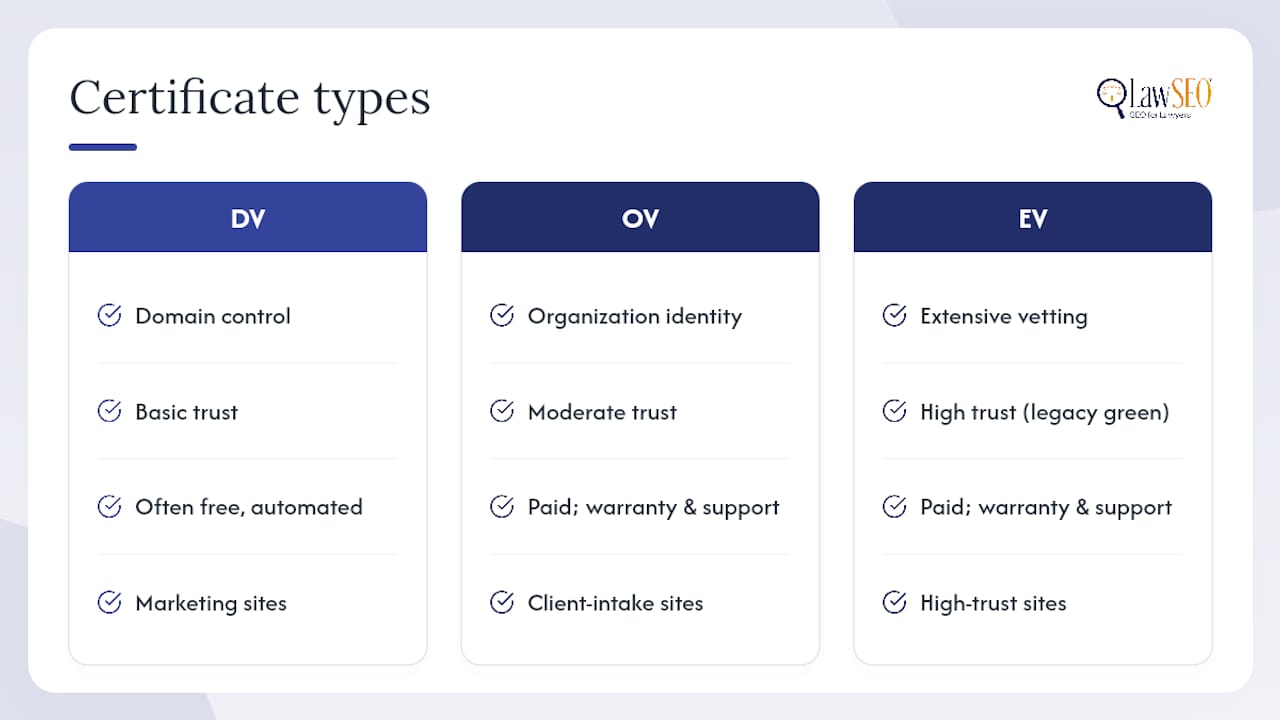
Domain Validation (DV) confirms you control the domain, nothing more. It’s fast, often free, and fine for a basic marketing site. Organization Validation (OV) verifies the actual business behind the domain, a reasonable step up for a firm handling client intake. Extended Validation (EV) requires the deepest vetting and once displayed a green company name in the browser bar; that visual cue has faded from modern browsers, but the underlying vetting still signals legitimacy to security-conscious reviewers.
On cost and automation, Let’s Encrypt issues free, automated DV certificates renewed every 90 days, often paired with the Certbot client for setup. Cloudflare bundles free TLS through its proxy layer, adding CDN performance on top. Paid certificate authorities like GlobalSign offer OV and EV validation with warranties and dedicated support, which larger firms sometimes want for liability coverage. If you run a client portal on a subdomain, a SAN or wildcard certificate covers multiple hostnames under one purchase instead of managing certificates one by one.
A Practical HTTPS Rollout Checklist
Getting a law firm site fully onto HTTPS is a short project, not a redesign. Start by inventorying every endpoint, your main site, subdomains, client portal, mail server, and any CDN, so nothing gets missed mid-migration.
| Step | What to check |
|---|---|
| Inventory | List every domain, subdomain, and API endpoint that needs a certificate |
| Redirect | Force redirects from HTTP to HTTPS site-wide |
| Fix mixed content | Update internal links, images, and embedded forms to secure origins |
| Enable HSTS | Start with a short max-age before committing to preload |
| Automate renewal | Use ACME clients like Certbot or a managed CA integration |
| Validate | Run an SSL Labs scan and a mixed-content scanner across browsers |
HSTS deserves particular care. It instructs browsers to refuse HTTP connections entirely for your domain, which shuts down downgrade attacks, but submitting your domain to the preload list is nearly irreversible. Test with a short max-age first.
Pro Tip: Run your domain through Qualys SSL Labs before and after migration. A grade below B usually means an outdated cipher suite or an incomplete certificate chain, both fixable in an afternoon.
Keeping Certificates Alive: Renewal And Monitoring
A certificate that expires unnoticed takes your entire site offline, forms, portal, everything, until someone catches it. That’s not a hypothetical inconvenience; it’s a compliance gap the moment it happens.
Automate renewal through ACME protocols, Certbot, or your hosting provider’s built-in certificate management rather than tracking expiration dates by hand. Add external monitoring that alerts you days before expiry, not the morning of.
- Disable deprecated TLS 1.0 and 1.1 in your server configuration.
- Enable forward secrecy so a single compromised key can’t decrypt past sessions.
- Turn on OCSP stapling to speed up certificate validation for visitors.
Common Mistakes Law Firms Make With SSL
The most frequent failure is treating a certificate as a one-time install rather than a lifecycle. Compliance specialists increasingly treat certificate lapses as liability events, not just IT annoyances, because an expired cert during a client interaction can look like negligence.
Pro Tip: Set two alerts, not one: an internal calendar reminder and an external uptime monitor. Redundancy here costs nothing and prevents the worst outage.
- Partial migration: some pages load over HTTPS while embedded scripts or images still pull from HTTP, triggering mixed-content warnings. Audit every asset URL after migration.
- Padlock overconfidence: a padlock confirms encryption, not legitimacy. Attackers routinely obtain valid certificates for spoofed domains built to phish your clients, so pair HTTPS with staff training and email authentication like DMARC.
A Final Note From Todd
Enabling HTTPS is one of the cheapest, fastest security wins available to any firm, and there’s no defensible reason to skip it in 2026. If your site isn’t fully migrated, run an inventory this week and schedule automated renewals within 30 days. Treat it as baseline infrastructure, not a nice-to-have.
How Lawseo Helps You Get This Right
Lawseo runs technical audits that catch exactly the gaps this article covers, mixed content, missing HSTS, certificates approaching expiry, before they cost you a client or a ranking position. Instead of hiring a generalist agency to guess at legal-industry priorities, Lawseo’s technical reviews are built around how law firm sites actually get found and trusted, pairing HTTPS implementation support with ongoing security monitoring tied directly to your search visibility. If you want a clear picture of where your site stands, start with the law firm visibility checklist or reach out through Lawseo for a full site audit.
