


TL;DR:
- Attorney site accessibility SEO involves optimizing law firm websites to meet ADA and WCAG standards while enhancing search engine rankings through technical SEO practices. Many firms overlook this integration, but compliance features simultaneously improve user experience and ranking performance, making accessibility a strategic asset. Regular audits using multiple tools and technical improvements ensure compliance, boost rankings, and reduce legal exposure in a competitive legal market.
Attorney site accessibility SEO is the practice of optimizing a law firm’s website to meet both ADA compliance standards and Google’s technical ranking requirements simultaneously. Most attorneys treat accessibility and SEO as separate concerns. They are not. Accessibility features boost user experience and search rankings at the same time, making every investment in compliance work double duty. This guide to attorney site accessibility SEO covers the standards you must meet, the audit process you must run, and the specific techniques that move rankings while protecting your firm from legal exposure.
What accessibility standards and SEO best practices law firms must follow
Web accessibility for law firms is governed by two overlapping frameworks: the Americans with Disabilities Act (ADA) and the Web Content Accessibility Guidelines (WCAG), currently at versions 2.1 and 2.2. Courts have consistently ruled that ADA requirements apply to websites, and law firms are not exempt. A single accessibility lawsuit can cost tens of thousands of dollars in legal fees before any settlement. Meeting WCAG 2.1 Level AA is the widely accepted threshold for avoiding that exposure while broadening your potential client base.
The overlap between accessibility compliance and SEO best practices for lawyers is significant and deliberate. Google’s crawlers parse your site much like a screen reader does. Semantic HTML, descriptive alt text, logical heading structures, and clear navigation all serve both audiences. The technical SEO fundamentals that improve your rankings are, in most cases, the same changes that make your site usable for people with disabilities.
Google’s 2026 ranking framework places heavy weight on Core Web Vitals, specifically two metrics every law firm must know:
- Largest Contentful Paint (LCP): The main content of your page must render in under 2.5 seconds. Slow LCP signals a poor user experience and directly impacts rankings for high-value queries.
- Interaction to Next Paint (INP): Every user interaction must receive a visible response in under 200ms. Sluggish interactions drive away the urgent clients who need legal help immediately.
- Cumulative Layout Shift (CLS): Visual instability during page load frustrates users and signals low quality to Google.
- Mobile performance: 70% of legal leads come from mobile devices. A site that fails on mobile fails your practice.
- HTTPS and site security: Secure connections are a baseline ranking signal and a client trust requirement. This is also foundational to any guide to lawyer site security SEO.
Meeting these standards is not optional in 2026. It is the price of entry for competitive legal search rankings.
How to perform an accessibility SEO audit for your law firm website
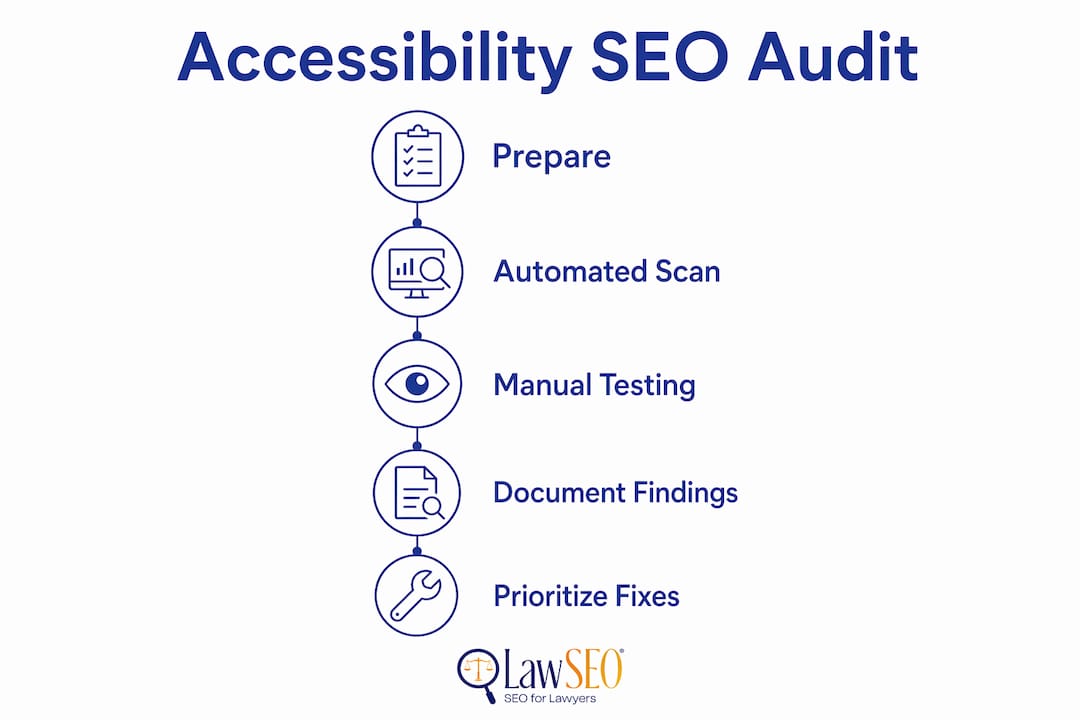
A law firm accessibility audit combines automated scanning with manual testing. Automated tools catch roughly 30 to 40 percent of accessibility issues. The rest require human evaluation. Comprehensive accessibility audits must include manual keyboard navigation tests and screen-reader simulations to capture all barriers automated tools miss.
Audit tools and their primary functions:
| Tool | Primary Use | Best For |
|---|---|---|
| Google Lighthouse | Performance, accessibility, SEO scoring | Quick baseline audits in Chrome DevTools |
| WAVE (WebAIM) | Visual accessibility evaluation | Identifying color contrast and form errors |
| Axe DevTools | WCAG-specific violation detection | Developer-level compliance testing |
| Google Search Console | Core Web Vitals field data | Real-user performance monitoring |
| PageSpeed Insights | LCP, INP, CLS measurement | Speed optimization prioritization |
Run your audit in this sequence to get accurate, actionable results:
- Run Google Lighthouse on your homepage, practice area pages, and contact page. Note your accessibility score and any flagged violations. Treat Lighthouse as a standard workflow tool, not a one-time check.
- Run WAVE on the same pages to catch color contrast failures, missing form labels, and empty links that Lighthouse may score differently.
- Test keyboard navigation manually. Tab through every page without touching your mouse. Every interactive element, including menus, forms, and call-to-action buttons, must be reachable and operable by keyboard alone.
- Simulate screen-reader use with NVDA (Windows) or VoiceOver (Mac). Confirm that your firm name, practice areas, attorney bios, and contact information are read in a logical order.
- Check Core Web Vitals in Google Search Console under the “Experience” report. Field data from real users is more reliable than lab data from Lighthouse alone.
- Review ARIA label implementation on dynamic elements. Google’s AI bots and screen readers parse interactive elements the same way, making ARIA labels on tap-to-call buttons critical for both indexing and usability.
Document every finding in a spreadsheet with severity ratings. Prioritize fixes that affect both accessibility compliance and Core Web Vitals scores first, since those deliver the highest combined return.
Specific techniques to optimize website accessibility and SEO for law firms
Improving attorney site accessibility and SEO performance requires concrete technical changes, not general intentions. The following techniques address the most impactful areas for law firm websites.
Image optimization with descriptive alt text

Every image on your site needs alt text that describes the image accurately and, where natural, includes a relevant keyword. Alt text optimized with keywords benefits both visually impaired users and search engine understanding of your content. For a photo of your firm’s founding partner, “Attorney Jane Smith, personal injury lawyer in Chicago” serves both purposes. Generic alt text like “lawyer photo” serves neither.
Semantic HTML and heading structure
Your page must use a single H1 tag containing your primary keyword phrase. H2 tags should organize major sections, and H3 tags should handle subsections. Never skip heading levels. Screen readers use heading structure to help users navigate long pages, and Google uses it to understand content hierarchy. A logical heading structure is one of the highest-impact, lowest-cost improvements available to most law firm websites.
ARIA labels on dynamic and interactive elements
Any element that functions as a button but is not coded as a native HTML button element requires an ARIA label. This includes tap-to-call links, chat widgets, accordion menus, and modal dialogs. Google’s crawlers interpret these elements the same way screen readers do. Missing ARIA labels mean Google cannot fully index your conversion paths, which directly suppresses rankings for queries with high commercial intent.
Color contrast and typography
WCAG 2.1 requires a minimum contrast ratio of 4.5:1 for normal text and 3:1 for large text. Many law firm websites use light gray text on white backgrounds, which fails this standard. Use the WebAIM Contrast Checker to verify every text-background combination on your site. Beyond contrast, body text should be set at a minimum of 16px with adequate line spacing to support users with low vision.
Page speed and loading performance
- Compress all images using WebP format instead of JPEG or PNG where browser support allows.
- Implement browser caching and a content delivery network (CDN) to reduce server response times.
- Defer non-critical JavaScript and eliminate render-blocking resources.
- Minify CSS and JavaScript files to reduce file sizes.
Structured data markup
Add LegalService and Attorney schema markup to your site using JSON-LD format. Structured data tells Google precisely what your firm does, where you practice, and who your attorneys are. This directly supports E-E-A-T signals, which Google uses to evaluate the trustworthiness of legal content. Accessible sites that also carry structured data markup demonstrate expertise and trustworthiness that Google prioritizes in competitive legal markets.
Pro Tip: Add structured data to your attorney bio pages first. These pages carry the highest E-E-A-T weight for legal queries, and schema markup on them produces faster ranking improvements than adding it to practice area pages alone.
Common mistakes to avoid in attorney site accessibility SEO
Most law firm websites share the same accessibility failures. Recognizing them is the first step toward fixing them.
- Ignoring mobile accessibility. A site that passes desktop accessibility checks can still fail on mobile. Touch targets must be at least 44×44 pixels. Text must be readable without zooming. Given that mobile devices drive the majority of legal search traffic, mobile accessibility failures are also mobile conversion failures.
- Skipping ARIA labels on interactive elements. Developers frequently build custom dropdown menus, modal windows, and chat widgets without ARIA roles or labels. These elements are invisible to screen readers and partially invisible to Google’s crawlers.
- Using poor color contrast. Light gray text on white is the most common offender on law firm websites. It fails WCAG standards and reduces readability for all users, not just those with visual impairments.
- Duplicate content and broken internal linking. Thin or duplicated practice area pages confuse both users and search engines. Every page needs a clear purpose, a unique title tag, and internal links that connect it logically to related content. You can review law firm site structure principles to address this systematically.
- Neglecting post-update accessibility testing. Many law firms skip accessibility testing after redesigns or content updates, which introduces regressions that erode both compliance and rankings over time. Build a quarterly audit into your website maintenance calendar.
- Missing accessible forms. Contact forms and consultation request forms must have visible labels on every field, not just placeholder text. Placeholder text disappears when a user starts typing, leaving users with cognitive disabilities unable to complete the form.
Each of these mistakes is fixable within a single development sprint. The cost of fixing them is always lower than the cost of an ADA lawsuit or a rankings drop on high-value practice area queries.
Key takeaways
Attorney site accessibility SEO requires meeting WCAG 2.1 standards, passing Core Web Vitals benchmarks, and implementing semantic HTML, ARIA labels, and structured data to achieve both legal compliance and competitive search rankings.
| Point | Details |
|---|---|
| ADA and WCAG compliance | Courts apply ADA requirements to websites; WCAG 2.1 Level AA is the accepted compliance threshold. |
| Core Web Vitals are non-negotiable | LCP under 2.5s and INP under 200ms directly affect rankings and user retention for legal queries. |
| Audit with multiple tools | Combine Lighthouse, WAVE, and Axe with manual keyboard and screen-reader testing for full coverage. |
| Accessibility and SEO overlap | Alt text, semantic HTML, and ARIA labels serve both screen readers and Google’s crawlers simultaneously. |
| Regular auditing prevents drift | Quarterly accessibility checks after site updates prevent compliance regressions and ranking losses. |
Why accessibility is the most undervalued SEO asset in legal marketing
After nearly three decades working in SEO, with the last several years focused exclusively on law firms, I have watched attorneys spend significant budgets on content and link building while their sites quietly failed basic accessibility checks. The pattern is consistent: a firm invests in a redesigned website, the developer delivers something visually polished, and nobody runs a Lighthouse audit or a keyboard navigation test before launch.
The consequence is not just legal exposure, though that risk is real and growing. The deeper consequence is that inaccessible sites signal to Google that the firm is less trustworthy. Fast, accessible websites reflect the professionalism of a law practice and directly influence the algorithm’s trust signals. A site that loads slowly, uses unlabeled interactive elements, and fails contrast checks is telling Google the same thing it tells a potential client with a disability: this firm did not pay attention to the details.
The attorneys I have seen gain the most ground in competitive markets are those who treat accessibility as a professional standard, not a compliance checkbox. They audit quarterly. They fix regressions before they compound. They understand that web design and SEO are inseparable disciplines, not separate vendor relationships. That mindset is what separates firms that rank consistently from those that chase rankings reactively.
Accessibility is not a burden. It is the most durable SEO investment a law firm can make.
— TODD
How Lawseo can help your firm meet accessibility and SEO standards
Lawseo works exclusively with attorneys and law firms, which means every audit, optimization, and content strategy we deliver is built around the specific demands of legal search. Our SEO audit for attorneys covers Core Web Vitals, WCAG compliance, ARIA label implementation, structured data, and mobile performance in a single, prioritized report. We do not hand you a generic checklist. We identify the specific fixes that will move your rankings and reduce your legal exposure. If you are ready to treat accessibility as the competitive advantage it is, explore our proven legal SEO strategies and see how Lawseo approaches law firm website optimization from the ground up.
FAQ
What is attorney site accessibility SEO?
Attorney site accessibility SEO is the practice of optimizing a law firm’s website to meet ADA and WCAG accessibility standards while simultaneously improving Google search rankings through technical SEO. The two disciplines share significant overlap in semantic HTML, site speed, and structured navigation.
Does the ADA apply to law firm websites?
Yes. Courts have ruled that ADA requirements apply to websites, and law firms are not exempt from these obligations. Following WCAG 2.1 Level AA is the widely accepted standard for compliance and avoiding litigation.
How often should a law firm run an accessibility audit?
Law firms should run a full accessibility audit at least quarterly and after every significant website update. Skipping post-update testing is one of the most common causes of compliance regressions and ranking drops in legal SEO.
Which tools are best for a law firm accessibility audit?
Google Lighthouse, WAVE, and Axe DevTools are the three primary tools for law firm accessibility audits. Automated tools should always be supplemented with manual keyboard navigation testing and screen-reader simulation for complete coverage.
How does accessibility affect Google rankings for attorneys?
Accessible sites earn higher Google rankings because accessibility features like descriptive alt text, semantic HTML, and fast load times directly improve the signals Google uses to evaluate page quality and trustworthiness, including Core Web Vitals and E-E-A-T.
