


Yes, you can hide your Google Business Profile address if customers never visit that location, and Google gives you a simple toggle to do it. That single switch changes what the public sees, not what Google actually requires from you. You still need an accurate, verifiable address on file even after you flip the display off, and once hidden, your public listing shows a service area instead of a street address.
- Hiding is a display setting, not an exemption from verification.
- Service-area businesses (SABs) are the intended use case.
- The public listing switches from a street address to a service-area map.
Key Takeaways
Hiding a Google Business address is safe and often smart for service-area businesses, but it requires ongoing verification accuracy and a plan to replace the proximity signal it removes.
| Point | Details |
|---|---|
| Toggle is display-only | Turning off “Show business address to customers” hides the public listing, not Google’s verification requirement. |
| SABs are the intended use case | Hide the address if customers never visit; keep it visible if they come to your location. |
| API exclusion is a real risk | Hidden listings can return NOT_FOUND from Google’s Places API, cutting off directory and tool distribution. |
| Address history affects ranking | Editing or hiding an address can re-anchor the map pin unpredictably, so audit before you edit. |
| Lawseo audits before acting | Lawseo runs address-history, grid, and review audits before recommending any hidden-address transition. |
How Do You Hide Your Address on Google Business?
Not every business should hide its address, and Google’s own rules draw a clear line based on where you actually serve customers. If people visit your location, that address stays visible. If you go to them, it usually should not be.
Three business models cover most cases:
- Storefront businesses. A retail shop or a law office with walk-in clients needs a visible, verifiable street address because customers physically show up.
- Service-area businesses (SABs). A mobile plumber, a home cleaning service, or a traveling notary never hosts clients at a home office, so Google recommends removing the address entirely and listing a service area instead.
- Hybrid businesses. Some companies do both, seeing clients at an office some days and traveling to them on others. Google allows you to list both the address and a service area in that case.
Beyond the technical rule, weigh privacy, safety, and any landlord restrictions on commercial signage before you decide. A home-based consultant with no interest in walk-in traffic has little reason to expose a residential address to the public.
Steps to Hide Your Business Address in Google Business Profile
The path is the same whether you manage your profile through the dashboard or the Google Business Profile app, and it takes about two minutes.
- Sign in and open your Business Profile.
- Go to Edit profile, then select Location.
- Next to “Business location,” choose Edit.
- Turn off Show business address to customers.
- Define your service area by entering the cities, ZIP codes, or a driving radius you actually cover.
Google confirms this exact menu path in its own documentation on managing your business address, and the process holds up in community reports from business owners who have done it for privacy reasons on their help forum threads.
Here’s the part people skip: hiding the address doesn’t mean you get to leave the address field blank or fake. Google still requires a real, physical location for verification, and if you ever move, you have to verify again. Toggling the display off has zero effect on that requirement.
Pro Tip: Screenshot your service area settings before and after every edit. If your rankings shift unexpectedly, you’ll have a record to compare against and can pinpoint exactly what changed.
What Are Google’s Rules for Hidden and Virtual Addresses?
Google’s guidelines are specific about what counts as an acceptable address, and misunderstanding them is one of the fastest ways to trigger a suspension.
- P.O. boxes and mailboxes are never allowed, hidden or not. Google requires a real, geocodable location for every listing.
- Unstaffed virtual offices are a common failure point. If nobody is actually present to represent your business at that address, Google may reject or suspend the listing.
- Storefronts still need visible signage and a permanent presence. A business that invites customers in but doesn’t look occupied raises verification flags.
- Reverification triggers include moving, address edits, and any mismatch between what you list and what Google can confirm.
The official guidelines for representing your business on Google spell out these restrictions directly, and they apply whether your address is visible or hidden. One detail worth remembering: hiding an address doesn’t loosen these standards at all. It just changes who sees the underlying, still-verified location.
What Are the Risks of Hiding Your Google Business Address?
Hiding your address solves a privacy problem, but it can create a visibility problem you won’t notice until traffic drops. Independent testing found that hidden-address listings can return a NOT_FOUND response from Google’s own Places API even while the listing stays live and visible on Maps. That gap matters because plenty of directories, booking tools, and third-party apps pull data through that same API layer, and a listing excluded from it effectively disappears from that entire distribution channel.
Hiding the address also doesn’t erase Google’s internal use of it. Your address on file still feeds proximity calculations behind the scenes, even though the public never sees it, and that anchoring can behave unpredictably.
Testing and practitioner reporting suggest that editing or hiding an address can cause a listing’s functional map pin to snap back toward its original registration point, sometimes disrupting rankings that took months to build.
That reversion risk, documented in Search Engine Land’s analysis of address changes, is the reason experienced practitioners never touch an established listing’s address without a documented contingency plan first.
How Do You Optimize a Hidden-Address Business Profile?
Once your street address disappears from public view, you lose part of the proximity signal that helps Google rank local businesses. You compensate for that by strengthening every other relevance signal you control.
- Declare a precise service area. Vague coverage claims perform worse than specific cities, ZIP codes, or a defined radius.
- Build location-specific content on your own website. Pages targeting the towns and neighborhoods you actually serve give Google (and searchers) more to work with than the listing alone.
- Run an active review acquisition and response program. Reviews carry real ranking weight, and treating them as a substitute for the missing proximity signal is standard practice among experienced local SEO practitioners.
- Keep citations consistent across every directory where your business name, phone, and service area appear.
- Fill out every category, service, and attribute field. Relevance signals matter more when distance signals are muted.
For law firms specifically, a residential or hidden address requires a distinct playbook. Attorney virtual office SEO strategies that lean on prominence signals, like earned links and detailed practice-area content, tend to outperform firms that hide behind a service area with no supporting content.
Pro Tip: If two competitors show identical service areas, the one with more granular, city-specific landing pages usually wins the click, not the one closest to the searcher.
How Do You Check Where Google Actually Anchors Your Listing?
Before you touch an existing profile’s address settings, find out where Google currently believes your business sits. Guessing is how rankings disappear overnight.
- Run a grid ranking report. Query your target keyword from a dozen or more points across your service area to see where your listing actually surfaces, not where you assume it does.
- Test Places API visibility directly. Look up your listing by place ID and confirm whether it returns valid data or a NOT_FOUND response, since that tells you if you’re excluded from third-party distribution.
- Ask three onboarding questions before any edit: What was the original registration address? Has address visibility ever been toggled before? Has the business physically moved since verification?
This checklist mirrors the audit practitioners run before recommending any address change, and skipping it is how businesses lose rankings they can’t easily trace back to a cause.
When Should You Actually Hide a Business Address?
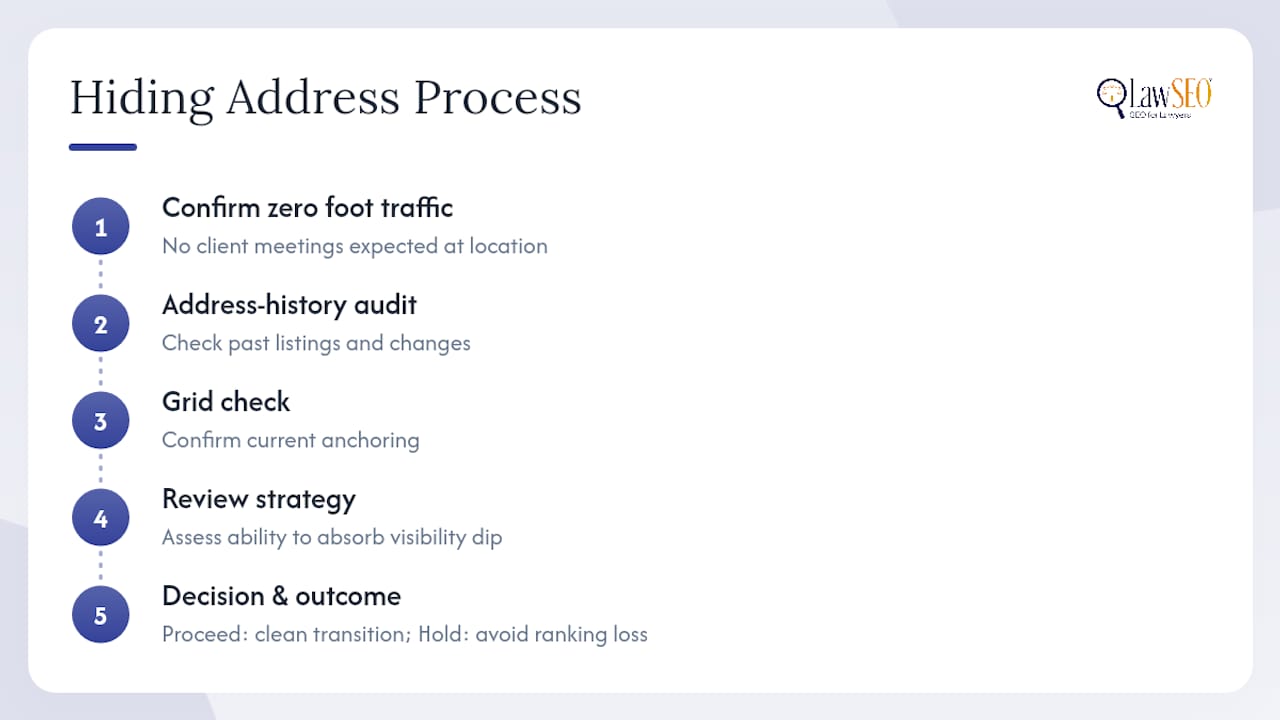
We recommend hiding an address only when a business genuinely has zero foot traffic and no walk-in expectation from its market. A firm operating from a home office with no client meetings there fits that description. A firm that occasionally invites clients in for consultations does not, no matter how much the owner would prefer more privacy.
Before touching any live listing, we run an address-history audit, a grid check to confirm current anchoring, and a review-strategy review to see whether the account can absorb a temporary visibility dip. That sequence is what separates a clean transition from a ranking loss that takes months to diagnose. Todd R. Stager, who leads strategy on every Lawseo campaign, has applied this same Google Business Profile approach for law firms across markets where firms face this exact decision.
Get Professional Help Managing Your Address Transition
Hiding an address is a one-click toggle, but doing it without breaking three months of ranking momentum takes more than a click. Lawseo runs a full address-history audit, verifies your reverification status, and checks Places API visibility before recommending any change, the same process outlined above, applied to your actual listing rather than a generic checklist. Firms that hide an address without that groundwork often lose distribution to directories and booking tools without ever knowing why.
Lawseo also builds the review acquisition programs, citation consistency, and locally targeted content that offset the proximity signal you give up when the street address disappears from public view. If your firm is weighing this decision or has already made the change and seen a ranking dip, visit Lawseo’s homepage to request a profile audit and get a specific plan for your situation instead of a one-size-fits-all guide.
Sources
- Why Google Business Profile address changes can disrupt local rankings – Search Engine Land
