


Nine formats do the heavy lifting for client acquisition: practice-area pages, FAQ pages with schema, pillar/cluster pages, long-form guides, case studies, attorney bios, video and podcast content, downloadable guides, and short snippet-ready Q&As. If you build only one thing this quarter, build comprehensive practice-area pages with FAQ schema attached. Practice-area pages convert better than any other format when they run 1,500 to 2,500 words and answer the process, fee, and timeline questions clients actually type into Google before they call.
That prioritization isn’t a guess. It reflects how practice-area landing pages perform against thinner content, and how FAQ content structured with schema gets pulled into rich results and cited by generative engines like ChatGPT and Google’s AI Overviews.
A prospective client who finds a clear answer to “how much does a DUI defense cost in my state” on your site converts faster than one who has to call and ask. The format that pre-answers the hiring decision wins the click and the case.
Here’s the shortlist, ranked by how fast each one earns its production cost:
- Practice-area pages — your highest-converting asset, built once and refined continuously
- FAQ pages with FAQPage schema — capture high-intent, question-based searches
- Pillar pages with topic clusters — build topical authority and internal linking depth
- Case studies and case-result pages — build trust through outcomes, within bar-rule limits
- Attorney bio pages with Person schema — reinforce credibility signals search engines weigh heavily
- Long-form guides and blog posts — feed the awareness stage and support pillar structure
- Video and podcast content — build trust fast and repurpose into text for SEO
- Downloadable guides and whitepapers — capture leads at the consideration stage
- Short Q&A/snippet pages — built specifically for AI and voice-search extraction
Key Takeaways
Comprehensive practice-area pages with FAQ schema convert better than any other legal content format because they answer hiring-decision questions before the prospective client ever calls.
| Point | Details |
|---|---|
| Audit practice-area pages first | Check length, fee/process clarity, and FAQ coverage against the 1,500 to 2,500 word benchmark. |
| Build 5 schema-marked FAQs | Marketing lead drafts, lead attorney reviews for accuracy and bar compliance. |
| Publish one anonymized case study | Partner approves consent and disclaimer language before the marketing team publishes. |
| Test one short explainer video | Assign to a content owner; add captions and a transcript for accessibility and SEO. |
| Get AI-ready structure in place | Lawseo builds attorney-reviewed, schema-enabled content programs designed for both search and generative-engine citation. |
Understanding the Types of Legal Content Formats and When to Use Each
Not every format belongs at every funnel stage, and treating them interchangeably wastes budget. The framework below sorts each format by the job it’s actually doing.
A practice-area page is your core conversion asset. It should run 1,500 to 2,500 words, cover what you handle, your process, typical timelines, fee structure, FAQs, and a clear call to action. This is hire-now content: a visitor lands here because they already need a lawyer, and comprehensive pages that pre-answer the top hiring questions close more of them than a two-paragraph summary ever will.
An FAQ page with schema targets the consideration stage, when someone is researching but hasn’t picked a firm. Keep answers concise, lead with the direct answer, and mark up the page with FAQPage schema so search engines and AI tools can extract it cleanly.
A pillar page with topic clusters organizes an entire practice area (say, personal injury) into one authoritative hub linking out to subpages on narrower queries like rideshare accidents or wrongful death claims. This cluster model captures both broad and long-tail search traffic while building the internal linking structure search engines reward.
Case studies and case-result pages build trust for readers in the decision stage. They take longer to produce, since they require attorney sign-off, anonymization, and often client consent, but nothing else demonstrates outcomes as concretely.
Attorney bio pages matter more than most firms realize. A bio with verifiable admissions, court experience, and Person schema markup strengthens the expertise and trust signals that both Google and AI answer engines weigh when deciding which firm to surface.
Video content, particularly short attorney-introduction clips and FAQ explainers, drives engagement that text alone can’t match, and the transcript doubles as SEO copy once repurposed onto the page.
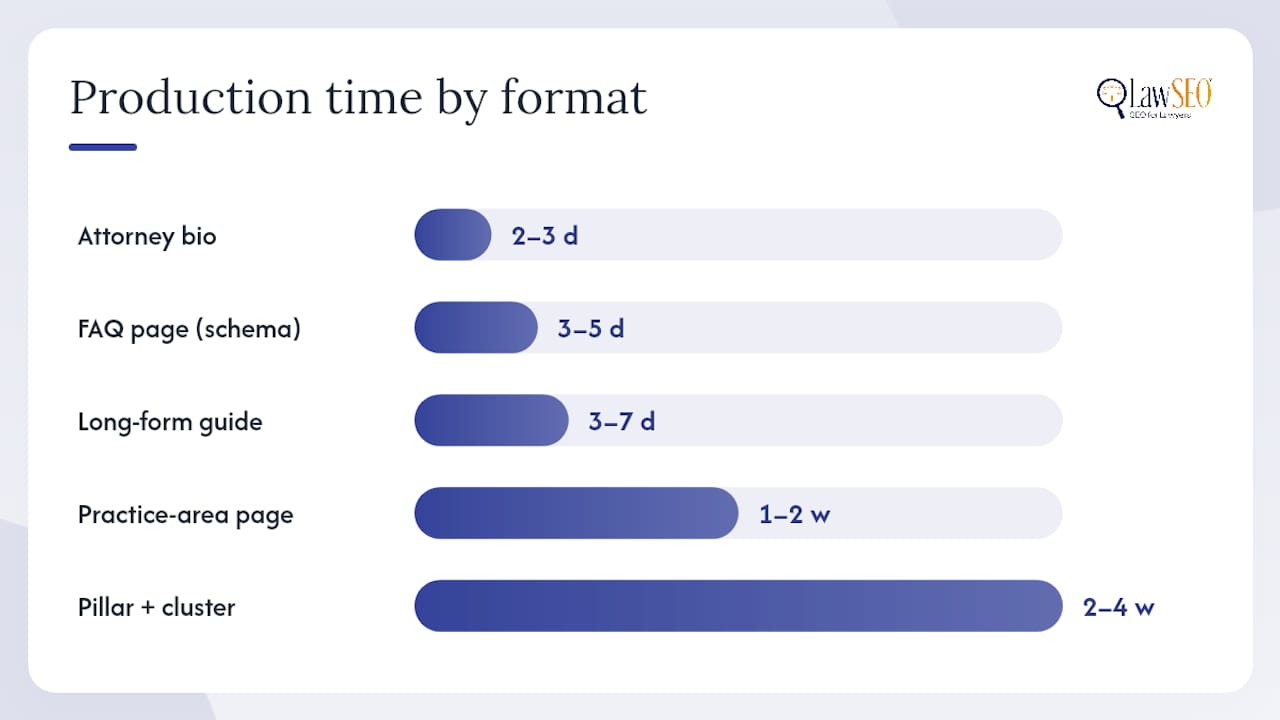
Here’s how the formats stack up on time and cost:
| Format | Typical Length/Runtime | Production Time | Primary Funnel Stage |
|---|---|---|---|
| Practice-area page | detailed word count appropriate for depth | 1–2 weeks with review | Hire-now |
| FAQ page (schema) | multiple question-answer pairs with concise answers | 3–5 days | Consideration |
| Pillar page + cluster | hub and subpages with sufficient depth | 2–4 weeks | Awareness to consideration |
| Case study/result page | moderately detailed | 1–2 weeks (consent + review) | Decision |
| Attorney bio | informative length | 2–3 days | Trust reinforcement |
| Long-form guide/blog | enough to cover topic | 3–7 days | Awareness |
| Video/podcast episode | suitable runtime | 1–3 weeks (script, shoot, edit) | Trust and awareness |
| Downloadable guide | substantial content | 2–3 weeks | Lead capture |
| Snippet/short Q&A page | brief focused content | 1–2 days | AI/voice capture |
SEO and AI Optimization Tactics for Every Format
Every legal document type built for search has one job before it has any other: answer the question in the first sentence readers or machines will see. That single habit does more for AI citation than any technical trick you can add afterward.
For FAQ pages, write the question the way a client would actually say it out loud, not in legal shorthand. Answer it in the first sentence, keep the full answer under 90 words, and attach FAQPage schema. This structure is exactly what Google’s structured data guidance recommends for content meant to surface in rich results and generative answers.
For practice-area pages, structure your H1 around the practice area and location, then use H2 question headings (“What does a workers’ compensation claim cost in [state]?”) that mirror real search queries. Local signals, your office address, service area language, and links to your Google Business Profile, reinforce relevance for “near me” searches.
For long-form guides, internal links back to your pillar and practice-area pages spread authority through the cluster instead of trapping it on one orphaned post.
For case studies, present facts in a structured, scannable format: case type, jurisdiction, outcome, and a plain-language disclaimer. Structured facts are easier for both readers and AI systems to parse and cite accurately.
For video, always publish a full transcript alongside the embed. It becomes on-page text that ranks independently of the video player.
For downloadable guides, decide deliberately between gated and ungated. Gating captures a lead but sacrifices the SEO value of having that content indexable; ungating trades lead capture for reach and citation potential.
- Lead every answer block with a single-sentence direct response
- Use conversational, question-phrased H2 headings
- Add FAQPage, Article, VideoObject, or Person schema depending on the format
- Link every subpage back to its pillar page
- Publish transcripts for all video and podcast content
Pro Tip: Format your FAQ answers as question, then a one-sentence direct answer, then one or two short supporting sentences. Generative engines excerpt that exact shape because it’s the cleanest unit of meaning they can lift and cite without editing.
Building an Editorial Workflow That Keeps Content Compliant
Speed and accuracy don’t have to trade off against each other if the workflow has clear gates. The sequence that works for most firms:
- Brief. The marketing lead or content owner defines the format, target keyword, funnel stage, and required legal citations.
- Draft. A writer, in-house or outsourced, produces the piece against the brief, flagging any legal claims that need attorney verification.
- Attorney review. The lead reviewing attorney checks accuracy, jurisdiction-specific citations, and anything that could misstate the law or outcomes.
- Compliance check. Someone confirms the piece meets state bar advertising rules, particularly disclaimers on case results and any “no guarantee of outcome” language.
- Publish with schema. The content owner adds structured data and pushes live.
Set review SLAs up front. A 48 to 72 hour attorney review window keeps the pipeline moving without turning your busiest partner into a bottleneck.
Case results deserve extra care. Most state bars require a disclaimer that past results don’t guarantee future outcomes, and many require anonymizing client identities unless you have documented consent to name them. Build a standard consent form and disclaimer language once, then reuse it every time, rather than reinventing the ethics review for each new case study.
Pro Tip: Keep a one-page “compliance cheat sheet” per state bar you practice in. It saves your reviewing attorney from re-researching advertising rules every single time a new case study crosses their desk.
Where to Publish Each Format and What to Measure
Distribution should match the format’s job. Practice-area pages and FAQ content live on your primary site, ideally within the relevant practice-area section. Video belongs on YouTube and is embedded on-site; podcasts distribute through Apple Podcasts, Spotify, and an on-site archive page. Downloadable guides need a dedicated landing page with a short, low-friction form.
| Format | Primary Channel | Key Metric |
|---|---|---|
| Practice-area page | Firm website | Contact form submissions, phone calls |
| FAQ page | Firm website, Google Business Profile Q&A | Featured snippet appearances, time on page |
| Case study | Firm website, referral pages | Time to contact, lead quality |
| Video | YouTube, embedded on-site | View-through rate, engagement |
| Podcast | Podcast platforms, on-site archive | Downloads, subscriber growth |
| Downloadable guide | Dedicated landing page | Form completions, email opt-ins |
One asset should never stay one asset. Repurposing a single substantive piece into three to five secondary assets, social posts, video clips, FAQ entries, GBP Q&A responses, multiplies its reach without multiplying production cost.
- Turn a long-form guide into 3 social posts and 2 FAQ entries
- Turn a video transcript into an on-page FAQ block
- Turn a case study into a GBP Q&A answer and a testimonial excerpt
Pro Tip: Run short A/B tests on meta descriptions, FAQ answer phrasing, and CTA button copy. Legal search traffic is local and intent-heavy, so small wording changes often move conversion rates faster than a full content rewrite would.
Templates That Cut Production Time in Half
A blog post outline template should force answer-first structure: open with a one-sentence direct response to the implied search query, follow with H2 question headings, and close with an FAQ block written in schema-ready Q&A pairs.
A minimal FAQ schema snippet doesn’t need to be code-heavy to understand. Structurally, it pairs each question with its answer text and marks the whole block as an FAQPage type, so search engines and AI crawlers can read question and answer as a matched unit rather than guessing at page structure.
A case-study one-pager should capture: case type, jurisdiction, key facts (anonymized unless consent is on file), outcome, and a disclaimer stating that results don’t guarantee similar outcomes in future cases.
For Article, FAQPage, and Person schema, the purpose in plain terms: Article schema tells search engines this is a piece of journalism or analysis with an author and publish date; FAQPage schema flags a question-answer block for potential rich-result display; Person schema attaches verifiable credentials, bar admissions, and case history to an attorney’s name.
| Template | Core Fields | Primary Use |
|---|---|---|
| Blog outline | Direct answer, H2 questions, FAQ block | Awareness content |
| FAQ schema | Question text, answer text, page URL | Snippet and AI capture |
| Case-study one-pager | Case type, jurisdiction, outcome, disclaimer | Trust building |
| Attorney bio | Admissions, education, case history, Person schema | Credibility signal |
How to Prioritize Formats with a Limited Content Budget
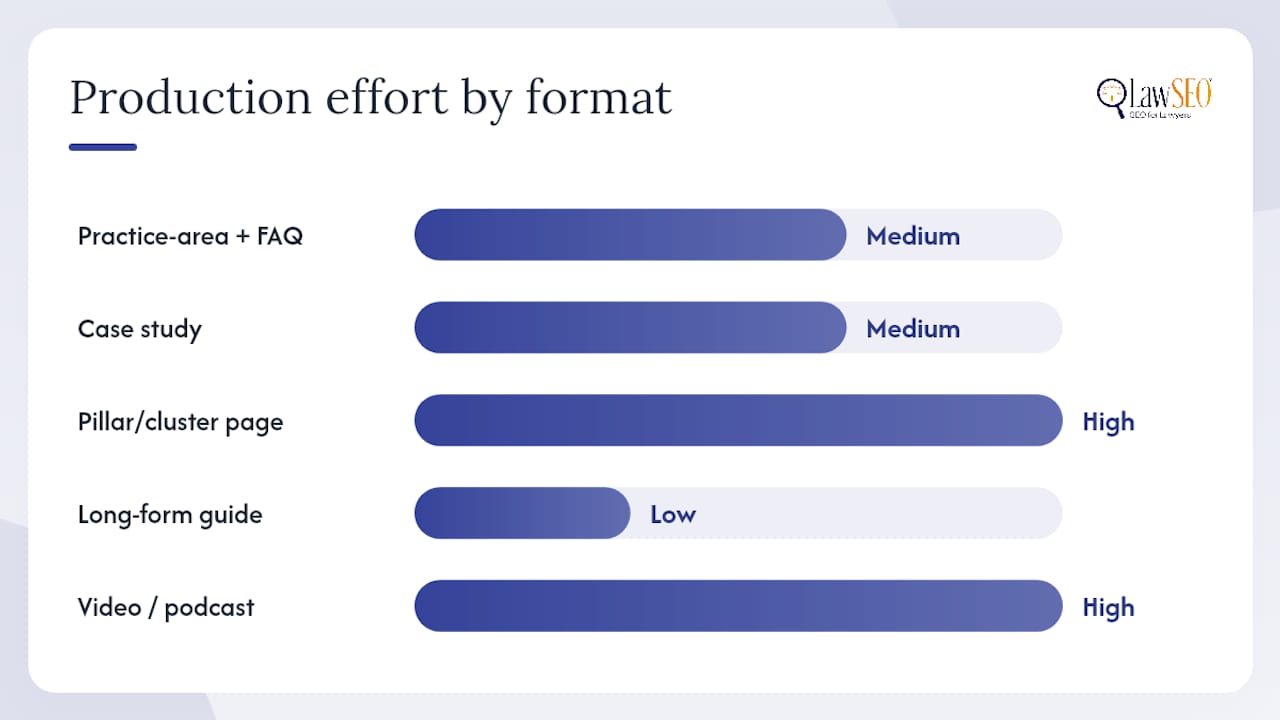
Score every format candidate on three axes: conversion impact (high, medium, low), production effort (high, medium, low), and speed to publish (days versus weeks). A format that’s high impact and low effort should always jump the queue ahead of one that’s medium impact and high effort, no matter how appealing the medium-impact idea sounds in a planning meeting.
- Start with practice-area pages plus FAQ schema, since they combine the highest conversion impact with moderate effort.
- Add anonymized case studies next, since trust content compounds once the conversion foundation is in place.
- Layer in targeted long-form guides that feed your pillar pages and widen top-of-funnel reach.
- Add multimedia, video and podcast, once your written foundation is stable, since these carry the highest production effort.
| Format | Conversion Impact | Production Effort | Speed to Publish |
|---|---|---|---|
| Practice-area page + FAQ schema | High | Medium | 1–2 weeks |
| Case study | High | Medium | 1–2 weeks |
| Pillar/cluster page | Medium | High | 2–4 weeks |
| Long-form guide | Medium | Low | Days |
| Video/podcast | Medium | High | 2–3 weeks |
Firm size and practice area change the calculus. A high-volume personal injury practice benefits from a dozen tightly scoped FAQ pages answering common claim questions, since search volume is high and questions repeat across many prospective clients. A boutique IP litigation firm gets more mileage from two or three deeply researched long-form guides, since its prospects search less often but with far more specific intent.
Making Legal Content Accessible to Every Reader
Accessibility isn’t optional for client-facing legal content, and it’s increasingly a legal exposure issue in its own right under the Americans with Disabilities Act. Firms that publish inaccessible content risk the same kind of complaint they’d advise a business client to avoid.
Every video needs closed captions, not just for compliance, but because captions double as searchable text that search engines can index. Every downloadable guide needs a text-based HTML version alongside the PDF, since PDFs are often difficult for screen readers to parse correctly. Color contrast on FAQ pages and practice-area pages should meet WCAG 2.1 AA standards, particularly for call-to-action buttons that carry the entire conversion weight of the page. Alt text on any infographic should describe the actual data conveyed, not just label the image generically.
Podcasts need transcripts for the same dual reason as video: accessibility for hearing-impaired visitors and a fully indexable text asset for search. Skipping this step means losing both an audience and a ranking opportunity in the same decision.
The Rise of Podcasts, Video, and Other Emerging Legal Formats
Short-form video and podcast content have moved from experimental to expected. A five-minute attorney explainer answering “what happens at a deposition” builds trust faster than a page of text, because a prospective client gets to see and hear the person who might represent them before ever picking up the phone.
The tactic that makes these formats worth the investment is repurposing, not the original recording itself. Transcribing video and podcast content into on-page text and short, snippet-ready Q&As lets a single recording capture both YouTube search traffic and traditional organic search traffic, instead of one or the other.
Interactive formats are gaining ground too: short quizzes (“do I have a case?”) and simple eligibility calculators give visitors an immediate, personalized answer, which keeps them on-page longer and produces a natural lead-capture moment. None of these formats replace the practice-area page. They extend its reach into channels text alone can’t touch.
Why LawSEO Prioritizes These Formats First
Nearly three decades of watching search algorithms change, and one pattern has held steady: content that answers a real question in plain language outperforms content written to please an algorithm. That’s why practice-area pages and schema-marked FAQs sit at the top of every content roadmap we build for clients. They answer the questions a prospective client is actually asking, in the order they’re asking them.
The shift toward AI-driven search hasn’t changed that principle, it’s sharpened it. Generative answer engines reward the same clarity and structure that has always worked for human readers, which is why attorney review and clean schema implementation sit at the center of how we build content programs, not as an afterthought bolted on before publishing.
What we see across client programs is consistent: firms that publish comprehensive, attorney-reviewed practice-area content with structured FAQs build cluster authority faster than firms chasing blog volume without a foundation underneath it.
Get Help Executing Your Legal Content Program
Building the formats above, correctly structured, schema-enabled, and attorney-reviewed, takes real production capacity most firms don’t have sitting idle. Lawseo handles that execution end to end: content strategy, schema implementation, AI/answer-engine optimization, and a review workflow built specifically around bar compliance rather than generic marketing sign-off. Every campaign is personally reviewed by founder Todd R. Stager, who brings 29 years of SEO experience to a niche where getting the legal ethics wrong is far costlier than getting the marketing wrong.
If you want a content program built around the formats that actually convert, start with a strategy consultation to see how these formats fit your practice area, your market, and your existing content gaps.
Further Resources for Building Your Content Program
Deepening your content strategy means pairing the format guidance above with sources built specifically for legal marketing and structured data.
- Law Firm Content Marketing: What Works in 2026 covers practice-area page benchmarks in more depth.
- Content Strategy for Law Firm SEO breaks down FAQ and schema tactics further.
- Google’s structured data guidance is the primary reference for implementing schema correctly.
- 6 Essential Examples of Law Firm Content for Growth shows real-world applications of the formats covered here.
- 7 Essential Content Marketing Tips for Lawyers offers additional workflow and governance guidance.
Whatever templates or examples you pull from these resources, run every claim through attorney review and check it against your state bar’s advertising rules before publishing. External guides can shape your structure, but only your reviewing attorney can confirm it’s compliant for your jurisdiction.
Sources
- Law Firm Content Marketing: What Works in 2026 | Legal Practice Marketing
- Google Developers — Structured data / search guidance
