


TL;DR:
- Technical SEO is essential because it ensures search engines can properly crawl, render, and index your website’s content, which directly impacts rankings. Common issues like misconfigured files, slow page speed, and conflicting signals waste crawl budget and hinder visibility. Regular audits and proper infrastructure lay the foundation for effective content marketing and higher search rankings.
Most website owners invest heavily in content and keywords, yet their pages still fail to rank. The reason is often technical. What is technical SEO? At its core, it is the practice of optimizing a website’s infrastructure so search engines can crawl, render, index, and interpret your content correctly. Without that foundation, even your best content sits invisible in the dark. This guide breaks down the technical SEO definition, explains how the crawl-to-index pipeline works, identifies the most common technical SEO issues, and gives you a practical path forward.
Key Takeaways
| Point | Details |
|---|---|
| Technical SEO is foundational | No amount of content or link building compensates for a site search engines cannot properly crawl and index. |
| Three files control access | Robots.txt, XML sitemaps, and canonical tags must be consistent or you risk blocking pages and wasting crawl budget. |
| The pipeline has three stages | Crawling, rendering, and indexing are sequential; failure at any stage prevents your content from ranking. |
| Common issues are fixable | Most technical SEO problems follow recognizable patterns and can be diagnosed with the right tools and a structured audit. |
| Ongoing maintenance is required | Technical SEO is not a one-time fix. Regular audits keep your site eligible as search engines and algorithms evolve. |
What technical SEO really encompasses
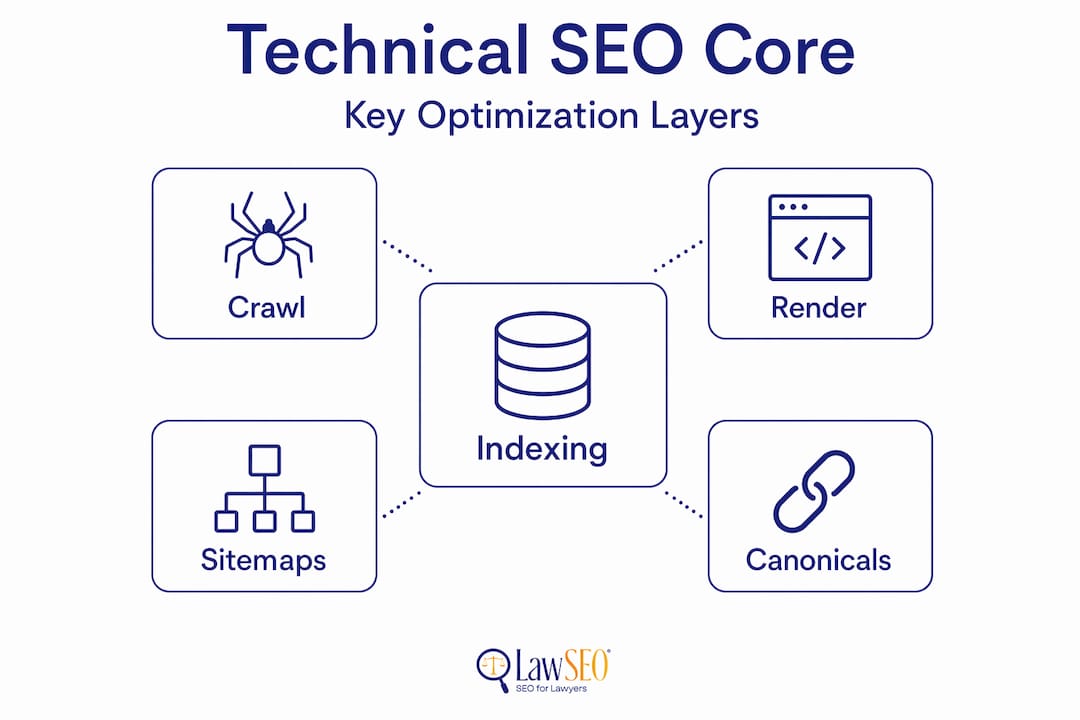
Technical SEO covers every aspect of your website’s infrastructure that affects how search engines discover, access, and understand your content. It is distinct from on-page SEO, which focuses on the words and structure of individual pages, and from off-page SEO, which covers external signals like backlinks. Technical SEO sits beneath both of those layers. It is the plumbing of your website.
The core components you need to understand are:
- Crawlability. Search engines send bots to discover your pages. If those bots hit walls, whether from misconfigured robots.txt files, broken internal links, or server errors, your content never enters consideration for ranking.
- Indexability. Crawling and indexing are not the same thing. A page can be crawled and still be excluded from the index due to noindex tags, canonical conflicts, or thin content signals.
- Site architecture. How you organize pages, categories, and internal links determines how efficiently crawl budget gets distributed across your site. A flat, logical structure keeps important pages close to the surface.
- HTTPS and server configuration. Google treats HTTPS as a ranking signal, and server-side errors like 5xx responses or slow time-to-first-byte directly affect how often and how deeply bots crawl your site.
- Page speed and mobile responsiveness. Core Web Vitals are now ranking factors. A page that loads in 4 seconds on mobile performs worse than a comparable page that loads in 1.5 seconds, both with users and with Google.
Understanding these components is step one. Knowing how they interact with each other is where the real leverage lies.
How search engines crawl, render, and index your content
The path from “new page published” to “ranking in search results” moves through three distinct stages. Most website owners treat this as a black box. It is not.
-
Crawling. Googlebot discovers your URL either through a sitemap, an internal link, or an external backlink. It sends an HTTP request to your server and fetches the HTML response. One detail that surprises many site owners: Googlebot fetches only the first 2MB of a resource. Anything beyond that threshold is ignored. If your page is bloated with inline scripts or unnecessary markup, critical content near the bottom may never be seen.
-
Rendering. After fetching the HTML, Google’s Web Rendering Service executes JavaScript to construct the full visual page. This step is resource-intensive, so Google often queues rendering for later. If your site relies heavily on JavaScript to display content, that content may not be indexed for days or weeks after publication. JavaScript-heavy sites must ensure critical content exists in the initial HTML response, not just after client-side execution.
-
Indexing. Even after successful crawling and rendering, indexing is not guaranteed. Google processes these stages sequentially, and indexing is an editorial decision based on perceived quality, duplication signals, and relevance. Pages with thin content, conflicting canonical tags, or noindex directives will be crawled, rendered, and then excluded from the index.
Understanding this pipeline reframes how you think about troubleshooting. When a page is not appearing in search results, you ask: Was it crawled? Was it rendered? Was it indexed? Each question points to a different diagnostic path.
Pro Tip: Use Google Search Console’s URL Inspection tool on any page that should rank but does not. The tool tells you whether Google has crawled it, whether rendering succeeded, and whether it is indexed. That three-part output maps directly to the crawl-render-index pipeline.
Robots.txt, sitemaps, and canonicals: where mistakes happen
Three files govern most of your technical SEO controls. They are also the three files that founders and site owners most consistently get wrong. Understanding each one individually is not enough. You need them to work together without contradiction.
| File | Primary function | Most common mistake |
|---|---|---|
| Robots.txt | Instructs bots which URLs to crawl or skip | Blocking entire directories or the whole site during development and forgetting to revert |
| XML sitemap | Lists the URLs you want Google to prioritize for crawling | Including noindexed, redirected, or low-quality URLs that signal poor site hygiene |
| Canonical tag | Declares the preferred version of a URL to prevent duplicate content | Self-referential canonicals conflicting with hreflang tags, or canonicals pointing to redirected pages |
The most damaging scenario occurs when these three files contradict each other. A URL blocked in robots.txt but listed in the sitemap sends a conflicting signal. A page with a canonical pointing to a different URL that itself carries a noindex tag effectively orphans both pages. Such errors waste crawl budget and reduce organic visibility across your entire domain.
Crawl budget waste is a specific problem worth naming. Google allocates a finite number of crawl requests to your site based on its authority and server responsiveness. If bots burn through that budget crawling low-value pages, thin parameterized URLs, or duplicate content, your important pages get crawled less frequently. For large sites, this directly delays how quickly new content ranks.
Pro Tip: Audit all three files together, not in isolation. Index hygiene requires that robots.txt, sitemap.xml, and canonical tags align. A URL should either be crawlable and indexed, or blocked at exactly one layer with the others in agreement.
How to improve your technical SEO: a practical checklist
Improving your technical SEO starts with a structured audit, not a shopping list of tools. The goal is to diagnose issues by mapping symptoms to crawl, render, or index stages. Once you know which stage is failing, the fix becomes obvious.
Here is a working technical SEO checklist organized by priority:
- Crawl access check. Confirm robots.txt is not blocking any page that should rank. Verify your XML sitemap is submitted in Google Search Console and contains only indexable, canonical URLs.
- HTTPS verification. Every page, including images, scripts, and stylesheets, should load over HTTPS. Mixed-content warnings degrade trust signals and can trigger browser security warnings that increase bounce rates.
- Core Web Vitals audit. Use Google’s PageSpeed Insights or Search Console’s Core Web Vitals report to identify pages failing Largest Contentful Paint, Cumulative Layout Shift, or Interaction to Next Paint thresholds.
- Mobile usability review. Google indexes the mobile version of your site first. Pages with text too small to read, clickable elements too close together, or content wider than the screen fail mobile-first indexing criteria.
- Crawl error monitoring. Check for 404 errors on pages with inbound links, soft 404s where the server returns a 200 status on an empty or error page, and 5xx server errors that interrupt crawling entirely.
- Duplicate content scan. Identify pages with identical or near-identical content and consolidate them using canonical tags, 301 redirects, or noindex directives as appropriate.
- Schema markup implementation. Structured data helps search engines understand your content and qualify it for rich results. For law firm sites, structuring your website correctly and adding schema for attorneys, local businesses, and FAQs directly improves visibility.
Technical SEO health directly determines how quickly new pages get discovered and ranked. Fixing these issues is not glamorous work, but it is the work that makes everything else you do in SEO actually pay off.
Pro Tip: Prioritize fixes by impact, not by complexity. A misconfigured robots.txt file that blocks your practice area pages costs you more traffic than a dozen missing meta descriptions. Fix pipeline-breaking issues first, then move to refinements.
My perspective on what most sites get wrong
I have been doing SEO for over 29 years. I’ve worked with hundreds of law firms, and the pattern I see most often is the same: firms spend real money on content and advertising, but their technical foundation is quietly undermining everything.
What surprises me most is not that people skip technical SEO. It’s that they don’t realize they’ve skipped it. They assume that because their site loads and looks fine in a browser, it must be fine for Google. Those are completely different questions. A browser will render your page even if Googlebot cannot. A page can look perfect to a visitor and be invisible to search engines at the same time.
The single most underestimated issue I encounter is the crawl-render-index pipeline. When a client tells me their content is not ranking, the conversation almost always reveals that their pages are technically broken before we even get to content quality. I’ve seen pages that Google has never indexed, not because the content was poor, but because a developer accidentally left a noindex tag from a staging environment.
My honest advice: treat technical SEO as the non-negotiable baseline. You would not build a legal argument on a flawed foundation. Do not build your search visibility on one either. Get the infrastructure right, then invest in content. The sequence matters enormously.
— Todd
Law firm SEO starts with a solid technical foundation
For attorneys and law firms competing in today’s search results, technical SEO for lawyers is not optional. It is the layer that determines whether your content ever has a chance to rank. If Googlebot cannot access your practice area pages, your content investment produces nothing. If your site fails Core Web Vitals on mobile, potential clients bounce before they ever see your credentials.
Lawseo offers specialized legal SEO services designed specifically for law firms, where every campaign is reviewed personally by Todd R. Stager. From technical audits to full-site optimization and ongoing monitoring, the work is built around the competitive realities of legal search. If you want to know exactly where your site stands technically, and what it would take to fix it, reach out to Lawseo for a focused evaluation.
FAQ
What is technical SEO in simple terms?
Technical SEO is the process of optimizing your website’s infrastructure so search engines can crawl, render, index, and understand your content. It covers areas like site speed, HTTPS, robots.txt configuration, and mobile responsiveness.
How is technical SEO different from on-page SEO?
On-page SEO focuses on the content and structure of individual pages, such as headings, keywords, and meta descriptions. Technical SEO addresses the underlying systems that control whether search engines can access and process those pages at all.
What are the most common technical SEO issues?
The most common issues include misconfigured robots.txt files that block important pages, XML sitemaps listing noindexed or redirected URLs, conflicting canonical tags, slow page speed, and pages that fail mobile-first indexing requirements.
Why does technical SEO matter for AI-driven search?
Even great content won’t appear in AI-generated answers if the underlying technical foundation is broken. AI search platforms pull from indexed, accessible content, so pages that cannot be crawled or indexed are excluded from consideration entirely.
What tools help with technical SEO audits?
Google Search Console is the most authoritative starting point, providing crawl data, index coverage reports, and Core Web Vitals metrics. Third-party crawl tools can identify broken links, duplicate content, and redirect chains across your entire site efficiently.
