

Refreshed and republished:

The best SEO tools for lawyers start with Google Search Console, Google Analytics 4 and Google Business Profile. Add a crawler, keyword suite or local rank tracker only when you can name the decision it will improve. This seven-tool shortlist pairs each option with a practical test, a limitation and a reason to hold off buying.
Choose SEO software for a task your team can perform; choose an agency when you really need people to do it.
Seven SEO tools by task
These are alternatives and complements, not a shopping list. In particular, Semrush and Ahrefs overlap. Select one for a defined research job before considering a second subscription. Tools support your law firm SEO strategy; they do not choose the right cases, verify legal advice or carry out every fix.
| Tool | Use it to answer | Cost model | Main limit |
|---|---|---|---|
| Google Search Console | Which pages and queries earn Google Search clicks? | Free | Clicks do not establish inquiries. |
| Google Analytics 4 | What measured actions happen on the site? | Free standard service; setup takes work | Events need configuration and testing. |
| Google Business Profile | How do people interact with a verified profile? | Free | A call-button click is not a completed call. |
| Screaming Frog SEO Spider | Which crawlable URLs have technical problems? | Free limited crawl; paid licence | Free limit: 500 URLs per crawl. |
| Semrush | Which keyword opportunities deserve inspection? | Paid plans; limits depend on selection | Research metrics do not establish case quality. |
| Ahrefs | Which competitor pages and referring links merit review? | Paid research plans | Third-party estimates are not your analytics. |
| BrightLocal Local Search Grid | How does Maps visibility vary around an office? | Paid service; check location and scan allowances | A grid observation is not traffic or a lead. |
1. Google Search Console: establish the search baseline
Use Search Console’s Performance report to inspect clicks, impressions, click-through rate and average position for your site. Start with a specific practice page and a consistent date range, then inspect the queries associated with it. Separate country and device when those differences matter.
Try this: pick one existing practice page and save its query report. Write down one useful action, such as clarifying a title that attracts the wrong intent. Google notes that search results vary by time, place, device and search history, so average position is not a fixed rank every potential client sees. Use this evidence alongside legal keyword research, not as proof that a page generated a signed case.
2. Google Analytics 4: validate the actions you measure
GA4 records events such as website interactions; important events can be designated as key events. For a law firm, the useful question is whether a visitor successfully contacted the firm, not merely whether a button was clicked.
Try this: send one non-sensitive test inquiry through your normal form and check the intended event in Realtime or DebugView. Verify that it records once on success and does not record success after a failed submission. Keep testing out of client intake reports. Your website analytics plan should document what each event means, its owner and its limits. A recorded form event still needs intake follow-through before anyone calls it a qualified inquiry. Neither a click report nor a successful test identifies the exact search phrase behind every real inquiry. Keep unknown attribution visible instead of filling it with an assumption.
3. Google Business Profile: measure profile interactions
For eligible firms with a verified profile, Business Profile performance provides interaction data from Search and Maps. One especially useful distinction: Google’s calls metric counts clicks on the call button. It does not confirm that a call connected, was answered or concerned a case your firm accepts. Performance data can also include activity from Google Ads.
Try this: review one office and one period, then compare the interaction trend with your intake team’s separately counted inquiries. Keep those measures separate. Use the local SEO playbook for the broader office strategy; do not label every profile interaction an organic lead.
4. Screaming Frog: investigate technical faults
Screaming Frog’s SEO Spider crawls websites and helps identify issues such as broken links, redirects and problematic page titles. Its free version crawls up to 500 URLs in a single crawl. That is a URL limit, not a promise that every page on a 500-page website will be covered. Advanced features, including JavaScript rendering, require a licence.
Try this: give the crawl to the person responsible for website changes. Ask them to identify one broken internal link, its source page and an appropriate repair. If the site depends on rendered JavaScript or needs a larger crawl, check the licence and configuration first. Treat findings as an SEO audit queue; a warning is not permission to remove pages or redirect them all to the homepage.
5. Semrush: investigate keyword and competitor gaps
Semrush’s keyword research tools support keyword discovery, competitor comparisons and organizing terms around content opportunities. They are a fit when someone on the team can turn that research into a prioritized page plan.
Try this: choose five phrases tied to a real practice area and service area. Inspect the actual results before accepting a tool’s suggestion. Record whether the results favor service pages, guides or directories, and whether your firm already has an appropriate page. Hold off if no one will inspect the results or implement the plan. Check the selected plan’s keyword, project, seat and reporting allowances; do not assume every advertised feature is included.
6. Ahrefs: inspect competing pages and link opportunities
Ahrefs Site Explorer provides research on pages, organic search visibility and backlinks. Use it when your missing decision concerns which competing page to study or which referring link deserves examination. Its estimates help frame a question; they are not a substitute for the other site’s private analytics.
Try this: inspect three relevant referring pages and record why each link makes sense in context. A local association resource and a scraped directory deserve different treatment even if both appear in a report. Do not buy links simply to raise a tool’s score. Assign a person to evaluate relevance and legitimacy using your ethical SEO review process.
7. BrightLocal: compare local visibility across a grid
BrightLocal Local Search Grid checks local search positions from geographic points around a location. It is useful when an office looks visible near its address but weaker farther away. Google says local results depend on relevance, distance and prominence; one search from the office cannot describe the whole service area.
Try this: save the query, business, grid center, spacing, date and scan settings. Keep them consistent for the comparison. A changed grid can produce a changed picture without a comparable change in visibility. Review available locations, scan frequency and credits before scheduling checks. A tool cannot remove distance as a factor or justify a fictitious office.
Separate visibility, actions and outcomes
A useful report answers three different questions. Keep the source and limitation beside every number. The diagram and table below form our decision framework; they are not a measured client funnel.
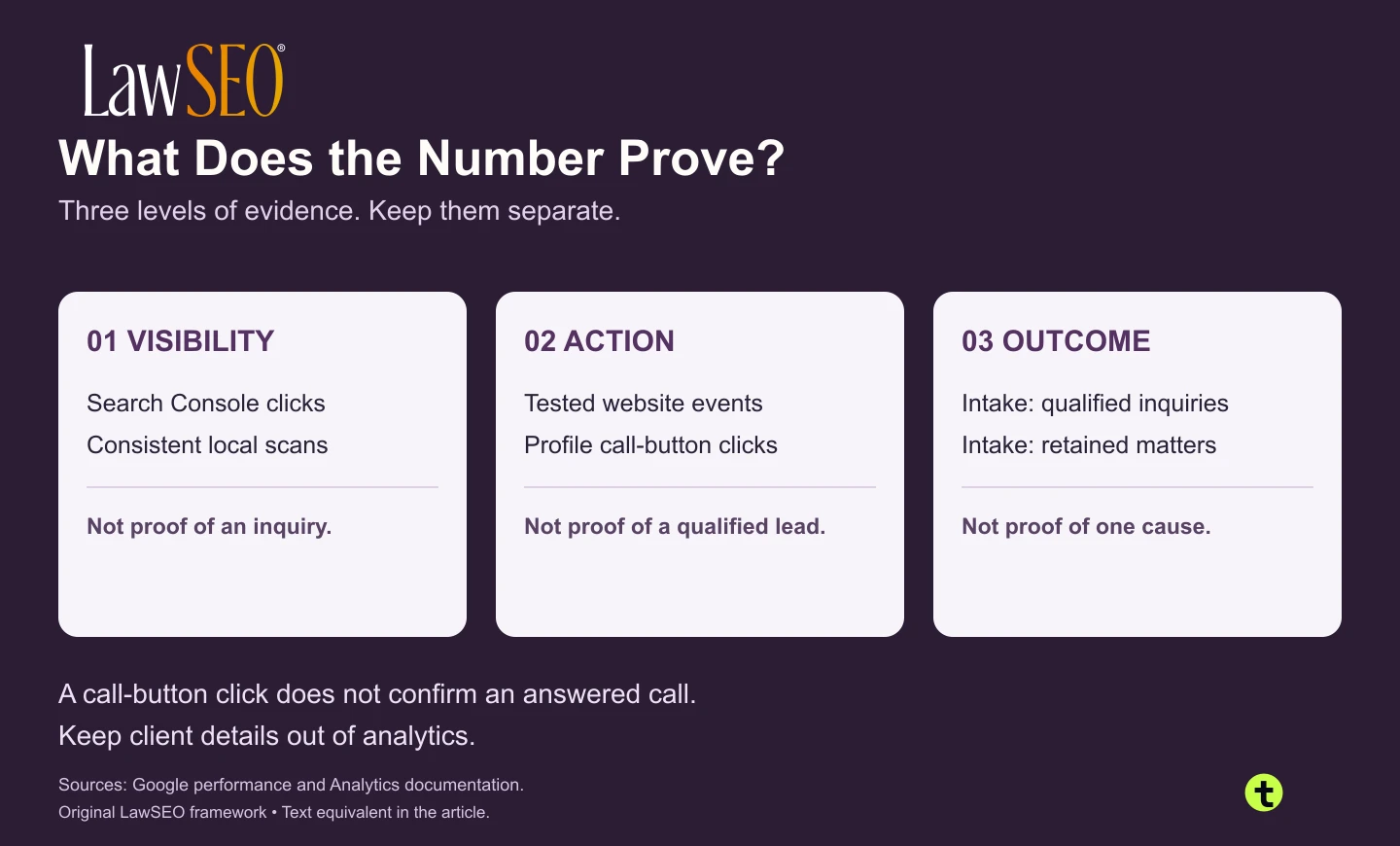
| Level | Evidence to retain | What it does not establish |
|---|---|---|
| Visibility | Dated Search Console reports and consistently configured local scans | That a particular person contacted the firm |
| Action | Tested success events; separately labeled profile call-button clicks | That every event is a unique, qualified inquiry |
| Outcome | Intake totals under a documented definition of qualified inquiry and retained matter | That a single tool or page caused every outcome |
Google prohibits sending personally identifiable information to Analytics. Its PII prevention guidance includes checking URLs and parameters. Keep names, emails, phone numbers and form narratives out of analytics payloads. Have the firm’s responsible reviewer assess the actual tracking and consent configuration. A vendor’s “compliant” label is not your review.

Five tests before you subscribe
Compare software and the people needed to use it with our free SEO workflow comparison with todds.ai. Enter your current setup beside a proposed todds.ai setup, including retained subscriptions, outside services and staff hours. The product-team worksheet labels verified capabilities, assisted steps and unfinished development; it uses your figures rather than promising savings. Print or save your comparison before leaving, because the page does not retain your answers.
- Name one decision. “Choose the next practice page to improve” is specific. “Get more SEO” is not. Name the person who will use the result.
- Request one real output. Use an authorized demo, trial or existing account to obtain the report you need. Save its period, filters, limits and source. Do not evaluate a dashboard from its promotional screenshot alone.
- Check one failure case. Can a failed form look successful? Can a crawl stop before important URLs? Can a changed grid masquerade as improvement? Document the correction or mark the test incomplete.
- Assign the action. A developer fixes a technical fault; an editor improves a page; intake classifies an inquiry. Put an owner and review date beside the output.
- Decide whether to keep it. At the review date, retain a paid tool only if it supplies a needed, usable decision that your existing tools do not already cover. Low traffic may require a longer measurement period, not an invented positive result.
Check recurring cost and account ownership
A starting price is not the full operating cost. Ask for the base plan, extra seats, office charges, intended usage, add-ons, setup work and billing term in one quote. Record a cancellation date and test whether you can export the report you actually need.
Illustrative arithmetic, not vendor pricing: software at 300 USD per month plus 24 staff hours at 50 USD per hour totals 1,500 USD. A hypothetical alternative with 320 USD in software and usage plus 14 staff hours totals 1,020 USD. Its combined cost is 480 USD lower, while its software bill is 20 USD higher. The worksheet separates cash expenses, staff-time value, billing periods and one-time setup. These are assumptions to test, not measured savings or a todds.ai quote.
Keep the firm in control of its Google accounts and require named, revocable access for outside providers. Before cancelling, confirm which exports, historical reports and configuration records the firm can retain. A low subscription price can still be poor value if nobody has the access or time to use its output.
Worked example: inquiries are unclear
Illustrative scenario, not a LawSEO client result: a small firm already has Search Console and a Business Profile. Its report shows search clicks and profile call-button clicks, but the owner cannot tell how many suitable inquiries reached intake.
Buying a keyword suite first would leave that question unanswered. Start by defining a qualified inquiry with intake. Verify the form-success event and establish a separate count of received inquiries. Investigate duplicates, spam and unanswered calls without placing private case details in Analytics. Compare the same period, keeping clicks, events and intake outcomes in distinct columns.
The first deliverable is a measurement specification and one verified test, not a ranking chart. Once that works, decide whether technical, keyword or local research is the next gap. Our guide to analytics for law firm websites provides the broader planning context.
SEO tool questions for law firms
Can a small firm start with free tools?
Yes. The three Google services cover different baseline questions, and Screaming Frog provides a limited free crawl. Someone still needs to configure measurement, interpret reports and carry out changes. Free software does not mean the work has no cost.
Should we subscribe to both Ahrefs and Semrush?
Start with the one that produces the output your team needs. Their research functions overlap. A second subscription needs a separate use case and budget justification; it should not be the default recommendation for every firm.
Does an SEO tool replace a marketing agency?
Software provides data and functions. A service provider supplies agreed work and responsibility. If the firm lacks someone to research, edit, implement and review, compare service scope as well as software features. Specify account ownership and the deliverables you can retain.
Will these tools guarantee rankings or AI citations?
No. Use them to investigate and improve specific work. An AI visibility score, content grade or estimated traffic figure does not establish indexing, citation, a qualified inquiry or a signed case. Check material recommendations against primary evidence and the finished page.
