


Apple Maps does not host written lawyer reviews. It aggregates ratings from third-party platforms, commonly Yelp, and displays them on your firm’s place card through Apple Business Connect. The verdict is simple: claim and verify your listing at Apple Business Connect, find out which outside platform actually feeds your Apple Maps rating, and put your review effort there first.
TL;DR:
- Most Apple Maps ratings for law firms come from Yelp, and improving your Yelp profile directly influences what Apple displays within days.
- Claiming and verifying your Apple Business Connect listing is quick and crucial; prioritize domain verification for more reliable, unmerged entries.
- Regularly audit your Apple Maps listing weekly for new reviews and monthly for data accuracy, focusing on source platform updates to maximize visibility.
- Ethically requesting reviews involves neutral, non-case-specific follow-ups without offering incentives, timed after case closure to avoid appearance of pressure.
- Removing negative reviews requires flagging the source content first, and false claims must be documented and escalated legally only if necessary.
How Apple Maps Reviews Work for Lawyers
Apple built Maps as an aggregator, not a review host. Instead of collecting written reviews the way Google does, Apple pulls ratings from partner platforms and links out to the source. On most law firm listings, that means Apple shows a percentage rating and a thumbs up or thumbs down summary, then routes anyone who taps for detail to the originating site.
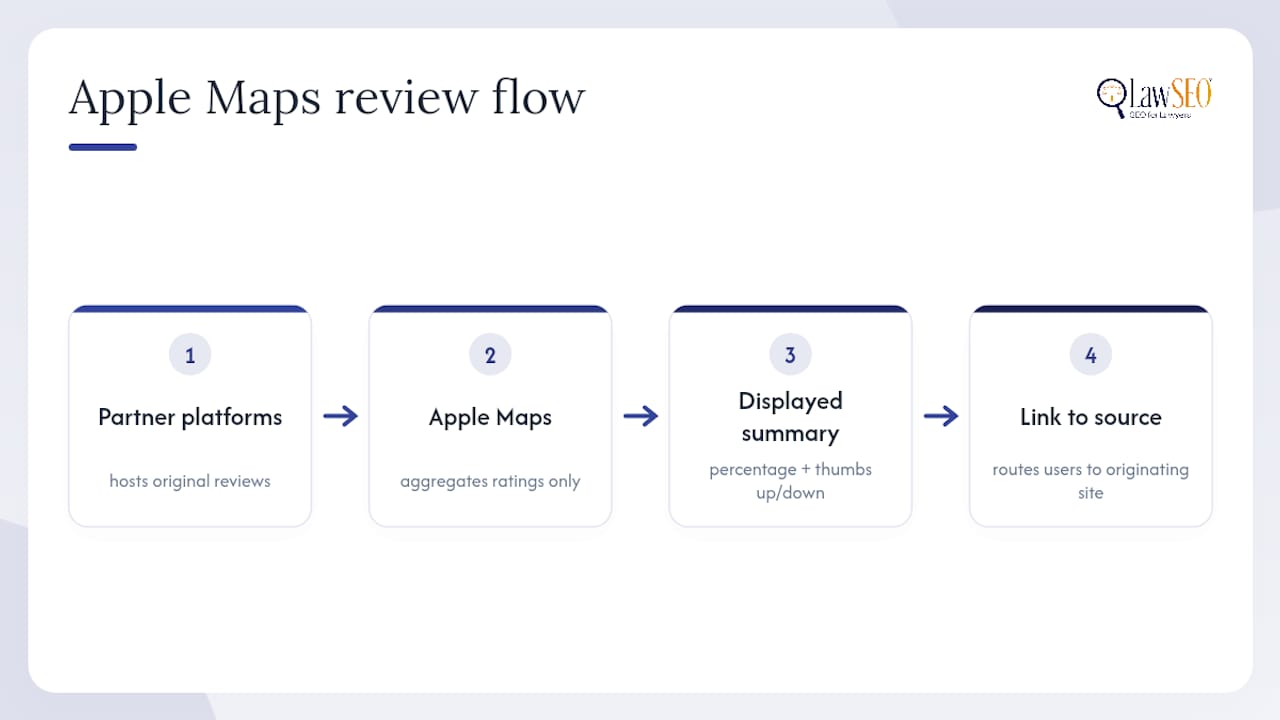
This matters practically. A firm cannot “write a review directly on Apple Maps” in the way it can on Google. Improving what Apple shows means improving the profile on whichever platform is actually supplying the data. Apple has signaled where this is heading: in May 2025 it began surfacing ratings and insights from curated expert sources like The MICHELIN Guide and The Infatuation for categories such as restaurants. Legal services are not part of that curated rollout yet, but the direction tells you Apple is investing more, not less, in how it displays third-party trust signals.
How Do You Claim an Apple Business Connect Listing?
Claiming your firm’s card is faster than most managing partners assume, and most law firms haven’t done it. Here is the sequence:
- Go to businessconnect.apple.com and sign in with an Apple Account.
- Search for your firm by name and address to locate the existing (often auto-generated) card.
- Choose a verification method. Apple typically offers domain verification, phone verification, or a postcard.
- Once verified, complete the priority fields: exact legal business name (and any “doing business as” variants), primary practice category, hours, phone number, website, address, and at least one action button.
- Publish the changes and check the live card on both iPhone Maps and Siri search results.
Domain verification is worth prioritizing over phone verification when your firm controls its website DNS. A domain-verified listing is less likely to get auto-merged with a duplicate or overwritten by a stale data feed, which is a common problem for firms with multiple office locations or a recent rebrand.
Pro Tip: If verification stalls for more than a few business days, resubmit with a scanned bar license or utility bill matching the exact address on file. Apple’s review queue moves faster with unambiguous documentation.
Which Review Sites Actually Feed Your Apple Maps Rating?
You can check this yourself in under a minute. Open your firm’s card in Apple Maps on an iPhone or Mac, tap the star rating or review count, and Apple will show you the source site and route you there. That single tap tells you exactly where to focus review generation instead of guessing.
In the United States, three platforms dominate the feed for professional services listings:
- Yelp is the most common source for law firm ratings on Apple Maps, and improving your Yelp profile often changes what Apple displays within days of the underlying rating shifting.
- TripAdvisor rarely applies to law firms but occasionally surfaces for firms with a hospitality or travel-adjacent practice area.
- Foursquare still powers background location data for some cards, even when it is not the visible rating source.
Industry guidance consistently points to the same audit step: identify the feeding platform before you spend a single hour on review generation. A firm that pours effort into Google reviews while Apple is pulling from Yelp is optimizing the wrong channel for that specific surface. Treat Google as your overall discovery engine, Yelp as the lever for Apple Maps specifically, and any niche directory as a secondary layer.
Can Lawyers Ethically Ask Clients for Reviews?
Yes, but the request has to be structured carefully. Bar rules on attorney advertising, client confidentiality, and solicitation vary by state, and a review request that reveals a client’s identity or the nature of their matter can create real exposure. The safest approach treats every request as passive and consent based, never transactional.
A few practices keep firms on solid ground:
- Send a neutral, non case specific follow up email inviting feedback, without referencing the outcome or the matter type.
- Use a client portal or post engagement survey with an optional review link, so the client initiates the public post.
- Never offer anything of value, including fee discounts, in exchange for a review, since several state bars treat that as compensated testimony.
- Document your firm’s review request policy so associates and staff follow a consistent, compliant script.
Pro Tip: Time the request to the closing of the matter, not the middle of active representation. A review requested mid-case can look like pressure, even when none was intended.
For firms building a broader testimonial strategy, attorney testimonial SEO and general ethical SEO practices for attorneys go deeper into state-by-state nuance than a single checklist can cover.
How Do You Remove a Bad Review From Apple Maps?
Because Apple links to the source rather than hosting the content itself, removal has to start at the source platform. The sequence looks like this:
- Confirm exactly which platform is feeding the review by tapping it on your Apple Maps card.
- File a removal or flagging request on that platform, using Yelp’s content-guideline reporting tool or TripAdvisor’s equivalent process.
- Wait for the platform to process the request. Reputation-management guidance recommends allowing 48 to 72 hours before re-checking, since Apple’s cache does not update instantly even after a source removes content.
- If the review still appears on your Apple Maps card after that window, use Apple’s built-in “Report a Problem” feature on the place card itself.
- If the review contains a demonstrably false factual claim, not just an unfavorable opinion, document everything and consult counsel about a defamation claim before escalating further.
Most disputes resolve at the platform level. Legal escalation should be reserved for cases involving verifiable falsehoods, not simply an unhappy client’s honest opinion.
What Listing Details Actually Improve Your Apple Maps Card?
A verified listing with weak content still underperforms. The fields that move the needle for a law firm are specific:
- Upload photos of the office exterior and interior, attorney headshots, and any visible credentials, since Apple’s Ratings & Photos Terms govern what gets moderated and how submitted images are retained.
- Use Showcases and action buttons deliberately. A “Call” button reduces friction for someone searching from their car after an accident; a “Website” button works better for research-stage prospects comparing firms.
- Select the most accurate primary category (Personal Injury Attorney versus general Lawyer, for example), since a mismatched category can bury you in irrelevant searches.
- Keep hours accurate, especially for firms offering after-hours consultations, and make sure your website’s schema markup matches the name, address, and phone number on your Apple card exactly.
Pro Tip: Mismatched NAP data (name, address, phone) between your website and your Apple listing is one of the most overlooked reasons a verified card still underperforms in search.
How Often Should You Audit Your Apple Maps Listing?
Reputation management on Apple Maps is not a one-time project. Set a recurring cadence instead of checking sporadically:
- Weekly: scan for new reviews on the platform feeding your Apple card, particularly Yelp.
- Monthly: audit claim status, linked review sources, rating averages, photo quality, hours accuracy, and NAP consistency across your website and listing.
- Quarterly: step back and reassess whether your action buttons, category selection, and Showcase content still match how your firm actually practices.
Yelp’s own notification settings, Apple Business Connect’s dashboard alerts, and third-party reputation-management platforms can automate the weekly layer so nothing slips. For a broader framework on ongoing reputation monitoring across platforms, this step-by-step reputation management guide covers workflows that translate well to a law firm’s monthly audit cycle.
Why This Guidance Holds Up
This playbook comes from Lawseo, a firm built exclusively around SEO for attorneys, led personally by founder Todd R. Stager, who has spent more than 29 years in search marketing and reviews strategy on every client account himself. That specialization matters here because Apple Maps optimization for a law firm looks different than it does for a restaurant or retail store, right down to which review platform actually feeds the listing.
A few reasons this guidance is built to be actionable, not theoretical:
- The recommendations map directly to services Lawseo delivers daily: local SEO, Business Connect claiming, and compliant reputation management for attorneys.
- The ethical framing reflects real bar-advertising constraints, not generic marketing advice repurposed for lawyers.
- Firms working through a local SEO case study can see how listing and review work translates into measurable visibility gains over time.
Where To Start This Week
If you take one thing from this, make it this: claim your Apple Business Connect listing before you do anything else. An unclaimed card is an open door for outdated hours, a wrong phone number, or a competitor’s listing outranking yours in Siri results.
Everything downstream, review generation, photo uploads, action buttons, compounds off that first step. A firm that fixes its Yelp profile while leaving its Apple card unclaimed is optimizing the wrong layer. Manage the source platforms and the Apple card together, and the gains show up on both.
— TODD
Get Your Apple Maps Listing Working for Your Firm
Lawseo is the alternative to hiring a generalist marketing agency for Apple Maps and reputation work. Instead of a contractor who treats your firm like any other local business, you get a team that works exclusively with law firms and understands why a bar-compliant review request looks nothing like a restaurant’s “leave us five stars” campaign. Lawseo’s SEO for Attorneys service includes Business Connect claiming, review-source audits, and ongoing monitoring built around the ethical constraints covered above, not generic reputation templates repurposed from other industries. If your firm’s Apple Maps card is unclaimed, showing a wrong category, or pulling a rating from a source you haven’t touched in years, visit the Lawseo services page and schedule a consult to get it fixed before the next prospective client checks Siri from their car.
Sources
- Apple newsroom — Apple brings insights, ratings and reviews from expert sources to Apple Maps
- Apple Business Connect
- BrightLocal — How to optimize Apple Maps listing
- Synup — Guide to Apple Maps reviews
These are the platform sources that actually determine what Apple Maps shows for your firm.
FAQ
Does Apple Maps Have Reviews?
Apple Maps does not host its own written reviews for most businesses, including law firms. It displays an aggregated rating pulled from a third-party platform, usually Yelp in the U.S., and links to that source for full reviews.
What Did Tim Cook Say About Apple Maps?
Apple’s public statements about Maps have focused on expanding data quality and adding curated content from expert sources like The MICHELIN Guide, rather than specific commentary on legal services listings.
What Is the 80/20 Rule for Lawyers?
In a marketing context, the principle generally refers to the idea that a small share of marketing channels or client sources drives most new business. Applied to Apple Maps, it means focusing effort on the one review platform actually feeding your listing rather than spreading review requests thin across every directory.
How Much Do Apple Lawyers Get Paid?
This question typically refers to attorneys employed directly by Apple as in-house counsel, which is unrelated to how outside law firms appear on Apple Maps. Public salary data for Apple’s internal legal team isn’t something this guide covers.
How Long Does It Take to Fully Optimize an Apple Business Connect Listing?
Claiming and verifying a listing usually takes a few days once documentation is submitted correctly. Full optimization, meaning accurate categories, complete photos, active Showcases, and a healthy review source, typically takes a few weeks of steady attention rather than a single sitting.
