


TL;DR:
- Mobile SEO for law firms involves optimizing websites for Google’s mobile-first indexing to improve visibility and user experience on smartphones and tablets. A technical audit focusing on Core Web Vitals, content parity, and site speed is essential before content optimization, with speed improvements primarily achieved through image compression and JavaScript deferment. Using responsive design, regular monitoring, and avoiding common mistakes like blocked resources or duplicate mobile URLs ensures better rankings and client engagement.
Mobile SEO for law firms is defined as the practice of optimizing your website to meet Google’s mobile-first indexing standards while delivering a fast, readable experience to users on smartphones and tablets. Google now uses the mobile version of your site as the primary basis for ranking decisions, which means a poorly optimized mobile presence directly suppresses your firm’s visibility in search results. Attorneys and legal marketers who understand how to boost mobile SEO gain a measurable competitive edge in markets where potential clients search for legal help on their phones before they ever pick up the phone to call. Tools like Google Search Console and PageSpeed Insights are the starting points for any serious mobile SEO effort, and this guide covers exactly how to use them.
How to boost mobile SEO: diagnosing core technical issues first
Mobile SEO optimization begins with a technical audit, not a content rewrite. Before you adjust a single title tag or publish a new practice area page, you need to know whether Google can fully crawl, render, and index your mobile site. Skipping this step means optimizing on top of a broken foundation.
Core Web Vitals are the three performance metrics Google uses to measure real-world page experience: Largest Contentful Paint (LCP), Interaction to Next Paint (INP), and Cumulative Layout Shift (CLS). For law firm websites, LCP is the most consequential metric because it measures how quickly your main content loads for a visitor. Core Web Vitals improvements appear in Google’s real-user Chrome data within a rolling 28-day window, so fixes you implement today will reflect in your rankings within a month.
The Google Search Console Core Web Vitals report segments performance by mobile and desktop separately. Pull the mobile report first and sort by “Poor” URLs. These are the pages actively losing ranking potential right now. The Chrome User Experience Report (CrUX) feeds this data, meaning it reflects actual user behavior on your site, not just a lab simulation.
Content parity is a second critical diagnostic area. Mobile-first indexing requires that your mobile pages contain the same titles, schema markup, internal links, and body content as your desktop pages. If your desktop site displays attorney bios, practice area descriptions, or structured data that your mobile site hides behind a collapsed tab or omits entirely, Google’s mobile crawler will not see it. That missing content directly harms your rankings.
- Run Google’s Mobile-Friendly Test on your homepage and top five practice area pages
- Use the URL Inspection tool in Google Search Console to render each page as Googlebot Mobile
- Check the Coverage report for any mobile-specific crawl errors
- Verify that no CSS or JavaScript files are blocked in your robots.txt, since blocked rendering resources weaken mobile SEO signals and rankings
- Compare your mobile and desktop page source to confirm content parity
Pro Tip: Export your Core Web Vitals mobile report from Google Search Console as a CSV and sort by page template type. Law firm sites typically share the same header, footer, and chat widget across all pages, so one fix to a shared component can resolve failures across dozens of URLs simultaneously.
How to optimize site speed for your law firm’s mobile pages
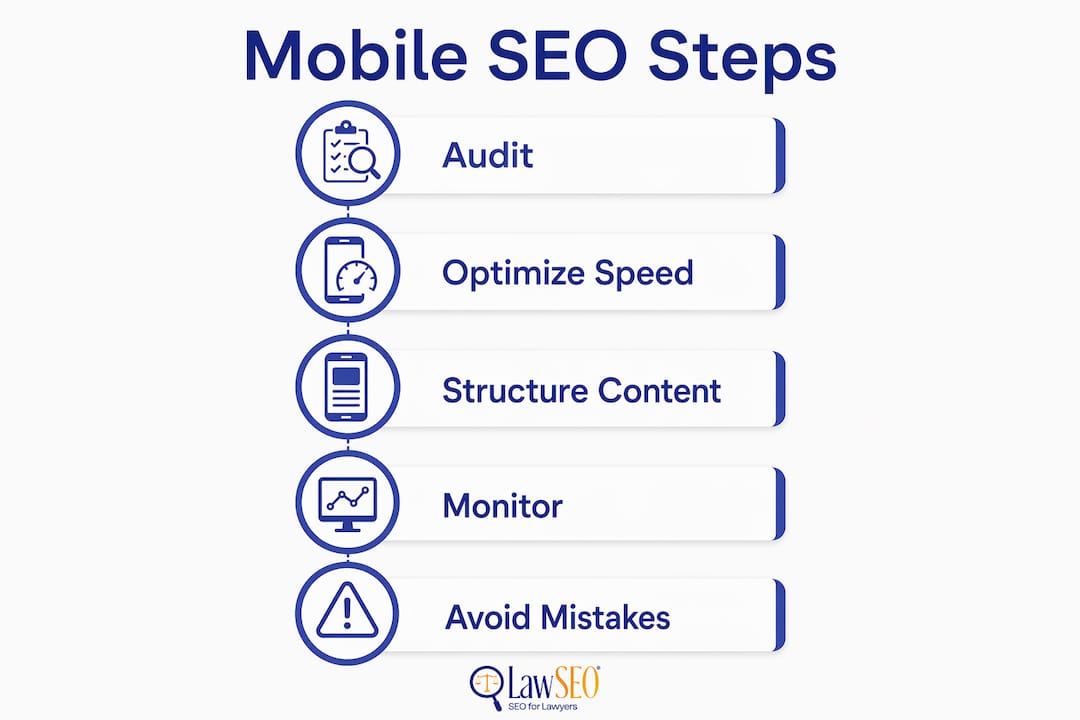
Site speed is the single most controllable variable in mobile SEO performance, and it separates law firms that rank from those that do not. A slow mobile site increases bounce rates, reduces time on page, and signals poor user experience to Google’s ranking systems. The good news is that most law firm speed problems trace back to a small set of fixable issues.
Follow this sequence to address the highest-impact improvements first:
-
Upgrade your hosting and add a CDN. Time to First Byte (TTFB) measures how quickly your server responds to a browser request. A TTFB above 800 milliseconds is a red flag. Move to a managed WordPress host like WP Engine or Kinsta, and serve static assets through a content delivery network like Cloudflare. Hosting critical rendering resources via CDN also improves Googlebot’s crawl efficiency, which benefits your overall mobile SEO.
-
Convert and compress all images. Images are the leading cause of slow LCP scores on law firm websites. Optimizing images with WebP format, responsive srcset attributes, and lazy-loading reduces image sizes by 25 to 35%, with direct improvements to LCP scores. Replace every JPEG and PNG in your media library with WebP equivalents. Add "loading=“lazy”` to all images below the fold.
-
Defer non-critical JavaScript. Legal websites frequently load live chat widgets, call tracking scripts, and review aggregators that block page rendering. Add the
deferattribute to any script that does not need to execute before the page displays. Breaking up long JavaScript tasks also improves your INP score, which measures how quickly your page responds to user interactions like clicking a contact form button. -
Optimize font delivery. Attorney websites often use custom brand fonts loaded from Google Fonts or Adobe Fonts. Add
font-display: swapto your CSS so text renders immediately in a fallback font while the custom font loads. This eliminates the invisible text flash that damages both CLS and perceived load speed. -
Audit and limit third-party scripts. Each third-party script adds a separate network request. Run a WebPageTest audit and identify every third-party domain your site calls. Remove scripts you do not actively use. For scripts you must keep, load them asynchronously.
Pro Tip: Law firm contact forms and intake widgets are common INP offenders. Test each form on a mid-range Android device using Chrome DevTools in throttled 4G mode. If the submit button takes more than 200 milliseconds to respond, the form’s JavaScript needs refactoring or replacement.
How to structure law firm content for better mobile search rankings
Content structure on mobile is not just a readability preference. It directly affects how Google interprets and ranks your pages. Legal content tends to be dense and formal, which works against mobile users who scan before they read. Reformatting that content for mobile improves both user engagement and search visibility.

Short paragraphs are the baseline requirement. On a smartphone screen, a five-sentence paragraph becomes a wall of text that users scroll past. Keep paragraphs to two or three sentences on pages targeting mobile traffic. Use H2 and H3 subheadings to break up long practice area pages so users can jump to the section most relevant to their situation.
Schema markup is a high-leverage tactic that most law firms underuse. Adding LegalService, Attorney, and LocalBusiness schema to your mobile pages gives Google structured signals about your practice areas, location, and credentials. A responsive, single-URL design that includes all schema on the mobile version is the correct implementation. Separate mobile subdomains (m.yourfirm.com) create schema duplication risks and require careful canonical tag management.
Voice search optimization matters more for legal queries than most attorneys realize. Mobile users frequently ask Google questions like “who is the best personal injury lawyer near me” or “what should I do after a car accident.” Targeting these long-tail, conversational queries in your FAQ sections and blog content captures mobile traffic that shorter keyword phrases miss.
- Write title tags under 60 characters so they display fully on mobile SERPs without truncation
- Keep meta descriptions under 155 characters and include a clear call to action
- Avoid intrusive interstitials and pop-ups that block main content on mobile, since Google applies a ranking penalty to pages that use them
- Confirm that hidden mobile content such as collapsed tabs or accordions containing key practice area text is still crawlable by Googlebot
What tools should you use to monitor mobile SEO performance?
Tracking mobile SEO performance requires a dedicated monitoring setup, not just a monthly glance at overall traffic. The data you collect determines which optimizations to prioritize next and whether your current changes are producing results.
| Tool | Primary use | What to track |
|---|---|---|
| Google Search Console | Mobile performance and page experience | Click-through rate, impressions, Core Web Vitals by URL |
| Google Analytics 4 | Traffic segmentation | Mobile vs. desktop sessions, bounce rate, conversion rate |
| Semrush Position Tracking | Keyword ranking by device | Mobile rank changes week over week |
| PageSpeed Insights | Page-level speed diagnostics | LCP, INP, CLS scores with field data |
| Screaming Frog | Technical crawl audits | Missing schema, blocked resources, redirect chains |
Monitoring mobile keyword rankings with a position tracking tool and comparing them against desktop rankings reveals gaps that aggregate traffic data hides. A practice area page ranking third on desktop but fifteenth on mobile signals a mobile-specific technical or content problem worth investigating. Set up weekly automated reports in Semrush or a comparable platform so you catch ranking drops before they translate into lost client inquiries.
Common mobile SEO mistakes law firms make
Most mobile SEO failures at law firms are not caused by ignorance of best practices. They result from decisions made during website builds that prioritize desktop aesthetics over mobile performance. Recognizing these patterns helps you fix existing problems and avoid repeating them.
- Neglecting mobile-first indexing requirements. Missing content on mobile that exists on desktop harms rankings because Google’s mobile crawler sets the baseline for what it indexes. Desktop content cannot compensate.
- Using separate mobile URLs without proper tags. If your site runs on m.yourfirm.com, every page needs a canonical tag pointing to the preferred URL and a rel=“alternate” tag on the desktop version. Missing these tags creates duplicate content issues.
- Ignoring Core Web Vitals failures. Core Web Vitals act as tiebreakers when content quality is similar between competing pages. In a competitive legal market, that tiebreaker determines who gets the click.
- Blocking CSS or JavaScript in robots.txt. This is one of the most damaging and most common technical errors on law firm websites. If Googlebot cannot render your page, it cannot evaluate your content.
- Overloading pages with uncompressed images and unaudited scripts. A law firm homepage with a full-screen video background, three chat widgets, and a cookie consent manager will fail Core Web Vitals on mobile regardless of how well the content is written.
Pro Tip: After any website redesign, run a full mobile crawl with Screaming Frog set to a mobile user agent before the new site goes live. Catching blocked resources, missing schema, and content parity failures before launch costs far less than recovering lost rankings afterward.
Key takeaways
Mobile SEO for law firms requires a technical foundation built on Core Web Vitals compliance, content parity, and fast page delivery before any content or metadata optimization will produce lasting ranking gains.
| Point | Details |
|---|---|
| Technical audit comes first | Diagnose Core Web Vitals, crawl errors, and content parity before optimizing content. |
| Image optimization drives speed | WebP format and lazy-loading reduce image sizes by 25 to 35%, improving LCP directly. |
| Schema must appear on mobile | Include LegalService and Attorney schema on mobile pages, not just desktop versions. |
| Monitor by device separately | Track mobile keyword rankings independently from desktop to catch device-specific drops. |
| Avoid interstitials and pop-ups | Google penalizes mobile pages where pop-ups block main content, reducing rankings. |
Why mobile SEO is the most underinvested asset in legal marketing
After nearly three decades working in SEO, I have watched law firms spend heavily on pay-per-click advertising while their organic mobile presence quietly deteriorates. The pattern is consistent: a firm invests in a visually impressive website, launches it without a mobile performance audit, and then wonders why their cost per lead keeps climbing. The answer is almost always sitting in their Google Search Console Core Web Vitals report, ignored.
The legal market is one of the most competitive verticals in local search. When two firms have comparable content quality and domain authority, mobile page experience becomes the deciding factor. I have seen firms move from page two to the top three positions in competitive personal injury markets simply by fixing LCP and removing render-blocking scripts. No new content. No link building campaign. Just technical execution.
My recommendation is to treat mobile-first indexing compliance as a non-negotiable baseline, not an optional enhancement. Build your mobile SEO foundation before you invest another dollar in content production or paid advertising. The firms that do this in 2026 will hold positions that are genuinely difficult for competitors to displace.
— TODD
How Lawseo helps law firms win on mobile search
Lawseo works exclusively with attorneys and law firms, which means every mobile SEO strategy we develop accounts for the specific competitive pressures, ethical guidelines, and client acquisition patterns of the legal sector. Our mobile SEO audits for law firms cover Core Web Vitals diagnostics, content parity analysis, schema implementation, and page speed optimization from a single integrated review. Todd R. Stager personally reviews every client strategy, bringing over 29 years of SEO experience to each campaign. If your firm is ready to build a mobile presence that consistently attracts qualified clients, explore our law firm SEO services and request a consultation today.
FAQ
What is mobile-first indexing and why does it matter for law firms?
Mobile-first indexing means Google uses your mobile site as the primary version for crawling, indexing, and ranking. Law firms with content or schema missing from their mobile pages lose ranking credit even if their desktop site is fully optimized.
How do Core Web Vitals affect my law firm’s mobile search ranking?
Core Web Vitals serve as tiebreakers when competing pages have similar content quality, meaning faster, more stable pages outrank slower ones. Improvements to LCP, INP, and CLS scores appear in Google’s ranking data within a 28-day rolling window.
What is the fastest way to improve mobile page speed for a law firm website?
Converting images to WebP format, adding lazy-loading, and deferring non-critical JavaScript scripts produce the largest speed gains in the shortest time. These changes directly improve LCP scores, which is the Core Web Vital most closely tied to perceived load speed.
Should law firms use a separate mobile website or a responsive design?
A responsive, single-URL design is the correct approach for mobile SEO. Separate mobile subdomains require precise canonical and alternate tag management, and any configuration error creates duplicate content problems that suppress rankings.
How often should a law firm audit its mobile SEO performance?
Run a full mobile technical audit after every website update and at minimum once per quarter. Monitor Core Web Vitals and mobile keyword rankings weekly using Google Search Console and a position tracking tool to catch issues before they affect client acquisition.