


Most attorneys believe mobile-first indexing is simply about having a mobile-friendly website. That’s a costly misconception. Google’s mobile-first indexing prioritizes the smartphone version for all indexing and ranking decisions, fundamentally changing how law firms must approach SEO in 2026. With mobile queries exceeding 60-70% of all searches, your mobile site isn’t just an alternative version anymore. It’s your primary digital storefront for potential clients. This guide reveals the technical realities and strategic imperatives that separate law firms dominating search results from those struggling to attract qualified leads.
Table of Contents
- What Is Mobile-First Indexing And Why It Matters For Law Firms
- Understanding The Technical Aspects: Render Budget And Crawl Efficiency
- Ensuring Content Parity And Mobile User Experience For Ranking Success
- Practical Steps To Verify And Optimize Your Law Firm’s Mobile-First Indexing Status
- Enhance Your Law Firm’s SEO With Expert Mobile-First Strategies
- Frequently Asked Questions About Mobile-First Indexing For Law Firms
Key takeaways
| Point | Details |
|---|---|
| Mobile version drives rankings | Google uses your mobile site exclusively for indexing, affecting both mobile and desktop search positions. |
| Render budget limits crawl | Heavy client-side rendering wastes Googlebot’s resources, reducing pages indexed and slowing visibility improvements. |
| Content parity is mandatory | Your mobile site must contain identical content, structured data, and metadata as desktop to maintain rankings. |
| Mobile UX impacts conversions | Poor mobile experience directly harms both search rankings and client acquisition rates for law firms. |
| Verification is essential | Google Search Console provides definitive confirmation of mobile-first indexing status and identifies optimization opportunities. |
What is mobile-first indexing and why it matters for law firms
Mobile-first indexing represents a fundamental shift in how Google evaluates and ranks websites. Instead of primarily using the desktop version of your site, Google now uses the smartphone version for all indexing and ranking decisions. This transition completed in 2021, meaning every law firm website currently operates under these rules whether you’ve optimized for it or not.
The implications extend far beyond simple mobile compatibility. When potential clients search for legal services on any device, Google determines your ranking based entirely on your mobile site’s content, structure, and performance. This matters because mobile search dominance now accounts for the overwhelming majority of legal queries. Someone injured in an accident, facing criminal charges, or dealing with a family law crisis searches immediately on their phone, not waiting to reach a desktop computer.
Your mobile site performance directly impacts client acquisition. A law firm with a slow, incomplete, or poorly structured mobile site loses rankings across all devices, missing opportunities to connect with clients at their moment of highest need. Understanding why SEO matters for lawyers becomes critical when mobile optimization determines whether your firm appears on page one or disappears entirely from search results.
Why law firms must prioritize mobile-first optimization:
- Majority of legal searches originate from mobile devices during crisis moments
- Rankings on both mobile and desktop depend on mobile site quality
- Competitors optimizing for mobile-first indexing gain significant visibility advantages
- Google’s algorithm increasingly rewards superior mobile user experiences
- Client conversion rates depend on seamless mobile interactions from search to contact
Understanding the technical aspects: render budget and crawl efficiency
Googlebot Smartphone operates under constraints that many law firm websites inadvertently violate. Unlike desktop crawlers, Googlebot Smartphone has a distinct render budget that limits how much computational power it dedicates to rendering each page. This technical reality creates a hidden bottleneck that dramatically affects how many pages Google can index from your site.
The render budget functions like a time and resource allocation. Googlebot must download your HTML, fetch JavaScript and CSS files, execute client-side code, and render the final page content. Heavy reliance on client-side rendering forces Googlebot to spend excessive time on each page, reducing the total number of pages it can crawl during each visit to your site. For law firms with hundreds of practice area pages, attorney profiles, and blog posts, this limitation can leave significant portions of your site invisible to search engines.
| Rendering Method | Average Time Per Page | Pages Crawled Per Hour | Impact on Indexing |
|---|---|---|---|
| Static HTML | 150ms | 24,000 | Optimal crawl efficiency, fastest indexing |
| Server-side rendering | 400ms | 9,000 | Good efficiency, reliable indexing |
| Client-side hydration | 2,500ms | 1,440 | Severe bottleneck, delayed indexing |
| Heavy JavaScript frameworks | 4,000ms | 900 | Critical limitation, many pages never indexed |
These differences compound over time. A law firm site requiring 2,500ms per page allows Google to index only 1,440 pages per hour compared to 24,000 pages with static HTML. If your site has 500 pages but Googlebot only crawls 200 during each visit due to render budget constraints, 300 pages remain undiscovered regardless of content quality. This directly impacts your ability to rank for valuable legal keywords and attract clients searching for specific services.
Pro Tip: Audit your site’s JavaScript dependencies and eliminate unnecessary client-side rendering. Move critical content rendering to the server side, ensuring Googlebot sees complete content immediately without executing heavy scripts. This single change can triple your effective crawl rate.
Technical best practices to optimize crawl efficiency:
- Implement server-side rendering for critical content and navigation elements
- Minimize JavaScript bundle sizes by removing unused libraries and dependencies
- Use static HTML for practice area descriptions, attorney bios, and contact information
- Defer non-essential scripts that don’t affect initial content visibility
- Monitor website speed for law firms using real user metrics
- Eliminate render-blocking resources that delay Googlebot’s content access
- Apply lazy loading only to below-the-fold images, never to primary content
Addressing these technical factors creates immediate improvements in how Google discovers and indexes your content. Law firms that optimize render efficiency see faster indexing of new pages, better rankings for existing content, and improved visibility across competitive legal search queries. The connection between technical performance and business outcomes becomes clear when you understand how to boost Google rankings for law firms through systematic optimization.
Ensuring content parity and mobile user experience for ranking success
Content parity means your mobile site must contain identical substantive content as your desktop version. Mobile-first indexing demands technical equivalence, not just similar information. Google compares your mobile and desktop versions, and discrepancies trigger ranking penalties because the mobile version serves as the authoritative source for indexing decisions.
Many law firms unknowingly violate content parity by hiding content in mobile accordion menus, removing detailed practice area descriptions to save space, or omitting attorney credentials that appear on desktop. These seemingly minor adjustments create significant problems. If your desktop site includes 800 words about personal injury case evaluation but your mobile site shows only 200 words, Google indexes the shorter version and ranks you accordingly. Your competitors with complete mobile content gain the advantage.
Technical equivalence extends beyond visible text. Structured data markup that helps Google understand your services, attorney profiles, and office locations must appear identically on mobile. Meta descriptions, title tags, heading structures, and image alt attributes require perfect consistency. Internal linking patterns matter too. If your desktop site links to 15 related practice areas but mobile navigation only surfaces 5, you’ve created an artificial barrier that weakens your site architecture in Google’s evaluation.
Pro Tip: Use Google Search Console’s URL Inspection tool to compare mobile and desktop rendering side by side. Look specifically for content that appears on desktop but disappears or changes significantly on mobile. Fix these discrepancies immediately, prioritizing pages that target your most valuable legal keywords.
Elements requiring mobile and desktop parity:
- Complete body content including all paragraphs, lists, and detailed explanations
- Image alt attributes that provide context for visual content
- Structured data markup for attorneys, services, reviews, and local business information
- Meta title and description tags that define search snippet appearance
- Heading hierarchy that organizes content and signals topic relevance
- Internal links that connect related practice areas and establish site architecture
- Contact information, phone numbers, and calls to action
Mobile user experience directly impacts rankings because Google measures real user behavior. Slow load times, intrusive interstitials that block content, tiny tap targets, and horizontal scrolling all trigger ranking penalties. More importantly, these UX failures cost you clients. Someone searching for immediate legal help won’t tolerate a frustrating mobile experience. They’ll return to search results and choose a competitor.
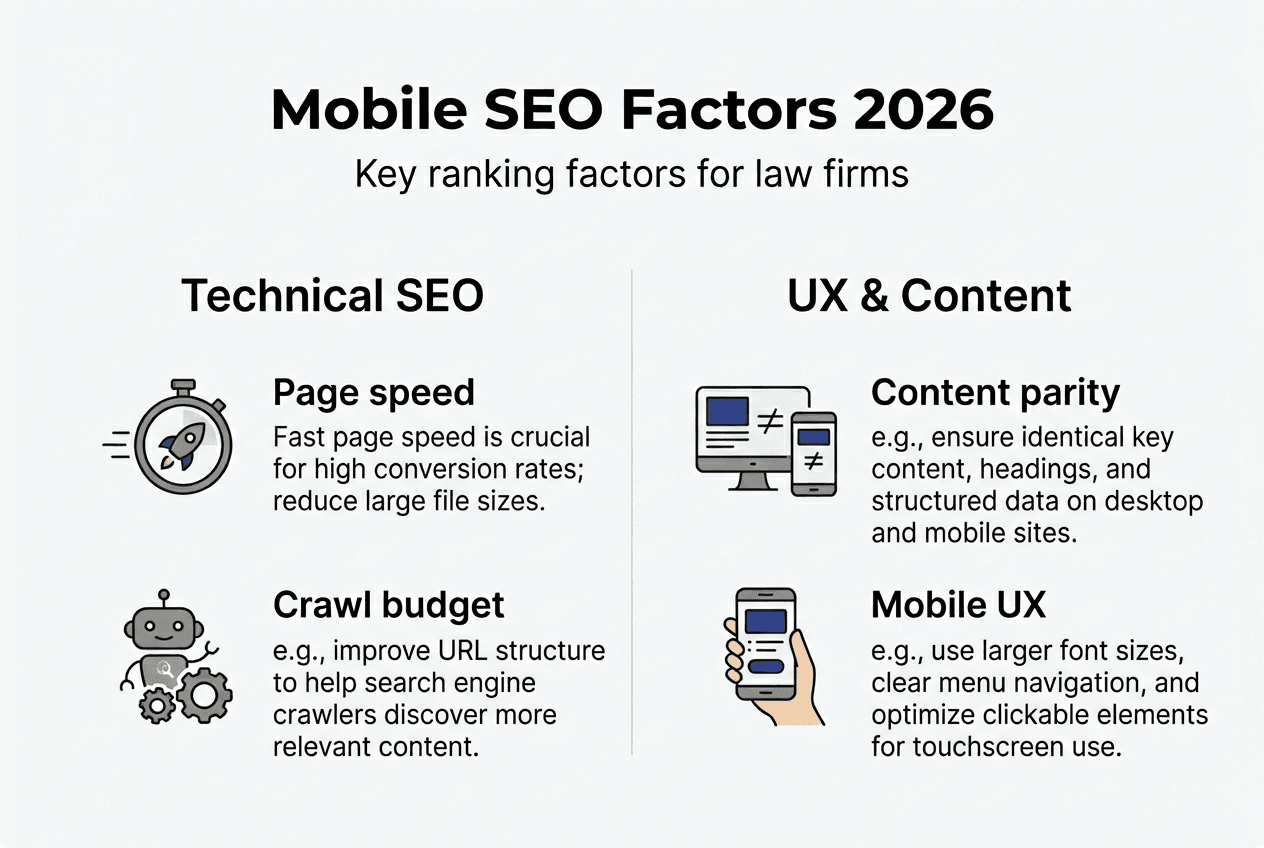
Optimizing mobile UX supports both rankings and business outcomes. Fast page loads, clear navigation, prominent contact buttons, and readable text without zooming create positive user signals that Google rewards. Implementing comprehensive on-page SEO for lawyers ensures these elements work together systematically. Understanding mobile SEO for legal websites helps you avoid common pitfalls that undermine both technical performance and client acquisition.
Practical steps to verify and optimize your law firm’s mobile-first indexing status
Verifying your mobile-first indexing status requires using Google Search Console as your primary diagnostic tool. This platform provides definitive confirmation of how Google crawls and indexes your site, revealing issues that block optimal performance. Without this verification, you’re operating blind, unable to confirm whether your optimization efforts actually succeed.
Steps to check mobile-first indexing status:
- Log into Google Search Console and select your law firm’s property
- Navigate to Settings, then click on Crawling to view Googlebot information
- Look for “Googlebot smartphone” listed as the primary crawler for your site
- Review the URL Inspection tool for individual pages to see mobile rendering
- Check the Coverage report for mobile-specific indexing issues or errors
- Examine the Mobile Usability report for UX problems affecting rankings
- Monitor Core Web Vitals to ensure mobile performance meets Google’s standards
Once you’ve confirmed mobile-first indexing, systematic optimization addresses the issues limiting your rankings. Common problems have predictable solutions, but you must prioritize based on impact. A site with severe mobile speed issues needs performance optimization before minor content adjustments. Understanding these priorities prevents wasted effort on low-impact changes.
| Mobile SEO Issue | Impact on Crawl/Indexing | Solution |
|---|---|---|
| Slow page load times | Reduces crawl rate, harms rankings directly | Optimize images, implement caching, upgrade hosting |
| Missing mobile content | Content not indexed, rankings drop significantly | Ensure full content parity with desktop version |
| Blocked JavaScript/CSS | Googlebot can’t render page, content invisible | Update robots.txt, allow resource crawling |
| Intrusive interstitials | User experience penalty, lower rankings | Remove or delay popups until after content interaction |
| Poor mobile navigation | Weakens internal linking, limits crawl depth | Implement clear menu structure, breadcrumbs |
| Inconsistent structured data | Reduces rich snippet eligibility, less visibility | Add identical schema markup to mobile version |
Continuous monitoring separates law firms that maintain rankings from those that gradually lose visibility. Google’s algorithm updates, competitor improvements, and changes to your own site require ongoing attention. Set up automated alerts in Search Console for mobile usability issues, indexing errors, and performance degradation. Review these reports monthly at minimum, weekly for competitive practice areas.
Pro Tip: Combine Google Search Console data with PageSpeed Insights and real device testing for comprehensive optimization. Search Console shows what Google sees, PageSpeed Insights reveals technical bottlenecks, and real device testing exposes actual user experience problems. Use all three perspectives to identify and fix issues systematically.
Mobile-first indexing status influences your entire SEO strategy. In competitive legal markets, the difference between page one and page three often comes down to mobile optimization quality. Law firms that treat mobile as an afterthought lose rankings to competitors who’ve fully embraced mobile-first principles. Implementing mobile SEO tips for attorneys systematically improves visibility and client acquisition. Avoiding common SEO mistakes for law firms prevents backsliding that undermines your progress.
Enhance your law firm’s SEO with expert mobile-first strategies
Navigating mobile-first indexing complexities requires specialized expertise that most law firms lack internally. LawSEO brings 29 years of focused legal SEO experience to help your firm implement 2026-compliant mobile optimization strategies that drive rankings and client acquisition. Our founder-led approach means every strategy receives expert review, ensuring your mobile site meets Google’s technical requirements while delivering exceptional user experiences that convert searchers into clients.
We’ve developed comprehensive legal SEO strategies for law firms specifically designed for mobile-first indexing success. Our services address technical optimization, content parity, crawl efficiency, and mobile UX systematically. We understand the unique challenges law firms face, from ethical marketing constraints to intensely competitive local markets. Specializing exclusively in mobile SEO for legal websites means we’ve solved these problems hundreds of times.
Ready to dominate mobile search results and attract more qualified clients? Visit LawSEO to schedule a comprehensive mobile SEO audit and discover exactly what’s limiting your firm’s online visibility.
Frequently asked questions about mobile-first indexing for law firms
What does mobile-first indexing mean for law firms specifically?
Mobile-first indexing means Google exclusively uses your mobile site version to determine rankings for all searches, including desktop queries. For law firms, this matters because most potential clients search for legal help on smartphones during crisis moments. Your mobile site quality directly determines whether you appear in search results when someone needs your services.
How can I check if my law firm website is mobile-first indexed?
Log into Google Search Console, navigate to Settings, then Crawling to see which Googlebot version crawls your site. If “Googlebot smartphone” appears as the primary crawler, your site is mobile-first indexed. Use the URL Inspection tool to verify how Google renders individual pages on mobile devices and identify any content or technical discrepancies.
Does mobile-first indexing affect desktop search rankings?
Yes, absolutely. Google uses your mobile site to determine rankings for both mobile and desktop searches. If your mobile site has incomplete content, slow performance, or technical issues, you’ll lose rankings on desktop search results even if your desktop site is perfect. Mobile optimization now controls all search visibility.
What are best quick fixes to improve mobile SEO for law firms?
Ensure complete content parity between mobile and desktop versions first. Then optimize mobile page speed by compressing images and minimizing JavaScript. Add clear, prominent contact buttons and phone numbers. Fix any mobile usability errors shown in Google Search Console. These changes create immediate improvements in both rankings and client conversion rates.
Why is mobile UX so critical in legal SEO today?
Google measures real user behavior on mobile devices and uses these signals for rankings. Poor mobile UX causes visitors to immediately return to search results, signaling low quality to Google. For law firms, mobile UX also determines whether potential clients contact you or choose a competitor. Fast loads, easy navigation, and clear calls to action support both rankings and business growth.