

TL;DR:
- Poor website design drives potential clients away and harms search engine rankings.
- Accessibility compliance is legally necessary and expands client reach, preventing lawsuits.
- Improving UX with fast load times, clear navigation, and responsive design boosts client engagement.
Poor website design costs law firms clients every single day. While many attorneys focus on courtroom performance and case outcomes, their websites quietly drive away potential clients through slow load times, confusing navigation, and inaccessible content. With over 4,000 ADA lawsuits filed in a single year and 26% of U.S. adults living with a disability, the stakes for ignoring user experience go far beyond aesthetics. This guide breaks down exactly what user experience (UX) means for legal websites, what the law requires, and how intentional design choices translate directly into more consultations, stronger trust, and reduced legal exposure.
Key Takeaways
| Point | Details |
|---|---|
| Accessibility is essential | Complying with ADA and WCAG guidelines is crucial for legal protection and business growth. |
| Mobile-first design wins | With over half of law firm web visits on mobile, responsive design directly impacts client engagement. |
| Small changes, big results | Even minor UX improvements can boost referrals, trust, and case volume for attorneys. |
| Regular audits prevent risk | Ongoing UX and accessibility reviews minimize legal exposure and keep websites performing at their best. |
Why user experience matters for attorneys
User experience refers to everything a visitor feels and does when they land on your website. For attorneys, that means whether a potential client can quickly find your practice areas, understand your credentials, and take the next step toward hiring you. It is not just about looking professional. It is about removing every friction point between a person in legal distress and the attorney who can help them.
When UX is poor, the consequences are measurable. Visitors leave within seconds, bounce rates climb, and your Google rankings drop because search engines track engagement signals. Worse, a client who needed your help simply calls your competitor instead. The user experience and SEO impact on law firm websites are deeply connected: Google rewards sites that keep users engaged and penalizes those that frustrate them.
Accessibility adds another layer of urgency. Accessibility is both a legal requirement and an SEO advantage that most law firms are still ignoring. With 26% of U.S. adults having a disability, accessible websites unlock access to an estimated $490 billion in annual consumer spending. That is not a niche audience. That is a significant share of the clients who need legal help most.
“Accessibility isn’t just a defense against lawsuits—it builds trust and expands your client base.”
Here is what separates a high-UX law firm website from a low-UX one:
| Feature | High-UX law firm website | Low-UX law firm website |
|---|---|---|
| Page load speed | Under 3 seconds | 6+ seconds |
| Mobile optimization | Fully responsive | Broken on small screens |
| Navigation | Clear, intuitive menus | Cluttered, hard to follow |
| Accessibility | WCAG 2.1 AA compliant | No accessibility features |
| Calls to action | Prominent, clear, and direct | Buried or missing entirely |
| Contact options | Multiple, easy-to-find | Single form, hard to locate |
Investing in effective law firm website design is not a cosmetic upgrade. It is a business decision with measurable returns in leads, trust, and compliance.
Understanding key elements of effective law firm UX
With the “why” established, it is time to get clear on what actual elements make a law firm website genuinely effective for clients. These are not abstract design principles. Each one has a direct line to whether a visitor becomes a paying client.
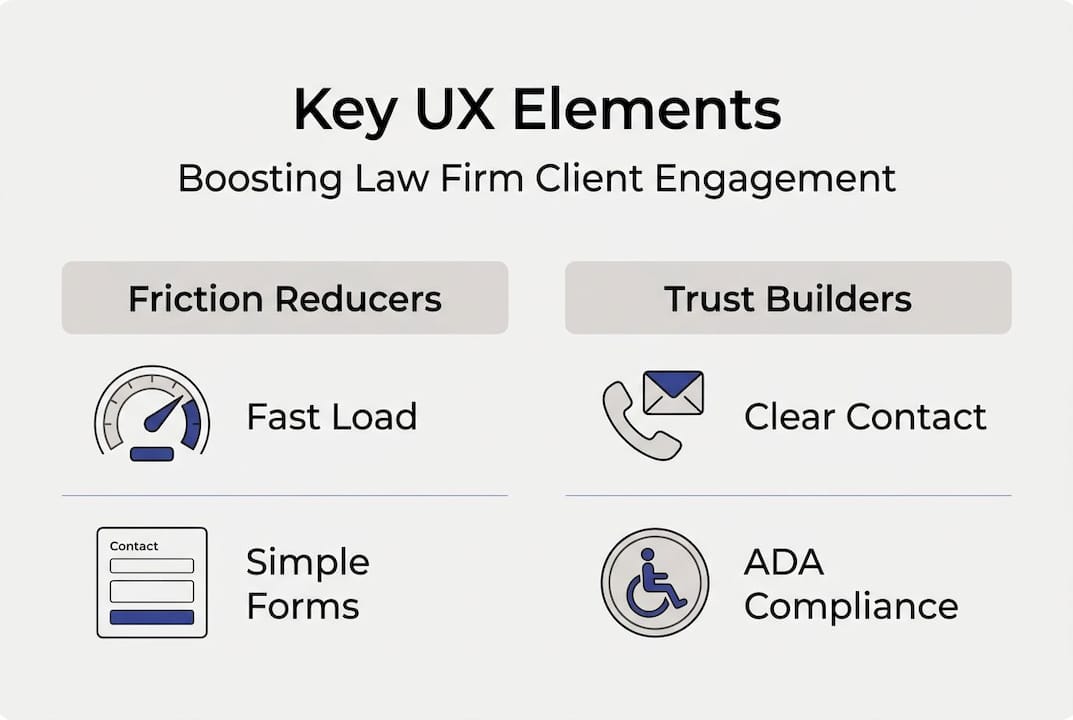
Here are the core UX elements every attorney website needs:
- Fast page loading: Visitors expect pages to load in under three seconds. Slow sites signal unprofessionalism and cause immediate drop-off.
- Mobile responsiveness: Mobile devices now account for over half of law firm website traffic. If your site breaks on a phone, you are losing the majority of your visitors.
- Clear calls to action (CTAs): Every page should guide visitors toward a specific next step, whether that is scheduling a consultation, calling your office, or submitting a contact form.
- Intuitive navigation: Menus should be simple and logical. Visitors should find what they need in two clicks or fewer.
- Calming visual design: For personal injury, family law, or criminal defense attorneys, a clean and reassuring visual tone reduces anxiety and builds confidence in your firm.
- Trauma-informed content: PI and family law attorneys especially benefit from language that acknowledges emotional distress without being clinical or cold.
- ADA and WCAG compliance: Accessibility is not optional. It is a legal foundation that also improves SEO and expands your reach. Review website accessibility best practices as a starting point.
One critical mistake many firms make is installing accessibility overlays or popup widgets as a quick fix. These tools rarely solve underlying code problems and can actually create new barriers for screen reader users. The right approach is to fix the core code and structure of your site.
The top website features for law firms that convert visitors into clients all share one trait: they reduce friction at every step of the client journey.
Pro Tip: Always test your site’s UX on a mobile device before reviewing it on desktop. Most of your visitors are on phones, and problems that are invisible on a large monitor become glaring on a small screen.
For a deeper look at improving law firm site usability, start with the pages that get the most traffic and work outward from there.
Building accessibility and compliance into your legal website
Knowing the elements that underpin great UX, let us focus on the legal and ethical necessity: accessibility. This is where many attorneys face the most risk and the greatest opportunity.
The Web Content Accessibility Guidelines (WCAG) 2.1 AA standard is the benchmark most courts and regulators use to evaluate whether a website is accessible. It covers four core principles: content must be perceivable, operable, understandable, and robust. For law firms, meeting this standard means your site works for users who rely on screen readers, keyboard navigation, or assistive technology.
ADA compliance lawsuits against law firms are rising, and the financial and reputational consequences are serious. Settlements can reach tens of thousands of dollars, and the publicity alone can damage a firm’s credibility.
Here is a numbered checklist to assess and upgrade your website’s accessibility:
- Run an automated audit using tools like WAVE or Google Lighthouse to identify obvious errors.
- Fix image alt text so screen readers can describe visuals to users with visual impairments.
- Check color contrast ratios to ensure text is readable against background colors.
- Verify keyboard navigation by tabbing through your entire site without using a mouse.
- Add captions to all videos and transcripts to audio content.
- Review form labels to confirm every input field is properly labeled for assistive technology.
- Test with a real screen reader such as NVDA or VoiceOver to catch issues automated tools miss.
Common accessibility issues found on attorney websites include:
| Issue | Impact | Solution |
|---|---|---|
| Missing alt text on images | Screen readers skip content | Add descriptive alt text to all images |
| Low color contrast | Text unreadable for low vision users | Use contrast ratio of at least 4.5:1 |
| No keyboard navigation | Excludes motor-impaired users | Ensure all interactive elements are keyboard accessible |
| Auto-playing media | Disorienting for cognitive/sensory disabilities | Disable autoplay or add pause controls |
| Unlabeled form fields | Confuses assistive technology | Add visible and programmatic labels |
For ADA compliance for attorneys, the goal is not just to avoid lawsuits. It is to serve every potential client who visits your site. Explore accessibility compliance insights for a fuller picture of what firms face today.
Translating UX best practices into more client engagement
Accessibility and great UX are only as useful as their impact, so here is how to use them to measurably boost your practice. The connection between UX improvements and business outcomes is direct and well-documented.
When your website is fast, accessible, and easy to navigate, more visitors complete contact forms. More people call. Clients who have a positive experience on your site are more likely to leave strong reviews and refer others. Accessible, client-centered design gives attorneys a real and demonstrable business edge over competitors who have not made these investments.
Here are immediate actions you can take this month to improve UX across your firm’s website:
- Compress all images to reduce page load time without sacrificing visual quality.
- Rewrite your homepage headline to speak directly to the client’s problem, not your firm’s history.
- Add a click-to-call button that is visible on every mobile page.
- Simplify your contact form to three fields or fewer to reduce abandonment.
- Review your practice area pages and add clear CTAs at the top and bottom of each one.
- Check your site on three different browsers and two different mobile devices for consistency.
- Update your Google Business Profile to align with the messaging on your website.
Small upgrades compound over time. A faster page here, a clearer CTA there, and within a few months your site functions as a genuine client acquisition tool rather than a digital business card. For website conversion strategies for attorneys, the best results come from treating UX as a system, not a checklist.
Pro Tip: Do not limit UX improvements to your homepage. Roll out accessibility and usability upgrades across every page of your site. Practice area pages, attorney bio pages, and blog posts all influence trust and SEO rankings equally.
To learn more about legal web accessibility and how it connects to your firm’s growth, start with the pages that drive the most organic traffic.
Why most attorneys still underestimate the power of UX
After seeing the practical steps, it is worth reflecting on why more attorneys have not made user experience a core part of their strategy. The honest answer is not cost or technical complexity. It is mindset.
Conventional wisdom in the legal profession says that substance wins. Credentials, case results, and referrals are what matter. That is true inside the courtroom. But online, clients judge you before they ever read your bio. They judge you in the first three seconds based on how your site feels. The user experience impact on legal SEO is not a marketing abstraction. It is the first impression you make on every prospective client who finds you through search.
The attorneys who outperform their peers online have internalized one idea: every digital interaction is a client service moment. A slow page is a broken promise. A confusing menu is a barrier to access. An inaccessible site tells a disabled visitor that your firm was not thinking about them.
Fear of change is the real barrier. Many attorneys worry that redesigning their site will disrupt their rankings or confuse existing clients. In reality, thoughtful UX improvements consistently strengthen both. Treat UX as ongoing professional development, not a one-time project. The firms that review and refine their websites regularly are the ones that sustain competitive advantages over time.
Take your law firm’s user experience to the next level
For attorneys ready to go beyond the basics and turn insight into action, the resources at LawSEO.com are built specifically for legal professionals navigating the intersection of UX, accessibility, and search performance. Even modest UX investments, such as fixing mobile responsiveness or improving page speed, can produce significant gains in client engagement within weeks. If you want structured guidance, the improvement strategies available through LawSEO.com walk you through every layer of the process. For firms ready to compete at the highest level, explore proven legal SEO strategies that combine UX, content, and technical optimization into a single growth system.
Frequently asked questions
What are the biggest UX mistakes law firms make?
The most common mistakes are ignoring mobile optimization, failing accessibility checks, and using confusing navigation or intrusive popups that block content and frustrate visitors.
Why is accessibility critical for attorney websites?
Accessibility is legally required under the ADA and WCAG standards, and non-compliance exposes your firm to lawsuits while also limiting your reach to the 26% of U.S. adults who have a disability.
How can better user experience attract more legal clients?
Improved UX reduces friction in the client journey, which means more visitors complete contact forms, call your office, and ultimately hire your firm after finding you through search.
What’s an easy first step to improve a law firm website’s UX?
Start with a free mobile and accessibility audit using tools like Google Lighthouse or WAVE, then prioritize fixing the highest-impact issues first before moving to secondary improvements.